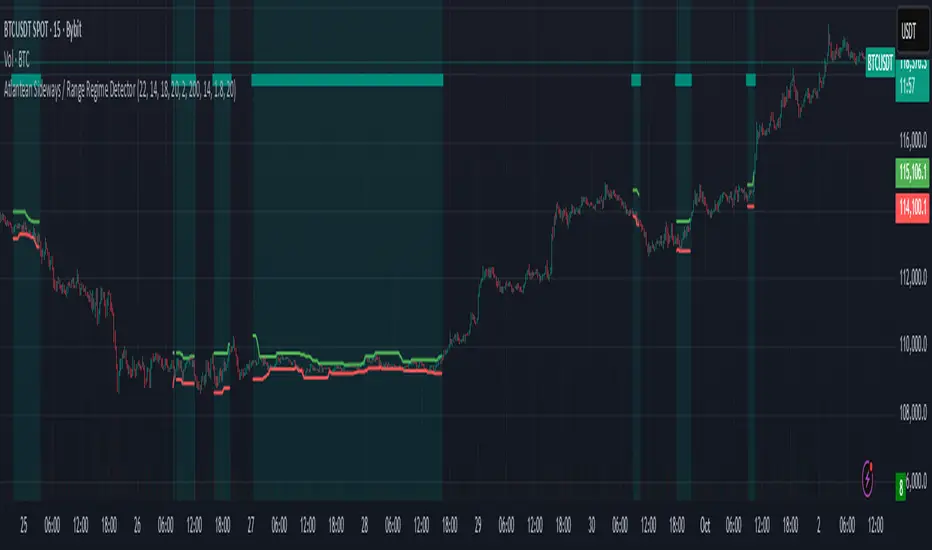
[COG] NautilusOverview
This indicator combines multiple technical analysis tools to identify high-probability entry points in trending markets. It uses moving average crossovers for trend direction, Bollinger Bands for mean reversion opportunities, and optional filters to reduce false signals and avoid choppy market conditions.
What Makes This Indicator Unique
Heiken Ashi Toggle:
All calculations can be performed on either regular or Heiken Ashi candles with a single click
Multi-Layer Filtering System: Four independent filters work together to improve signal quality
First Entry Detection: Automatically identifies and labels the first signal after a trend change
Anti-Overtrading Protection: Built-in cooldown mechanism prevents signal spam
Core Components
1. Trend Detection (EMA/SMA Crossover)
The indicator uses a 15-period EMA and 50-period SMA to determine market direction. Buy signals only occur when EMA > SMA, and sell signals only when EMA < SMA.
// Trend Detection
bullishTrend = ema15 > sma50
bearishTrend = ema15 < sma50
2. Bollinger Bands Mean Reversion
Entry signals trigger when price touches or penetrates the Bollinger Bands, indicating potential reversal or pullback opportunities within the established trend.
//Bollinger Band Touch Detection
lowerBandTouch = selectedLow <= bbLower
upperBandTouch = selectedHigh >= bbUpper
// Base Entry Conditions
baseBuySignal = bullishTrend and lowerBandTouch and bullishClose
baseSellSignal = bearishTrend and upperBandTouch and bearishClose
3. Candle Confirmation
Signals require a bullish candle close (close > open) for buy signals and bearish candle close (close < open) for sell signals, ensuring momentum alignment.
// Candle Close Type
bullishClose = selectedClose > selectedOpen
bearishClose = selectedClose < selectedOpen
Optional Filters (All Toggleable)
Filter 1: StochRSI Momentum
Ensures entries occur during oversold/overbought conditions. Buy signals require StochRSI < 20, sell signals require StochRSI > 80.
// StochRSI Calculation
rsi = ta.rsi(stochRSISource, rsiLength)
stochRSI_K = ta.sma(ta.stoch(rsi, rsi, rsi, stochRSILength), stochKSmooth)
// Filter Conditions
stochRSIOversoldCondition = stochRSI_K < stochRSIOversold
stochRSIOverboughtCondition = stochRSI_K > stochRSIOverbought
Filter 2: MA Separation (Anti-Chop)
Blocks signals when moving averages are too close together, indicating sideways/choppy market conditions. Default threshold is 1% separation.
// Calculate percentage separation between EMA and SMA
maSeparationPct = (math.abs(ema15 - sma50) / sma50) * 100
// MA separation filter condition
maSeparationValid = maSeparationPct >= maSeparationThreshold
Why this matters: When the 15 EMA and 50 SMA are very close (< 1% apart), the market is typically consolidating. Signals in these conditions have lower win rates.
Filter 3: Cooldown Period
Prevents over-trading by blocking new signals for a specified number of bars (default: 10) after a signal occurs. Buy and sell cooldowns are tracked separately.
// Variables to track the bar index of the last signal
var int lastBuySignalBar = na
var int lastSellSignalBar = na
// Calculate bars since last signal
barsSinceLastBuy = na(lastBuySignalBar) ? 999999 : bar_index - lastBuySignalBar
// Cooldown filter condition
buyCooldownValid = barsSinceLastBuy >= cooldownBars
// Update tracking when signal fires
if buySignal
lastBuySignalBar := bar_index
Advanced Features
Heiken Ashi Mode
Toggle between regular candles and Heiken Ashi candles for all calculations. Heiken Ashi candles smooth price action and can reduce false signals in volatile markets.
// Fetch Heiken Ashi OHLC values
= request.security(
ticker.heikinashi(syminfo.tickerid),
timeframe.period,
)
// Select which OHLC to use based on toggle
selectedClose = useHeikenAshi ? haClose : close
First Entry Detection
Automatically identifies and labels the first signal after a trend change with "1. Trend Cycle Entry" text. This helps traders distinguish between fresh trend entries and continuation signals.
// Detect trend changes
trendChangedToBullish = bullishTrend and not bullishTrend
// Reset tracking when trend changes
if trendChangedToBullish
hadBuySignalInCurrentBullTrend := false
// Identify first signal in new trend
isFirstBuyInTrendCycle = buySignal and not hadBuySignalInCurrentBullTrend
How Signals Are Generated
The indicator uses a layered approach where each condition must be satisfied:
// Apply all filters
buySignal = enableBuySignals and baseBuySignal and
(not enableStochRSIFilter or stochRSIOversoldCondition) and
(not enableMASeparationFilter or maSeparationValid) and
(not enableCooldownFilter or buyCooldownValid)
Buy Signal Requirements:
✅ 15 EMA above 50 SMA (bullish trend)
✅ Candle low touches or goes below lower Bollinger Band
✅ Candle closes bullish (green)
✅ (Optional) StochRSI < 20
✅ (Optional) MA separation > threshold %
✅ (Optional) Cooldown period expired
Sell Signal Requirements:
✅ 15 EMA below 50 SMA (bearish trend)
✅ Candle high touches or goes above upper Bollinger Band
✅ Candle closes bearish (red)
✅ (Optional) StochRSI > 80
✅ (Optional) MA separation > threshold %
✅ (Optional) Cooldown period expired
Customization Options
Moving Averages:
Adjustable EMA length (default: 15)
Adjustable SMA length (default: 50)
Source selection (Close, Open, High, Low, HL2, HLC3, OHLC4)
Bollinger Bands:
Adjustable length (default: 20)
MA type selection (SMA, EMA, SMMA, WMA, VWMA)
Adjustable standard deviation multiplier (default: 2.0)
StochRSI Filter:
Adjustable RSI length (default: 14)
Adjustable Stochastic length (default: 14)
Customizable oversold/overbought levels (default: 20/80)
MA Separation Filter:
Adjustable minimum separation percentage (default: 1.0%)
Cooldown Filter:
Adjustable cooldown period in bars (default: 10)
Visual Settings:
Customizable colors for all elements
Adjustable line widths
Toggle first entry labels on/off
How to Use
Basic Setup: Apply the indicator to your chart. By default, it shows moving averages, Bollinger Bands, and entry signals.
Choose Your Mode: Enable Heiken Ashi mode if you prefer smoother signals and are willing to accept some lag.
Enable Filters: Start with all filters disabled to see raw signals. Then enable filters one by one:
Start with MA Separation filter to avoid choppy markets
Add StochRSI filter to catch better momentum conditions
Add Cooldown filter to prevent over-trading
Adjust Parameters: Tune the parameters based on your timeframe and trading style:
Lower timeframes: Consider shorter cooldown periods
Higher timeframes: May want tighter MA separation requirements
Watch for First Entry Labels: The "1. Trend Cycle Entry" label highlights the highest-probability signals occurring right after trend changes.
Important Notes
⚠️ This indicator does not repaint. All signals appear on closed candles only.
⚠️ Past performance is not indicative of future results. This indicator should be used as part of a complete trading strategy with proper risk management.
⚠️ Filters reduce signal frequency: Enabling multiple filters will significantly reduce the number of signals. This is intentional to improve quality over quantity.
⚠️ Heiken Ashi mode considerations: While HA mode smooths signals, it can also introduce lag. Test both modes on your preferred timeframe.
Best Practices
Always backtest on your preferred timeframe before live trading
Start conservative with tighter filters, then loosen if needed
Pay special attention to "First Entry" signals for highest probability setups
Use appropriate position sizing and stop losses
Consider market conditions: trending vs ranging
Disclaimer
This indicator is for educational purposes only and should not be considered financial advice. Trading involves substantial risk of loss. Always do your own research and consider your risk tolerance before trading.
Bollingersband

BT Volatility Envelope BT Envelope is a flexible, multi-model volatility envelope designed to help traders identify contextual trade areas rather than standalone signals.
Instead of forcing a single volatility framework, BT Envelope allows users to switch between the three most widely used envelope models— Keltner Channels , ATR Bands , and Bollinger Bands —while keeping a consistent visual and behavioral structure.
---
Key Features
Selectable envelope type:
Keltner – smoothed true range, ideal for trend acceptance and volatility structure.
ATR Bands – raw volatility expansion/contraction, useful for risk and stop context.
Bollinger Bands – standard deviation–based mean reversion and overextension zones.
Configurable envelope base:
Multiple MA types supported (EMA, SMA, WMA, DEMA, TEMA, TRIMA, KAMA, MAMA, T3).
User-defined MA length.
Dual envelope spans:
Inner and outer bands using independent multipliers.
Visually separates rotation vs extension areas.
Optional higher-timeframe projection:
Plot envelopes from a higher timeframe directly onto a lower-timeframe chart.
Useful for aligning LTF execution with HTF structure.
---
How Traders Use BT Envelope
BT Envelope is not a buy/sell indicator. It is a context engine .
Traders use it to:
Define high-probability trade zones (mean, inner span, outer span).
Distinguish between rotation, trend acceptance, and overextension regimes.
Frame entries and exits around volatility structure rather than arbitrary levels.
Align lower-timeframe setups with higher-timeframe volatility boundaries.
Common techniques include:
Buying pullbacks toward the Envelope Base during trend acceptance.
Fading price at outer envelope extremes during range or exhaustion conditions.
Using envelope width and slope to gauge volatility expansion or compression.
---

TTM SqueezeUpdated TTM Squeeze — Correct AND Logic
John Carter’s classic TTM Squeeze.
There is one on here already, but it is using an OR‑based condition. The proper logic is AND for a true volatility squeeze. Both the Keltner Channel lower band and upper band must sit fully inside the Bollinger Bands. Using AND logic ensures the squeeze only triggers when volatility is genuinely compressed, producing a more accurate and reliable signal than the default implementation.

Bollinger Bands Bull/BearBollinger Bands Bull/Bear
by MasterTony
Overview & How It Works:
This indicator enhances classic Bollinger Bands by the legendary John Bollinger with emphasizing dynamic bull/bear coloring, gradient strength fills, overextension highlights, and an orange squeeze overlay to visualize volatility contraction.
Core Calculations:
Basis Line: User-selectable moving average (SMA by default) of the source (close by default).
Upper / Lower Bands: Basis ± (Multiplier × Standard Deviation over the chosen length). Default multiplier = 2.0.
Bull / Bear State Determination: Price position relative to the basis and outer or lower bollinger bands, smoothed with a short EMA.
Hysteresis is applied to prevent rapid flipping during consolidation.
Result: stable bullish state when price is convincingly above the basis, bearish when below.
Proximity & Gradient Strength: Distance from price to each band is measured and normalized against current band width.
The closer price is to a band, the stronger the signal and the more opaque the fill becomes.
Colored Band Fills: Bullish state → mint-green fills around both bands (brighter/opaquer when price hugs the upper band).
Bearish state → red fills around both bands (brighter/opaquer when price hugs the lower band).
Special Overextension Fill:
When price is very close (>85%) to the "active" band (upper in bull, lower in bear) and the state is confirmed, a Brighter gradient of the band green (bull) or lred (bear).
Strong Vs Weak Bollinger
Thicker the Bollinger Band stronger the trend, thinner the weaker. Gradient going from brighter to more transparent highlights potential exhaustion of strong Bollinger.
Squeeze Detection (Orange Overlay):
Bollinger Band Width Percentile (BBWP) is calculated over a user-defined lookback (default 100 bars).
Squeeze = BBWP ≤ 25% (bands are historically narrow).
Tight squeeze = BBWP < 15% → brighter orange.
Orange fill covers the entire area between upper and lower bands during squeeze periods.
Toggle available to hide squeeze fills if desired.
How to Read & Trade This Indicator
Visual Interpretation:
Green-dominant chart (mint fills + possible light-green basis-to-band fill) = bullish bias. The brighter and fuller the green, the stronger the momentum (price pushing against or touching the upper band).
Red-dominant chart (red fills + possible light-red basis-to-band fill) = bearish bias. Brighter/fuller red = stronger downward pressure.
Light special fills (light green or light red from basis to band) = overextension zone. Often seen near trend extremes — watch for continuation (breakout) or reversal (failure to hold the band).
Orange overlay = low volatility / squeeze. Two shades:
Lighter orange = regular squeeze (potential move brewing).
Brighter orange = very tight squeeze (high probability of imminent explosive move).
Trading Guidelines:
Trend Following (Shows Bull Zone and Bear Zones):
In green fills → favor longs or hold existing longs.
In red fills → favor shorts or hold existing shorts.
Strength increases as fills become more opaque (price near the outer band).
Squeeze Breakouts (Highest Probability Setups):
Wait for orange squeeze to appear.
When price closes outside the bands (breakout), enter in the direction of the break.
Bias the trade toward the prevailing color:Breakout upward during green fills = strong long signal.
Breakout downward during red fills = strong short signal.
If breakout direction opposes the color bias, be cautious (lower probability).
Entry/Exits:
Follow the Band color, Band color with special fill green or red is strong to determining Bull or Bear states. Green=price up Red= Price down
Risk Management:
Use the basis line as dynamic support/resistance.
Stops can be placed just beyond the opposite band or basis during strong trends.
Combine with volume or other confirmation for higher conviction.
This visual upgrade makes Bollinger Bands far more intuitive — the chart literally colors itself bullish or bearish while highlighting volatility cycles and overextension zones. Great for trend, breakout, and mean-reversion strategies across any timeframe.
Enjoy fellow traders, this is V1 more versions will be updated.
Please also boost and comment would love your ideas on advancements to this.
Cheers,
MasterTony

Box Theory LITEUnlock clean, essential market structure visualization with Box Theory LITE, a lightweight Pine Script® v6 overlay built for day/swing traders on futures (ES, NQ, MES), stocks (SPY, TSLA, AAPL), indices, and more. This free edition delivers core daily levels without signals or complexity—perfect for spotting support/resistance, trend bias, and volatility at a glance.
Key Features:
Previous Day Range Box: Semi-transparent yellow box framing yesterday's high/low (PDH/PDL), extended right to project potential breakout/reversal zones.
Flexible Session Toggle: Switch between Regular Trading Hours (RTH 0930-1600) and Global/Globex (1800-1700 or custom) with one click — instantly adapt the box, PDH/PDL, and Opening Range to RTH or full-session data.
Opening Range (OR): Plots high/low from the chosen session open — ideal for early bias, breakouts, or mean reversion setups.
Refined S/R Levels: Pivot highs/lows + multi-timeframe swings (hourly white, 4H aqua/fuchsia) for layered confluence across timeframes.
Trend & Volatility Tools: Customizable EMAs (up to 3 periods), Bollinger Bands (squeeze/expansion detection), and daily-resetting VWAP (volume-weighted fair value).
Fully Customizable: Toggle any element on/off, adjust colors, line widths, pivot/EMA lengths, box extension bars, session times, and more to match your setup.
Clean & Efficient: Optimized for smooth performance on all timeframes with limited objects (max lines/boxes respected).
Great for beginners building structure awareness or pros wanting a no-clutter foundation. No alerts, entries, backtesting, or signals—this is pure visual analysis.
For advanced upgrades—including automated entry/exit signals, manipulation filters, dynamic SL/TP projections, alert conditions, performance stats, and ticker-specific presets—check out Box Theory PRO (available now).
Notes & Disclaimer
Use for informational/educational purposes only. Trading involves substantial risk of loss; past performance ≠ future results. Not financial advice. Combine with your own strategy and risk management.
How to Use
Add to Chart
Search “Box Theory LITE” in TradingView’s Indicators (free & public). Apply to any chart.
Customize Inputs
Session Toggle: Turn ON for Regular (RTH) session, OFF for Global/Globex — or edit the exact times directly in settings.
Toggles: Show/hide Daily Box, OR Levels, Pivots/Swings, EMAs, BB, VWAP.
Box: Extension bars (default 20), color/transparency.
Styles: Line width, colors (PDH red, PDL green, OR blue/purple, etc.), mid-line style.
Parameters: Pivot length, EMA periods (50/20/100 default), BB length/multiplier.
Quick Interpretation
Yellow Box + PDH/PDL lines: Core daily range (RTH or Globex depending on toggle) — price often respects/breaks these.
OR High/Low: Early session structure (matches your toggle choice) — breakouts signal momentum, failures suggest reversal.
Pivots & Swings: Multi-TF confluence for stronger zones (aqua pivot highs, teal/orange lows, white hourly, fuchsia 4H).
EMAs: Trend filter (price above cluster = bullish bias).
Bollinger Bands: Volatility gauge — squeezes precede big moves.
VWAP: Intraday fair value — above = bullish control, below = bearish.
Workflow Tips
Start with the daily box/OR (toggle session to match your trading style) → layer swings/pivots for high-prob zones → use EMAs/BB/VWAP to filter direction/volatility. Toggle off unused features for cleaner charts. Best on intraday (1m–1h) for futures/indices, but flexible for any timeframe.
Questions, bugs, or feature requests? Message me on TradingView. Happy trading—stay disciplined!

MACD Sticky Dots Bull & Bear
**Sticky Dots – Multi-Confirmation Momentum & Trend Indicator**
What is it?
Dots designed to show momentum of trend, weak or strong illustrated through size and color. Certain thresholds give GREEN DOTS OR RED DOTS, when strong the dots are LARGER. Colors of candles are plotted along with Buy and Sell signals and rare reversal signals (these are all plotted based on inputs in the indicator). Along with these Dots is a moving average derived from Bollinger Bands, this acts as both support and resistance to price. Also Pivot Highs and Pivot Lows get plotted based on all these inputs and price action combined.
BELOW IS MORE DETAILS
**Key Visual Elements & Color/Symbol Meaning**
**1. Candlestick Colors** (toggle: "Show Candle Colors")
- **Bright Green** (#00FF00 shades): Price closes ≥ upper dispersion band (close ≥ disp_up). Strong bullish momentum.
- **Bright Red** (#FF0000 shades): Price closes ≤ lower dispersion band (close ≤ disp_down). Strong bearish momentum.
- **Yellow** (#FFEA00): Price inside the dispersion bands (neutral zone). Trend is consolidating or weak.
**2. Basis Moving Average Line** (20-period EMA, toggle: "Show Price Basis MA")
The thick line on price follows the same coloring logic as candles derived from thresholds that deem them bullish(green), consolidating(yellow) or bearish(red):
- **Dark Green** (rgb(0,162,30)): Strong bullish
- **Lime Green** (rgb(153,253,2)): Moderate bullish
- **Yellow** (#FFEA00): Neutral or weak.
- **Red** (rgb(243,13,13)): Bearish
**3. MACD Dots/Circles** (below bars, toggle: "Show Dots")
Normalized & sigmoid-compressed MACD histogram plotted as sticky dots:
- **small Green Dots** MACD positive:
- Solid bright green (#00FF00): Increasing momentum.
- Slightly transparent green (#16FF0A): Decreasing but still bullish.
- **Large Circle** (instead of small dot): Stochastic Momentum is in strong bull zone→ overbought emphasis.
- **Red Dots/Circles** (condensed_histNorm < 50):
- Solid bright red (#FF0000): Decreasing momentum (stronger bearish).
- Slightly transparent red (#FF0707): Increasing but still bearish.
- **Large Circle**: Stochastic Momentum is in strong bear zone → oversold emphasis.
**4. Buy/Sell Signals**
- **"B"** (green, below bar): Buy signal – confluence of all inputs in indicator in bullish state prints B
- **"S"** (red, above bar): Sell signal – confluence of all inputs in indicator in bearish state prints S
- **"R"** (yellow, below bar): Reversal – appears only after a completed downswing when price closes back above basis with new green dots (signals potential bottom).
**5. Pivot High / Pivot Low Lines** (horizontal) DESIGNED TO FIND PIVOT TOPS/BOTTOMS
- **Red horizontal line** (from swing high): Marks confirmed Pivot High during an active long (buy) position. Triggered when red circles appear after a bright red condition.
- **Green horizontal line** (from swing low): Marks confirmed Pivot Low during an active short (sell) position. Triggered on fresh green circles.
**6. Optional Plots**
- **Outer Bollinger Bands**: Standard Bollinger bands by the Great John Bollinger.
- **Dispersion Bands** (white, with translucent fill matching Trend color)
**How to Read & Trade the Indicator**
1. **Overall Trend Direction**
- Look at the Basis MA color first:
- Green → Uptrend bias.
- Red → Downtrend bias.
- Yellow → Range/Consolidation.
2. **Momentum Strength**
- Green dots/circles (especially large ones) = bullish momentum building.
- Red dots/circles (especially large) = bearish momentum building.
- Brighter dots + price outside dispersion = stronger conviction.
3. **Candle Coloring for Quick Bias**
- Green candles = price in strong bullish zone.
- Red candles = strong bearish zone.
- Yellow = indecision/consolidation – wait for breakout.
4. **Entry Signals**
- Wait for a **"B"** in a green/yellow candle context with green dots appearing.
- Best entries when price is above basis and Green dots are Large
- **"R"** label =potential big Reversal
5. **Exit / Reversal Management**
- Active long → watch for red circles → confirmed PH line = potential exit zone.
- Active short → watch for green circles → confirmed PL line = potential cover zone.
- **"R"** label = early warning of possible reversal after a downswing.

Bollinger Aurora Velocity [Pineify]Pineify - Bollinger Aurora Velocity
The Bollinger Aurora Velocity is an enhanced volatility and trend analysis indicator that transforms the classic Bollinger Bands into a visually stunning, multi-dimensional trading tool. By combining standard deviation bands with historical extreme tracking and dynamic momentum coloring, this indicator provides traders with deeper insights into volatility cycles, squeeze conditions, and trend strength all in one overlay.
Key Features
Classic Bollinger Bands with customizable period and standard deviation multiplier
Nebula Memory Cloud tracking historical band extremes for volatility context
Volatility Squeeze Detection with visual dot indicators on the basis line
Gradient-based candle coloring reflecting normalized price position
Multi-layer aurora gradient fills for intuitive visual analysis
How It Works
The indicator begins with a standard Bollinger Bands calculation using a simple moving average as the basis line, with upper and lower bands placed at a user-defined multiple of standard deviation. This core structure measures price volatility and identifies overbought/oversold conditions.
The Nebula Memory Cloud extends beyond traditional bands by tracking the highest point of the upper band and lowest point of the lower band over a configurable lookback period. This creates an outer envelope showing the maximum volatility expansion in recent history.
Trading Ideas and Insights
The Volatility Squeeze is a powerful concept where contracting Bollinger Bands often precede significant price breakouts. This indicator detects squeezes by comparing the current band width to its 100-period simple moving average. When the current range falls below this average, yellow dots appear on the basis line, alerting traders to potential explosive moves ahead.
When squeeze dots appear and the outer nebula cloud shows significant distance from the current bands, it suggests volatility is at a historical low relative to recent extremes—a setup often followed by strong directional moves.
How Multiple Indicators Work Together
Bollinger Bands establish the primary volatility envelope and mean-reversion zones
The Nebula Cloud provides historical context, showing how current volatility compares to recent extremes
Squeeze Detection identifies compression phases using relative bandwidth analysis
Normalized Scoring translates price position into a 0-100 scale for gradient coloring
Unique Aspects
Unlike standard Bollinger Bands indicators, the Aurora Velocity creates a heat-map effect on price bars. The normalized score calculates where price sits within the bands as a percentage, then applies a smooth gradient from bearish to bullish colors. This allows traders to instantly perceive momentum strength—saturated bullish colors near the upper band indicate strong upward pressure, while saturated bearish colors near the lower band signal selling dominance.
The aurora-style gradient fills between band layers create visual depth, making it easy to distinguish the core volatility zone from the historical extreme boundaries.
How to Use
Monitor candle colors for momentum direction—bright green indicates bullish positioning, bright red signals bearish pressure
Watch for yellow squeeze dots on the basis line as early warning for potential breakouts
Use the outer nebula cloud to assess if current volatility is testing historical extremes
Set alerts for price breakouts above the upper band or below the lower band
Combine squeeze conditions with the nebula cloud width to gauge breakout potential
Customization
Base Period - Controls Bollinger Bands calculation length (default: 20)
Standard Deviation Multiplier - Adjusts band width from the basis (default: 2.0)
Price Source - Select the price input for calculations (default: close)
Nebula Memory Length - Lookback period for tracking historical extremes (default: 50)
Color Settings - Customize bullish and bearish gradient colors
Conclusion
The Bollinger Aurora Velocity elevates traditional Bollinger Bands analysis by adding historical volatility context through the Nebula Cloud, precise squeeze detection for breakout anticipation, and intuitive momentum visualization through gradient candle coloring. This combination helps traders identify not just where price is relative to volatility bands, but how that volatility compares to recent history and when compression may lead to expansion.

AlphaStrike: Zen ModeDescription:
1. The Philosophy: Reducing Cognitive Load Modern charts are often cluttered with dozens of noisy lines (Bollinger Bands, Moving Averages, Oscillators) that lead to "Analysis Paralysis." This script is designed with a "Zen" philosophy: P rocess the complexity in the background, but display only the decision.
This is not a simple indicator overlay. It is a Risk-Based Trading Engine that runs multiple validation checks (Momentum, Volatility, and Price Action) simultaneously but hides the underlying calculations to keep the chart clean. It focuses the trader's attention on the two things that matter most: Trend Direction and Position Sizing.
2. The "Invisible" Technical Engine The script operates on a Dual-State Logic system that adapts to market conditions. It uses standard indicators as filters, not just visuals.
A. Trend State (The Backbone) The script calculates a volatility-adjusted Trend Baseline (SuperTrend).
Green State: The market is in a markup phase. The script looks for continuation.
Red State: The market is in a markdown phase. The script looks for defense.
B. The "Confluence" Reversal Logic Instead of cluttering the screen with Bollinger Bands and RSI windows, the script performs these checks internally:
Condition 1 (Volatility): Is price extending beyond the 2.0 Standard Deviation (Bollinger Lower/Upper)?
Condition 2 (Momentum): Is RSI overextended (<35 or >65)?
Condition 3 (Price Action): Is there a specific Pin Bar candle pattern (Long wick rejection)?
Result: Only when all three conditions align does the script print a "Reversal Circle." This filters out weak signals that usually occur in strong trends.
3. The Risk Management Calculator (Key Feature) Most traders fail not because of bad entries, but because of inconsistent sizing. This script features a built-in Dynamic Position Sizing Dashboard located in the bottom right.
Adaptive Stop Loss:
In a Trend: The Stop Loss is automatically set to the Trend Line (SuperTrend).
In a Reversal: The script internally scans for the nearest Swing Low/High (using hidden Pivot calculations) and sets the Stop Loss there.
Position Sizing Math: The dashboard reads your Account Size and Risk % inputs. It instantly calculates the "Max Size" (contract/share amount) allowed for the current trade.
Formula: Position Size = (Account Value * Risk %) / Distance to Stop.
Benefit: This ensures you risk the exact same dollar amount on every trade, whether the stop loss is 1% away or 10% away.
4. How to Read the Signals
Triangles (Breakouts): These represent a shift in the dominant trend direction.
Green Triangle: Bullish Trend Start.
Red Triangle: Bearish Trend Start.
Circles (Mean Reversion): These are high-probability counter-trend plays.
Blue Circle: Buy Reversal (Oversold + Pinbar + Bollinger Support).
Orange Circle: Sell Reversal (Overbought + Pinbar + Bollinger Resistance).
5. Settings
Trend Settings: Adjust the ATR Period and Factor to change the sensitivity of the trend line.
Reversal Settings: Tweak the RSI and Bollinger thresholds to filter out more/less signals.
Risk Management: Input your total Account Size and desired Risk Per Trade (e.g., 1%) to calibrate the Dashboard.
Disclaimer This tool provides algorithmic analysis and risk calculations. It does not guarantee profits or provide financial advice. Always verify position sizes before executing.

RSI Bollinger Band and Trend Confidence Gauge█ RSI BB Trend Confidence Gauge (ADX/DMI)
Cross-checks Trend + Momentum + Strength in real time so you focus on VERIFIED conditions.
Most of us have been there: you see a move starting, you jump in, and the market immediately turns into a sideways chop-fest that eats your stop. This is a simple dashboard that forces the market to “prove itself” before you put capital at risk.
█ WHAT MAKES THIS DIFFERENT?
Most indicators are “Yes/No” machines — they fire signals anytime two lines cross, even when the market is weak, noisy, or range-bound. This script is a Quality Filter .
Instead of asking “Is price moving?”, it asks: “Is the move backed by alignment, momentum, and strength?”
VERIFIED only appears when all three agree, helping you avoid low-probability chop and “no-trade” consolidation zones.
█ QUICK START
• UP + VERIFIED + High ➔ “A-Tier” state; favor pullbacks or continuation.
• DOWN + VERIFIED + High ➔ bearish control is real; avoid dip-buying.
• Conflict (gray) ➔ indicators disagree; step aside and wait for alignment.
• R or B markers ➔ overextension warnings; don’t chase into extremes.
█ THE "ANTI-CHOP" ENGINE
Trading is probability, not guessing. This script uses a 3-stage logic gate to verify conditions:
• 1) The Trend (HMA 13/34): Hull Moving Averages provide a fast, smooth regime filter. If fast vs. slow isn’t clean, the regime isn’t ready.
• 2) The Fuel (RSI 50): A trend without momentum is a trap. UP/DOWN only prints when RSI confirms.
• 3) The Proof (ADX/DMI): Final gate. VERIFIED only appears when ADX ≥ 22 and DI+/DI- agrees . If strength isn’t there, stay sidelined.
█ VISUALS YOU'LL ACTUALLY USE
• Live Dashboard: Bottom-center snapshot of RSI, Direction (UP/DOWN/Conflict), VERIFIED status, and Confidence tier (Low/Med/High).
• Exhaustion Markers: Orange icons when price is extended: "R" for RSI extremes and "B" for Bollinger Band hits. These flag caution zones.
• Trend Ribbon: Zero-line bias bar: Lime (bullish), Red (bearish), Gray (conflict/chop risk).
█ SETTINGS
• Action ADX Minimum (default 22): Want stricter verification? Try 25. Want earlier signals? Try 20 (higher noise/risk).
Disclaimer: Educational tool only. Not financial advice. Past performance does not guarantee future results. Always use strict risk management.

BT State, Structure & EnergyBT State, Structure & Energy
BT State, Structure & Energy is a market context framework — not a signal generator.
It helps traders understand when meaningful outcomes are possible, before interpreting absorption, aggression, or entries.
This tool enforces the correct analytical hierarchy used by professional traders.
---
Core Concept
Markets resolve in layers, not signals.
This indicator separates volatility behavior into three distinct components:
State (BBWP) → Can something happen?
Structure (Keltner Width %) → Is the market opening or compressing?
Energy (ATR %) → Is there enough participation to traverse structure?
Most traders invert this sequence and fail.
This framework does not.
---
Indicator Mapping
BBWP → State
Defines volatility regime and expansion permission.
Keltner Width % → Structure
Tracks the opening and closing of the market’s price envelope.
ATR % → Energy
Measures the arrival and decay of kinetic participation.
These are non-directional metrics. They describe environment, not bias.
---
Visual Design
BBWP Columns (Heatmap)
Low opacity columns show volatility state without overpowering price.
Compression Background
Subtle shading highlights regimes where expansion is statistically unlikely.
Structure Line (KWP)
User-defined base color with light/dark slope variants.
Energy Line (ATR %)
User-defined base color with light/dark slope variants.
Brightness reflects slope (rising or falling), not direction.
---
How to Use
Start with State
If volatility permission is closed, most signals will fail.
Then read Structure
Structure often opens before state transitions.
Then read Energy
Energy confirms whether structure can be traversed.
Only then interpret Absorption
Absorption matters when expansion is allowed.
Finally read Aggression
Aggression answers who is winning right now .
Correct hierarchy:
Market State → Absorption → Aggression
---
Best Practices
Do not use this as an entry signal
Use it to filter false breakouts and chop
Pair with absorption and order-flow tools
Use higher opacity on HTF, lower on LTF
Adjust slope length per timeframe (longer on HTF)
---
Who This Is For
This tool is designed for traders who want to:
Understand market condition before acting
Avoid chasing activity in compressed regimes
Trade with context instead of indicators in isolation
If you are looking for buy/sell arrows, this is not the tool.
If you want to know where you are , this is exactly the tool.
---
BT State, Structure & Energy
Understand the environment before interpreting the tape.

Beast Mode - Flux OscillatorBeast Mode – Flux Oscillator (BM-FLUX) is a momentum + volatility-compression oscillator designed to help traders visualize (1) directional momentum shifts and (2) “pressure build-up” periods where volatility contracts and expansion risk increases. It combines a MACD-style momentum core with a Bollinger Bands vs. Keltner Channels squeeze filter, displayed in a clean oscillator pane (overlay=false).
---
What makes it useful/original:
1) You can switch the smoothing method between EMA and VWMA. When VWMA is enabled, the fast/slow averages are volume-weighted, which can help emphasize momentum moves that occur on higher participation.
2) It includes built-in volatility squeeze context by detecting when Bollinger Bands are inside Keltner Channels and marking those compression periods on the zero line, helping you interpret momentum signals differently during contraction vs. expansion regimes.
---
How it works (overview):
Momentum core:
- The script calculates a fast MA and slow MA from close (EMA or VWMA depending on the “Weight with Volume?” setting).
- The Fast Flux (MACD line) is: fast_ma − slow_ma
- The Slow Flux (signal line) is: EMA(macd_line, Signal Length)
- The Flux Histogram is: macd_line − signal_line
Squeeze detection:
- Bollinger Bands are calculated using BB Length and BB Mult.
- Keltner Channels are built using the same basis and a True Range average over KC Length scaled by KC Mult.
- A squeeze is active when the Bollinger Bands are fully inside the Keltner Channels.
---
How to read it:
Histogram colors (direction + acceleration):
- Bright green = above zero and rising (bullish momentum strengthening)
- Dark green = above zero but falling (bullish momentum weakening)
- Bright red = below zero and falling (bearish momentum strengthening)
- Dark red = below zero but rising (bearish momentum weakening)
Lines:
- Teal line = MACD line (Fast Flux)
- Orange line = Signal line (Slow Flux)
Squeeze dots:
- A white dot on the zero line indicates “Squeeze Active” (volatility compression).
---
Alerts:
- Flux Cross UP: MACD crosses above signal (momentum turns bullish)
- Flux Cross DOWN: MACD crosses below signal (momentum turns bearish)
- Squeeze Active: volatility compression detected (BB inside KC)
Alerts are informational conditions and do not guarantee outcomes.
---
Limitations / notes:
- This is an indicator (not a strategy) and does not provide backtest results.
- Like most momentum tools it can whipsaw in ranging markets.
- Squeeze conditions highlight volatility compression but do not predict direction by themselves.
- Always use proper risk management and confirm signals with your broader trading plan.

Microstructure Participation & Acceptance Indicator📊 Microstructure Participation & Acceptance Indicator
An advanced participation-based filter combining VWAP distance analysis, volume delta detection, and real-time acceptance/rejection state identification—designed for smaller timeframe trading.
📊 FEATURES
VWAP Distance Normalization
Context-aware fair value measurement:
Automatically resets based on selected anchor (Session/Week/Month)
ATR-normalized distance calculation for universal application
Identifies when price is extended or compressed relative to equilibrium
Configurable extreme distance threshold (default: 1.5 ATR)
Adjustable source input (default: HLC3)
Volume Delta Proxy
Bull vs Bear participation tracking:
Calculates volume imbalance between bullish and bearish candles
EMA smoothing for cleaner signal generation (default: 9 periods)
Delta ratio measurement to identify dominant side
Expansion/compression detection to gauge momentum commitment
Configurable expansion threshold (default: 1.3x)
Acceptance/Rejection State Machine
Real-time market regime identification with six distinct states:
🟢 Accepted Long
Price moving away from VWAP with expanding bullish delta
Distance from VWAP increasing
Volume confirming the move
Indicates real buying pressure—trade WITH the move
🟢 Accepted Short
Price moving away from VWAP with expanding bearish delta
Distance from VWAP increasing
Volume confirming the move
Indicates real selling pressure—trade WITH the move
🟠 Fade Long
Price extended beyond threshold (>1.5 ATR above VWAP)
Delta not supporting the extension
Volume participation absent or diminishing
Potential mean-reversion short setup
🟠 Fade Short
Price extended beyond threshold (>1.5 ATR below VWAP)
Delta not supporting the extension
Volume participation absent or diminishing
Potential mean-reversion long setup
⚪ Chop
Price compressed near VWAP
Bollinger Bands tight (width compressed)
Delta neutral—no clear commitment
NO TRADE ZONE—wait for expansion
⚪ Neutral
Transitional state between regimes
Momentum shifting but not yet confirmed
Monitor for next acceptance signal
Bollinger Bands
Standard volatility measurement with TradingView default styling:
Adjustable period length (default: 20)
Configurable standard deviation multiplier (default: 2.0)
Visual fill between bands for volatility context
Used internally for chop/compression detection
Live Dashboard
Real-time metrics display (top-right corner):
Current market state with color coding
VWAP distance in ATR units
Delta ratio (bull/bear volume balance)
Delta state (Expanding/Compressing)
High-contrast design for instant readability
🎯 HOW TO USE
For Trend Trading:
Accepted Long/Short backgrounds indicate confirmed participation—stay with the trend
Strong moves typically travel 1-1.5 ATR from VWAP with delta support
Use VWAP as dynamic support/resistance
Combine with momentum indicators (MACD, RSI) for confluence
Price above VWAP + Accepted Long state = bullish bias
Price below VWAP + Accepted Short state = bearish bias
For Mean Reversion:
Fade Long/Short states signal overextension without participation
Price beyond 1.5 ATR from VWAP with weak delta = potential reversal
Look for price return to VWAP when extended
Bollinger Band extremes + Fade state = high-probability mean reversion setup
VWAP acts as mean reversion anchor during range-bound sessions
For Risk Management:
Chop state = avoid new entries
Bollinger Band compression + Chop = pre-expansion zone (wait for breakout)
Delta compression after strong move = early exhaustion warning
State transitions (Accepted → Neutral → Fade) = tighten stops
Signal Confirmation:
Strongest setups occur when multiple factors align:
BB breakout + Accepted state + price above/below VWAP
Price rejection at BB bands + Fade state
VWAP support/resistance hold + state transition
Delta expansion + distance increasing + trend direction
⚙️ SETTINGS
All components are fully customizable through organized input groups:
VWAP Distance Group:
VWAP source (default: HLC3)
Anchor period (Session/Week/Month)
ATR length for normalization (default: 14)
Extreme distance threshold in ATR multiples (default: 1.5)
Volume Delta Group:
Delta EMA length (default: 9)
Delta expansion threshold (default: 1.3)
Acceptance Logic Group:
Acceptance lookback period (default: 5)
Chop threshold in VWAP/ATR units (default: 0.3)
Bollinger Bands Group:
BB length (default: 20)
Standard deviation multiplier (default: 2.0)
Display Group:
Toggle state backgrounds
Toggle state change labels
Toggle VWAP line
Toggle Bollinger Bands
💡 EDUCATIONAL VALUE
This indicator teaches important concepts:
How institutional money identifies fair value (VWAP)
The difference between price movement and market acceptance
Why volume participation matters more than price action alone
How to distinguish between noise and committed directional moves
The relationship between volatility compression and expansion cycles
Why distance from equilibrium predicts mean reversion probability
⚠️ IMPORTANT NOTES
This indicator is for educational and informational purposes only
This is a filter, not a standalone trading system
No indicator is perfect—always use proper risk management
Past performance does not guarantee future results
Combine with your own analysis and risk tolerance
Test thoroughly on historical data before live trading
This is not financial advice—use at your own risk
🔧 TECHNICAL DETAILS
Pine Script Version 6
Overlay indicator (displays on price chart)
All calculations use standard, well-documented formulas
No repainting—all signals are confirmed on bar close
Compatible with all timeframes and instruments
Optimized for smaller timeframes (1-5 minute charts)
Minimal computational overhead
📝 CHANGELOG
Version 1.0
Initial release
VWAP distance normalization with ATR scaling
Volume delta proxy system (bull/bear EMA)
6-state acceptance/rejection state machine
Bollinger Bands integration
Real-time dashboard with live metrics
State change labels and background coloring
Full customization options
Developed for traders who need objective participation filters to distinguish high-probability setups from low-quality noise—without cluttering their charts with multiple indicator panels.

Bollinger Bands + VWAP + 4-State MACD BackgroundBollinger Bands + VWAP + 4-State MACD Background
An all-in-one technical analysis indicator combining three proven tools with an intelligent momentum-based background visualization system.
📊 FEATURES
Bollinger Bands
Standard Bollinger Bands implementation with full customization options:
Adjustable period length (default: 20)
Multiple moving average types: SMA, EMA, SMMA (RMA), WMA, VWMA
Configurable standard deviation multiplier (default: 2.0)
Visual fill between bands to highlight volatility zones
Offset capability for forward/backward display
Session VWAP (Volume Weighted Average Price)
Automatically resets at the start of each trading session:
Calculates true volume-weighted average price
Resets daily to provide fresh reference levels
Customizable source input (default: HLC3)
Adjustable line appearance (color and width)
Can be toggled on/off as needed
4-State MACD Background System
This is the unique feature of this indicator. The chart background dynamically changes based on MACD momentum analysis, providing instant visual feedback on trend strength and direction:
🟢 Strong Bullish (Bright Green)
MACD line is above signal line
Histogram is growing (momentum accelerating upward)
Indicates strong upward momentum
🟢 Weak Bullish (Pale Green)
MACD line is above signal line
Histogram is shrinking (momentum decelerating)
Early warning signal that uptrend may be weakening
🔴 Strong Bearish (Bright Red)
MACD line is below signal line
Histogram is falling (momentum accelerating downward)
Indicates strong downward momentum
🔴 Weak Bearish (Pale Red)
MACD line is below signal line
Histogram is rising (momentum decelerating)
Early warning signal that downtrend may be weakening
🎯 HOW TO USE
For Trend Trading:
Strong colored backgrounds indicate confirmed momentum in that direction - consider staying with the trend
Weak colored backgrounds signal potential momentum exhaustion - watch for possible reversals
Use VWAP as a dynamic support/resistance level
Bollinger Band breakouts combined with strong MACD backgrounds can confirm trend strength
Price above VWAP + strong bullish background = bullish bias
Price below VWAP + strong bearish background = bearish bias
For Mean Reversion:
Price touching upper/lower Bollinger Bands with weak MACD background may suggest potential reversal
VWAP acts as a mean reversion anchor during range-bound sessions
Background color shifts from strong to weak often precede price direction changes
Look for price return to VWAP when extended beyond bands with weakening momentum
Signal Confirmation:
Strongest signals occur when multiple indicators align:
BB breakout + MACD strong color + price above/below VWAP
Price rejection at BB bands + MACD color weakening
VWAP support/resistance hold + MACD color change
⚙️ SETTINGS
All components are fully customizable through organized input groups:
Bollinger Bands Group:
Period length
Moving average type (SMA/EMA/SMMA/WMA/VWMA)
Source (close/open/high/low/etc.)
Standard deviation multiplier
Offset
VWAP Group:
Toggle show/hide
Source calculation method
Line color
Line width
MACD Group:
Toggle background on/off
Fast length (default: 12)
Slow length (default: 26)
Signal length (default: 9)
Source
Four separate color settings for each momentum state
All colors include transparency controls
💡 EDUCATIONAL VALUE
This indicator teaches important concepts:
How volatility (Bollinger Bands) relates to price movement
The importance of volume-weighted pricing (VWAP)
Momentum analysis through MACD
How combining multiple timeframes and indicators can provide confluence
The difference between trend strength and trend direction
⚠️ IMPORTANT NOTES
This indicator is for educational and informational purposes only
No indicator is perfect - always use proper risk management
Past performance does not guarantee future results
Combine with your own analysis and risk tolerance
Test thoroughly on historical data before live trading
This is not financial advice - use at your own risk
🔧 TECHNICAL DETAILS
Pine Script Version 6
Overlay indicator (displays on price chart)
All calculations use standard, well-documented formulas
Minimal lag due to efficient coding
Compatible with all timeframes and instruments
No repainting - all signals are confirmed on bar close
📝 CHANGELOG
Version 1.0
Initial release
Bollinger Bands with multiple MA types
Session VWAP with daily reset
4-state MACD background system
Full customization options
Developed for traders who want multiple confirmation signals in a clean, organized format without cluttering their charts with separate indicator panels.

Bollinger Bands Mean Reversion using RSI [Krishna Peri]How it Works
Long entries trigger when:
- RSI reaches oversold levels, and
- At least one bullish candle closes inside the lower Bollinger Band
Short entries trigger when:
- RSI reaches overbought levels, and
- At least one bearish candle closes inside the upper Bollinger Band
This approach aims to capture exhaustion moves where price pushes into extreme deviation from its mean and then snaps back toward the middle band.
Important Disclaimer
This is a mean-reversion strategy, which means it performs best in sideways, ranging, or slowly oscillating market conditions. When markets shift into strong trends, Bollinger Bands expand and volatility increases, which may cause some signals to become inaccurate or fail altogether.
For best results, combine this script with:
- Price action
- Market structure
- Higher-timeframe trend context
- Previous day/week/month highs & lows
- Untested liquidity levels or imbalance zones
- Session timing (Asia, London, NY)
Using these confluences helps filter out low-probability trades and significantly improves consistency and precision.
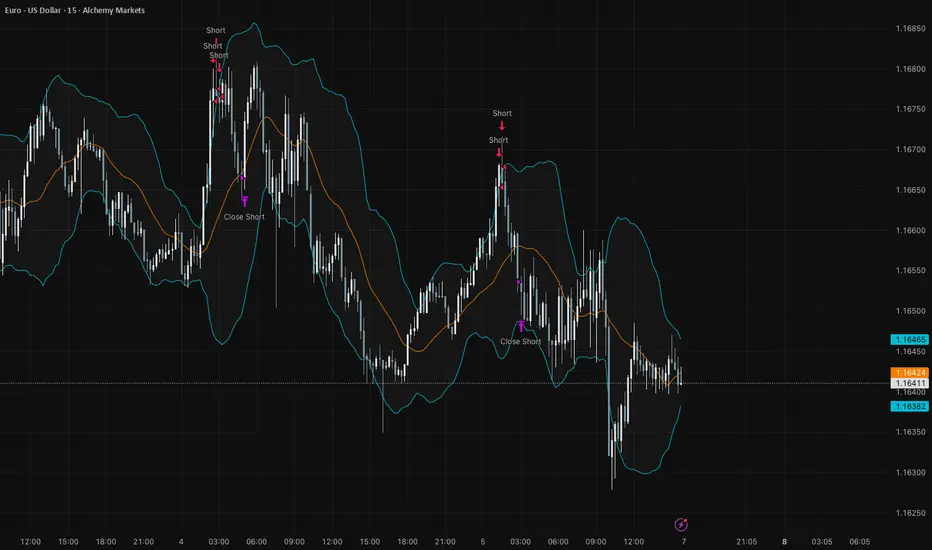
Pro Bollinger Bands Strategy [Breno]This strategy excels in highly volatile financial instruments, including cryptocurrencies, high-beta stocks, commodity futures, and certain exchange-traded funds (ETFs) that exhibit clear mean-reversion characteristics around their Bollinger Bands. The system's ability to utilize scaling (position averaging) and an ATR-based stop loss makes it particularly effective in markets with significant price swings, allowing the trader to capture profits from price extremes while managing increased volatility-related risk.
Core Strategy Logic
This Strategy implements a comprehensive trend-following and mean-reversion strategy primarily leveraging the Bollinger Bands (BB) indicator for entry and exit signals, complemented by an Average True Range (ATR)-based Stop Loss mechanism and an optional EMA filter. It is designed with robust features for capital management, including configurable leverage and a sophisticated position averaging (scaling) system.
Long Entry: A long position is initiated when the closing price crosses over the Lower Bollinger Band (ta.crossover(close,lowerBB)). This signals a potential mean-reversion opportunity following a price dip.
Short Entry: A short position is initiated when the closing price crosses under the Upper Bollinger Band (ta.crossunder(close,upperBB)). (Note: Short entries are disabled by default in the script inputs).
Exit Conditions (Profit Target): Long positions aim to exit upon interaction with the Upper Bollinger Band. Users can select from three exit methods:
"Close When Touch": Exits when close≥upperBB.
"Close Above then Below": Exits when the previous close was above the upper band, and the current close is below it (a reversal signal).
"High Above": Exits when high>upperBB. The strategy features an optional profitOnly setting, which restricts all exits to only occur if the trade is currently in profit (i.e., close is above the strategy.position_avg_price for longs).
Key Features and Customization
Bollinger Bands & Filters -
Customizable BB Parameters: The Length and Deviation of the Bollinger Bands are fully adjustable, allowing users to fine-tune the sensitivity of the entry and exit signals.
Optional EMA Filter: An optional EMA Filter can be enabled to align entries with the prevailing trend, where a Long entry is only permitted if close≥EMA(EmaFilterRange).
Risk and Capital Management -
Equity Allocation: Position size is dynamically calculated based on a Percentage of Equity (capitalPerc) combined with the set Leverage multiplier.
Dynamic Stop Loss (ATR-Based):
An optional Stop Loss (SL) is calculated using a multiple (slAtrInput) of the Average True Range (ATR).
The SL is set relative to the entry price upon trade activation, providing a volatility-adjusted risk management layer.
Position Averaging (Scaling): The script supports the addition of multiple units (pyramiding) to an existing position based on three user-selected criteria:
"No": No averaging.
"Percent": Adds to the position if the price has dropped by a set percentage (addPct) from the average price.
"ATR": Adds to the position if the current price is significantly below a calculated ATR-based support level from the average price.

Bollinger Bands Regression Forecast [BigBeluga]🔵 OVERVIEW
The Bollinger Bands Regression Forecast combines volatility envelopes from Bollinger Bands with a linear regression-based projection model .
It visualizes both current and future price zones by extrapolating the Bollinger channel forward in time, giving traders a statistical forecast of probable support and resistance behavior.
🔵 CONCEPTS
Classic Bollinger Bands use a moving average (basis) and standard deviation (deviation) to form dynamic envelopes around price.
This indicator enhances them with linear regression slope detection , allowing it to forecast how the band may expand or contract in the future.
Regression is applied to both the band’s basis and deviation components to predict their trajectory for a user-defined number of Forecast Bars .
The resulting forecast creates a smoothed, funnel-shaped projection that dynamically adapts to volatility.
▲ and ▼ markers highlight potential mean reversion points when price crosses the outer bounds of the bands.
🔵 FEATURES
Forecast Engine : Uses linear regression to project Bollinger Band movement into the future.
Dynamic Channel Width : Adapts standard deviation and slope for realistic volatility modeling.
Auto-Labeled Levels : Displays live upper and lower forecast values for quick reference.
Cross Signals : Marks potential overbought and oversold zones with ▲/▼ signals when price exits the band.
Trend-Adaptive Basis Color : Basis line automatically switches color to represent short-term trend direction.
Customizable Colors and Widths for complete visual control.
🔵 HOW TO USE
Apply the indicator to visualize both current Bollinger structure and its forward projection.
Use ▲/▼ breakout markers to identify short-term reversals or volatility shifts.
When price consistently rides the upper band forecast, the trend is strong and likely continuing.
When regression shows narrowing bands ahead, expect a volatility contraction or consolidation period.
For range traders, outer projected bands can be used as potential mean reversion entry points .
Combine with volume or momentum filters to confirm whether breakouts are genuine or fading.
🔵 CONCLUSION
Bollinger Bands Regression Forecast transforms classic Bollinger analysis into a predictive forecasting model .
By merging volatility dynamics with regression-based extrapolation, it provides traders with a forward-looking visualization of likely price boundaries — revealing not only where volatility is but also where it’s heading next.

Ultimate RSI Suite [BigBeluga]🔵 OVERVIEW
The Ultimate RSI Suite elevates the classic RSI into a full professional trading system.
It combines momentum analysis, advanced divergence detection, volatility-based RSI channels, multi-timeframe signals, deviation tracking, and reversal alerts into one powerful tool.
This is no ordinary RSI — it’s a complete momentum intelligence engine designed to identify trend strength, exhaustion, breakout conditions, and reliable reversal points with high precision.
⚠️ Note:
This suite enhances RSI with MTF dashboards, dynamic channels, deviation logic, and smart alerting — ideal for scalpers, swing traders, and institutional-style trend followers.
🔵 CONCEPTS
Measures market momentum to detect overbought/oversold zones and trend health
Tracks RSI behavior relative to dynamic channels (BB/Keltner/Donchian)
Identifies regular bullish & bearish divergences
Detects deviation moves after divergence to confirm trend continuation or exhaustion
Multi-timeframe RSI conditions reveal higher-timeframe confluence
Reversal triggers confirm early momentum shifts
Overbought/oversold gradients visually highlight exhaustion zones
🔵 FEATURES
Classic + Enhanced RSI with configurable lookback & price source
RSI-Channel System (Bollinger, Keltner, Donchian) for volatility-adaptive trend structure
RSI-Smoothing MA for trend direction filters
RSI Reversal Signals for early trend inflection detection
RSI Reversal Signals Deviation Levels +1 / +2 for advanced continuation confirmation
Overbought/Oversold Gradient Zones at 35/65 or user-defined levels
Divergence Engine for bullish & bearish momentum exhaustion signals
On-Chart Divergence & Signals (full overlay capability)
Divergence Engine Deviation Levels +1 / +2 for advanced continuation confirmation
Multi-Timeframe Dashboard (RSI OB/OS, signals, divergences, channel breaks)
• Hover your mouse over any signal cell to see how many bars ago it was triggered
• Signals automatically expire after 50 bars
Smart Alerts for divergence, reversals, channel breaks, and deviation triggers
🔵 HOW TO USE
Enter long when RSI reverses from oversold & prints bullish divergence or a ▲ signal
Enter short when RSI reverses from overbought & prints bearish divergence or ▼
Use channel breaks to confirm momentum expansions or trend shifts
Look for deviation crosses (+1 / +2) for strong confirmation after divergence
Track MTF table — more timeframe agreement = stronger conviction
Avoid trading against MTF RSI extremes (OB/OS stacked zones)
Combine with market structure or volume-based tools for maximum precision
🔵 ALERTS
Includes full automation suite:
Bullish / Bearish divergence
Reversal signals (▲ / ▼)
Channel breakouts (Up/Down)
Deviation +1 / +2 confirmation triggers
Extra RSI signal deviation alerts for precision continuation reads
Great for automated systems, confirmation models, and high-probability intraday/swing entries.
🔵 CONCLUSION
The Ultimate RSI Suite transforms RSI into a smart momentum-analysis system.
With multi-timeframe logic, dynamic channels, advanced divergence/deviation systems, and powerful visual cues, it offers institutional-grade trend, exhaustion, and reversal detection.
If you rely on RSI, this toolkit provides superior clarity, deeper context, and stronger execution timing — making it an elite upgrade for professional traders.
Script de pago

RSI Reversal + BB RSIReversal Alerts
SELL Reversal (reversalSELL)
Triggers when:
RSI touches or crosses above the upper BB, and
The current candle is bearish (close < open).
→ Plots a small red circle above the candle
→ Fires alert named “reversalSELL”
BUY Reversal (reversalBUY)
Triggers when:
RSI touches or crosses below the lower BB, and
The current candle is bullish (close > open).
→ Plots a small green circle below the candle
→ Fires alert named “reversalBUY”

Custom Bollinger Band Squeeze Screener [Pineify]Custom Bollinger Band Squeeze Screener
Key Features
Multi-symbol scanning: Analyze up to 6 tickers simultaneously.
Multi-timeframe flexibility: Screen across four selectable timeframes for each symbol.
Bollinger Band Squeeze algorithm: Detect volatility contraction and imminent breakouts.
Advanced ATR integration: Measure expansion and squeeze states with custom multipliers.
Customizable indicator parameters: Fine-tune Bollinger and ATR settings for tailored detection.
Visual table interface: Rapidly compare squeeze and expansion signals across all instruments.
How It Works
At the core, this screener leverages a unique blend of Bollinger Bands and Average True Range (ATR) to quantify volatility states for multiple assets and timeframes at once. For each symbol and every selected timeframe, the indicator calculates Bollinger Band width and compares it against ATR levels, offering real-time squeeze (consolidation) and expansion (breakout) signals.
Bollinger Band width is computed using standard deviations around a SMA basis.
ATR is calculated to gauge market volatility independent of price direction.
Squeeze: Triggered when BB width contracts below a multiple of ATR, forecasting lower volatility and set-up for a move.
Expansion: Triggered when BB width expands above a higher ATR multiple, signaling a high-volatility breakout.
Display: Results shown in an intuitive table, marking each status per ticker and TF.
Trading Ideas and Insights
Spot assets poised for volatility-driven breakouts.
Compare squeeze presence across timeframes for optimal entry timing.
Integrate screener results with price action or volume for high-confidence setups.
Use squeeze signals to avoid choppy or non-trending conditions.
Expand and diversify watchlists with multi-symbol coverage.
How Multiple Indicators Work Together
This script seamlessly merges Bollinger Bands and ATR with customized multipliers:
Bollinger Bands identify price consolidation and volatility squeeze zones.
ATR tailors the definition of squeeze and expansion, making signals adaptive to volatility regime changes.
By layering these with multi-symbol/multi-timeframe data, traders access a high-precision view of market readiness for trend acceleration or reversal.
The real synergy is in the screener's ability to visualize volatility states for a diverse asset selection, transforming traditional single-chart analysis into a broad market view.
Unique Aspects
Original implementation: Not a simple trend or scalping indicator; utilizes advanced volatility logic.
Fully multi-symbol and multi-timeframe support uncommon in most screeners.
Custom ATR multipliers for both squeeze and expansion allow traders to match their risk profile and market dynamics.
Visual clarity: Table structure promotes actionable insights and reduces decision fatigue.
How to Use
Add the indicator to your TradingView chart (supports any asset class including crypto, forex, stocks).
Select up to six symbols (tickers) and set your preferred timeframes.
Adjust Bollinger Band Length/Deviation and ATR multipliers to refine squeeze/expansion criteria.
Review the screener table: Look for "SQZ" (squeeze) or "EXP" (expansion) cells for entry/exit ideas.
Combine screener information with other technical or fundamental signals for trade confirmation.
Customization
Symbols: Choose any tickers for scanning.
Timeframes: Select short- to long-term intervals to match your trading style.
Bollinger Band parameters: Modify length and deviation for sensitivity.
ATR multipliers: Set low or high values to adjust squeeze/expansion triggers.
Table size and layout: Adapt display for optimal workflow.
Conclusion
The Bollinger Band Squeeze Screener Pineify delivers an innovative, SEO-friendly multi-asset solution for volatility and trend detection. Harness its original algorithmic design to uncover powerful breakout opportunities and optimize your portfolio. Whether you trade crypto with dynamic volatility or scan stocks for momentum, this tool supercharges your TradingView workflow.

Bollinger Band Screener [Pineify]Multi-Symbol Bollinger Band Screener Pineify – Advanced Multi-Timeframe Market Analysis
Unlock the power of rapid, multi-asset scanning with this original TradingView Pine Script. Expose trends, volatility, and reversals across your favorite tickers—all in a single, customizable dashboard.
Key Features
Screens up to 8 symbols simultaneously with individual controls.
Covers 4 distinct timeframes per symbol for robust, multi-timeframe analysis.
Integrates advanced Bollinger Band logic, adaptable with 11+ moving average types (SMA, EMA, RMA, HMA, WMA, VWMA, TMA, VAR, WWMA, ZLEMA, and TSF).
Visualizes precise state changes: Open/Parallel Uptrends & Downtrends, Consolidation, Breakouts, and more.
Highly interactive table view for instant signal interpretation and actionable alerts.
Flexible to any market: crypto, stocks, forex, indices, and commodities.
How It Works
For each chosen symbol and timeframe, the script calculates Bollinger Bands using your specified source, length, standard deviation, and moving average method.
Real-time state recognition assigns one of several states (Open Rising, Open Falling, Parallel Rising, Parallel Falling), painting the table with unique color codes.
State detection is rigorously defined: e.g., “Open Rising” is set when both bands and the basis rise, indicating strong up momentum.
All bands, signals, and strategies dynamically update as new bars print or user inputs change.
Trading Ideas and Insights
Identify volatility expansions and compressions instantly, spotting breakouts and breakdowns before they play out.
Spot multi-timeframe confluences—when trends align across several TFs, conviction increases for potential trades.
Trade reversals or continuations based on unique Bollinger Band patterns, such as squeeze-break or persistent parallel moves.
Harness this tool for scalping, swing trading, or systematic portfolio screens—your logic, your edge!
How Multiple Indicators Work Together
This screener’s core strength is its integration of multiple moving average types into Bollinger Band construction, not just standard SMA. Each average adapts the bands’ responsiveness to trend and noise, so traders can select the underlying logic that matches their market environment (e.g., HMA for fast moves or ZLEMA for smoothed lag). Overlaying 4 timeframes per symbol ensures trends, reversals, and volatility shifts never slip past your radar. When all MAs and bands synchronize across symbols and TFs, it becomes easy to separate real opportunity from market noise.
Unique Aspects
Perhaps the most flexible Bollinger Band screener for TradingView—choose from over 10 moving average methods.
Powerful multi-timeframe and multi-asset design, rare among Pine scripts.
Immediate visual clarity with color-coded table cells indicating band state—no need for guesswork or chart clutter.
Custom configuration for each asset and time slice to suit any trading style.
How to Use
Add the script to your TradingView chart.
Use the user-friendly input settings to specify up to 8 symbols and 4 timeframes each.
Customize the Bollinger Band parameters: source (price type), band length, standard deviation, and type of moving average.
Interpret the dashboard: Color codes and “state” abbreviations show you instantly which symbols and timeframes are trending, consolidating, or breaking out.
Take trades according to your strategy, using the screener as a confirmation or primary scan tool.
Customization
Fully customize: symbols, timeframes, source, band length, standard deviation multiplier, and moving average type.
Supports intricate watchlists—anything TradingView allows, this script tracks.
Adapt for cryptos, equities, forex, or derivatives by changing symbol inputs.
Conclusion
The Multi-Symbol Bollinger Band Screener “Pineify” is a comprehensive, SEO-optimized Pine Script tool to supercharge your market scanning, trend spotting, and decision-making on TradingView. Whether you trade crypto, stocks, or forex—its fast, intuitive, multi-timeframe dashboard gives you the informational edge to stay ahead of the market.
Try it now to streamline your trading workflow and see all the bands, all the trends, all the time!

RSI Bollinger Bands [DCAUT]█ RSI Bollinger Bands
📊 ORIGINALITY & INNOVATION
The RSI Bollinger Bands indicator represents a meaningful advancement in momentum analysis by combining two proven technical tools: the Relative Strength Index (RSI) and Bollinger Bands. This combination addresses a significant limitation in traditional RSI analysis - the use of fixed overbought/oversold thresholds (typically 70/30) that fail to adapt to changing market volatility conditions.
Core Innovation:
Rather than relying on static threshold levels, this indicator applies Bollinger Bands statistical analysis directly to RSI values, creating dynamic zones that automatically adjust based on recent momentum volatility. This approach helps reduce false signals during low volatility periods while remaining sensitive to genuine extremes during high volatility conditions.
Key Enhancements Over Traditional RSI:
Dynamic Thresholds: Overbought/oversold zones adapt to market conditions automatically, eliminating the need for manual threshold adjustments across different instruments and timeframes
Volatility Context: Band width provides immediate visual feedback about momentum volatility, helping traders distinguish between stable trends and erratic movements
Reduced False Signals: During ranging markets, narrower bands filter out minor RSI fluctuations that would trigger traditional fixed-threshold signals
Breakout Preparation: Band squeeze patterns (similar to price-based BB) signal potential momentum regime changes before they occur
Self-Referencing Analysis: By measuring RSI against its own statistical behavior rather than arbitrary levels, the indicator provides more relevant context
📐 MATHEMATICAL FOUNDATION
Two-Stage Calculation Process:
Stage 1: RSI Calculation
RSI = 100 - (100 / (1 + RS))
where RS = Average Gain / Average Loss over specified period
The RSI normalizes price momentum into a bounded 0-100 scale, making it ideal for statistical band analysis.
Stage 2: Bollinger Bands on RSI
Basis = MA(RSI, BB Length)
Upper Band = Basis + (StdDev(RSI, BB Length) × Multiplier)
Lower Band = Basis - (StdDev(RSI, BB Length) × Multiplier)
Band Width = Upper Band - Lower Band
The Bollinger Bands measure RSI's standard deviation from its own moving average, creating statistically-derived dynamic zones.
Statistical Interpretation:
Under normal distribution assumptions with default 2.0 multiplier, approximately 95% of RSI values should fall within the bands
Band touches represent statistically significant momentum extremes relative to recent behavior
Band width expansion indicates increasing momentum volatility (strengthening trend or increasing uncertainty)
Band width contraction signals momentum consolidation and potential regime change preparation
📊 COMPREHENSIVE SIGNAL ANALYSIS
Visual Color Signals:
This indicator features dynamic color fills that highlight extreme momentum conditions:
Green Fill (Above Upper Band):
Appears when RSI breaks above the upper band, indicating exceptionally strong bullish momentum
Represents dynamic overbought zone - not necessarily a reversal signal but a warning of extreme conditions
In strong uptrends, green fills can persist as RSI "rides the band" - this indicates sustained momentum strength
Exit of green zone (RSI falling back below upper band) often signals initial momentum weakening
Red Fill (Below Lower Band):
Appears when RSI breaks below the lower band, indicating exceptionally weak bearish momentum
Represents dynamic oversold zone - potential reversal or continuation signal depending on trend context
In strong downtrends, red fills can persist as RSI "rides the band" - this indicates sustained selling pressure
Exit of red zone (RSI rising back above lower band) often signals initial momentum recovery
Position-Based Signals:
Upper Band Interactions:
RSI Touching Upper Band: Dynamic overbought condition - momentum is extremely strong relative to recent volatility, potential exhaustion or continuation depending on trend context
RSI Riding Upper Band: Sustained strong momentum, often seen in powerful trends, not necessarily an immediate reversal signal but warrants monitoring for exhaustion
RSI Crossing Below Upper Band: Initial momentum weakening signal, particularly significant if accompanied by price divergence
Lower Band Interactions:
RSI Touching Lower Band: Dynamic oversold condition - momentum is extremely weak relative to recent volatility, potential reversal or continuation of downtrend
RSI Riding Lower Band: Sustained weak momentum, common in strong downtrends, monitor for potential exhaustion
RSI Crossing Above Lower Band: Initial momentum strengthening signal, early indication of potential reversal or consolidation
Basis Line Signals:
RSI Above Basis: Bullish momentum regime - upward pressure dominant
RSI Below Basis: Bearish momentum regime - downward pressure dominant
Basis Crossovers: Momentum regime shifts, more significant when accompanied by band width changes
RSI Oscillating Around Basis: Balanced momentum, often indicates ranging market conditions
Volatility-Based Signals:
Band Width Patterns:
Narrow Bands (Squeeze): Momentum volatility compression, often precedes significant directional moves, similar to price coiling patterns
Expanding Bands: Increasing momentum volatility, indicates trend acceleration or growing uncertainty
Narrowest Band in 100 Bars: Extreme compression alert, high probability of upcoming volatility expansion
Advanced Pattern Recognition:
Divergence Analysis:
Bullish Divergence: Price makes lower lows while RSI touches or stays above previous lower band touch, suggests downward momentum weakening
Bearish Divergence: Price makes higher highs while RSI touches or stays below previous upper band touch, suggests upward momentum weakening
Hidden Bullish: Price makes higher lows while RSI makes lower lows at the lower band, indicates strong underlying bullish momentum
Hidden Bearish: Price makes lower highs while RSI makes higher highs at the upper band, indicates strong underlying bearish momentum
Band Walk Patterns:
Upper Band Walk: RSI consistently touching or staying near upper band indicates exceptionally strong trend, wait for clear break below basis before considering reversal
Lower Band Walk: RSI consistently at lower band signals very weak momentum, requires break above basis for reversal confirmation
🎯 STRATEGIC APPLICATIONS
Strategy 1: Mean Reversion Trading
Setup Conditions:
Market Type: Ranging or choppy markets with no clear directional trend
Timeframe: Works best on lower timeframes (5m-1H) or during consolidation phases
Band Characteristic: Normal to narrow band width
Entry Rules:
Long Entry: RSI touches or crosses below lower band, wait for RSI to start rising back toward basis before entry
Short Entry: RSI touches or crosses above upper band, wait for RSI to start falling back toward basis before entry
Confirmation: Use price action confirmation (candlestick reversal patterns) at band touches
Exit Rules:
Target: RSI returns to basis line or opposite band
Stop Loss: Fixed percentage or below recent swing low/high
Time Stop: Exit if position not profitable within expected timeframe
Strategy 2: Trend Continuation Trading
Setup Conditions:
Market Type: Clear trending market with higher highs/lower lows
Timeframe: Medium to higher timeframes (1H-Daily)
Band Characteristic: Expanding or wide bands indicating strong momentum
Entry Rules:
Long Entry in Uptrend: Wait for RSI to pull back to basis line or slightly below, enter when RSI starts rising again
Short Entry in Downtrend: Wait for RSI to rally to basis line or slightly above, enter when RSI starts falling again
Avoid Counter-Trend: Do not fade RSI at bands during strong trends (band walk patterns)
Exit Rules:
Trailing Stop: Move stop to break-even when RSI reaches opposite band
Trend Break: Exit when RSI crosses basis against trend direction with conviction
Band Squeeze: Reduce position size when bands start narrowing significantly
Strategy 3: Breakout Preparation
Setup Conditions:
Market Type: Consolidating market after significant move or at key technical levels
Timeframe: Any timeframe, but longer timeframes provide more reliable breakouts
Band Characteristic: Narrowest band width in recent 100 bars (squeeze alert)
Preparation Phase:
Identify band squeeze condition (bands at multi-period narrowest point)
Monitor price action for consolidation patterns (triangles, rectangles, flags)
Prepare bracket orders for both directions
Wait for band expansion to begin
Entry Execution:
Breakout Confirmation: Enter in direction of RSI band breakout (RSI breaks above upper band or below lower band)
Price Confirmation: Ensure price also breaks corresponding technical level
Volume Confirmation: Look for volume expansion supporting the breakout
Risk Management:
Stop Loss: Place beyond consolidation pattern opposite extreme
Position Sizing: Use smaller size due to false breakout risk
Quick Exit: Exit immediately if RSI returns inside bands within 1-3 bars
Strategy 4: Multi-Timeframe Analysis
Timeframe Selection:
Higher Timeframe: Daily or 4H for trend context
Trading Timeframe: 1H or 15m for entry signals
Confirmation Timeframe: 5m or 1m for precise entry timing
Analysis Process:
Trend Identification: Check higher timeframe RSI position relative to bands, trade only in direction of higher timeframe momentum
Setup Formation: Wait for trading timeframe RSI to show pullback to basis in trending direction
Entry Timing: Use confirmation timeframe RSI band touch or crossover for precise entry
Alignment Confirmation: All timeframes should show RSI moving in same direction for highest probability setups
📋 DETAILED PARAMETER CONFIGURATION
RSI Source:
Close (Default): Standard price point, balances responsiveness and reliability
HL2: Reduces noise from intrabar volatility, provides smoother RSI values
HLC3 or OHLC4: Further smoothing for very choppy markets, slower to respond but more stable
Volume-Weighted: Consider using VWAP or volume-weighted prices for additional liquidity context
RSI Length Parameter:
Shorter Periods (5-10): More responsive but generates more signals, suitable for scalping or very active trading, higher noise level
Standard (14): Default and most widely used setting, proven balance between responsiveness and reliability, recommended starting point
Longer Periods (21-30): Smoother momentum measurement, fewer but potentially more reliable signals, better for swing trading or position trading
Optimization Note: Test across different market regimes, optimal length often varies by instrument volatility characteristics
RSI MA Type Parameter:
RMA (Default): Wilder's original smoothing method, provides traditional RSI behavior with balanced lag, most widely recognized and tested, recommended for standard technical analysis
EMA: Exponential smoothing gives more weight to recent values, faster response to momentum changes, suitable for active trading and trending markets, reduces lag compared to RMA
SMA: Simple average treats all periods equally, smoothest output with highest lag, best for filtering noise in choppy markets, useful for long-term position analysis
WMA: Weighted average emphasizes recent data less aggressively than EMA, middle ground between SMA and EMA characteristics, balanced responsiveness for swing trading
Advanced Options: Full access to 25+ moving average types including HMA (reduced lag), DEMA/TEMA (enhanced responsiveness), KAMA/FRAMA (adaptive behavior), T3 (smoothness), Kalman Filter (optimal estimation)
Selection Guide: RMA for traditional analysis and backtesting consistency, EMA for faster signals in trending markets, SMA for stability in ranging markets, adaptive types (KAMA/FRAMA) for varying volatility regimes
BB Length Parameter:
Short Length (10-15): Tighter bands that react quickly to RSI changes, more frequent band touches, suitable for active trading styles
Standard (20): Balanced approach providing meaningful statistical context without excessive lag
Long Length (30-50): Smoother bands that filter minor RSI fluctuations, captures only significant momentum extremes, fewer but higher quality signals
Relationship to RSI Length: Consider BB Length greater than RSI Length for cleaner signals
BB MA Type Parameter:
SMA (Default): Standard Bollinger Bands calculation using simple moving average for basis line, treats all periods equally, widely recognized and tested approach
EMA: Exponential smoothing for basis line gives more weight to recent RSI values, creates more responsive bands that adapt faster to momentum changes, suitable for trending markets
RMA: Wilder's smoothing provides consistent behavior aligned with traditional RSI when using RMA for both RSI and BB calculations
WMA: Weighted average for basis line balances recent emphasis with historical context, middle ground between SMA and EMA responsiveness
Advanced Options: Full access to 25+ moving average types for basis calculation, including HMA (reduced lag), DEMA/TEMA (enhanced responsiveness), KAMA/FRAMA (adaptive to volatility changes)
Selection Guide: SMA for standard Bollinger Bands behavior and backtesting consistency, EMA for faster band adaptation in dynamic markets, matching RSI MA type creates unified smoothing behavior
BB Multiplier Parameter:
Conservative (1.5-1.8): Tighter bands resulting in more frequent touches, useful in low volatility environments, higher signal frequency but potentially more false signals
Standard (2.0): Default setting representing approximately 95% confidence interval under normal distribution, widely accepted statistical threshold
Aggressive (2.5-3.0): Wider bands capturing only extreme momentum conditions, fewer but potentially more significant signals, reduces false signals in high volatility
Adaptive Approach: Consider adjusting multiplier based on instrument characteristics, lower multiplier for stable instruments, higher for volatile instruments
Parameter Optimization Workflow:
Start with default parameters (RSI:14, BB:20, Mult:2.0)
Test across representative sample period including different market regimes
Adjust RSI length based on desired responsiveness vs stability tradeoff
Tune BB length to match your typical holding period
Modify multiplier to achieve desired signal frequency
Validate on out-of-sample data to avoid overfitting
Document optimal parameters for different instruments and timeframes
Reference Levels Display:
Enabled (Default): Shows traditional 30/50/70 levels for comparison with dynamic bands, helps visualize the adaptive advantage
Disabled: Cleaner chart focusing purely on dynamic zones, reduces visual clutter for experienced users
Educational Value: Keeping reference levels visible helps understand how dynamic bands differ from fixed thresholds across varying market conditions
📈 PERFORMANCE ANALYSIS & COMPETITIVE ADVANTAGES
Comparison with Traditional RSI:
Fixed Threshold RSI Limitations:
In ranging low-volatility markets: RSI rarely reaches 70/30, missing tradable extremes
In trending high-volatility markets: RSI frequently breaks through 70/30, generating excessive false reversal signals
Across different instruments: Same thresholds applied to volatile crypto and stable forex pairs produce inconsistent results
Threshold Adjustment Problem: Manually changing thresholds for different conditions is subjective and lagging
RSI Bollinger Bands Advantages:
Automatic Adaptation: Bands adjust to current volatility regime without manual intervention
Consistent Logic: Same statistical approach works across different instruments and timeframes
Reduced False Signals: Band width filtering helps distinguish meaningful extremes from noise
Additional Information: Band width provides volatility context missing in standard RSI
Objective Extremes: Statistical basis (standard deviations) provides objective extreme definition
Comparison with Price-Based Bollinger Bands:
Price BB Characteristics:
Measures absolute price volatility
Affected by large price gaps and outliers
Band position relative to price not normalized
Difficult to compare across different price scales
RSI BB Advantages:
Normalized Scale: RSI's 0-100 bounds make band interpretation consistent across all instruments
Momentum Focus: Directly measures momentum extremes rather than price extremes
Reduced Gap Impact: RSI calculation smooths price gaps impact on band calculations
Comparable Analysis: Same RSI BB appearance across stocks, forex, crypto enables consistent strategy application
Performance Characteristics:
Signal Quality:
Higher Signal-to-Noise Ratio: Dynamic bands help filter RSI oscillations that don't represent meaningful extremes
Context-Aware Alerts: Band width provides volatility context helping traders adjust position sizing and stop placement
Reduced Whipsaws: During consolidations, narrower bands prevent premature signals from minor RSI movements
Responsiveness:
Adaptive Lag: Band calculation introduces some lag, but this lag is adaptive to current conditions rather than fixed
Faster Than Manual Adjustment: Automatic band adjustment is faster than trader's ability to manually modify thresholds
Balanced Approach: Combines RSI's inherent momentum lag with BB's statistical smoothing for stable yet responsive signals
Versatility:
Multi-Strategy Application: Supports both mean reversion (ranging markets) and trend continuation (trending markets) approaches
Universal Instrument Coverage: Works effectively across equities, forex, commodities, cryptocurrencies without parameter changes
Timeframe Agnostic: Same interpretation applies from 1-minute charts to monthly charts
Limitations and Considerations:
Known Limitations:
Dual Lag Effect: Combines RSI's momentum lag with BB's statistical lag, making it less suitable for very short-term scalping
Requires Volatility History: Needs sufficient bars for BB calculation, less effective immediately after major regime changes
Statistical Assumptions: Assumes RSI values are somewhat normally distributed, extreme trending conditions may violate this
Not a Standalone System: Like all indicators, should be combined with price action analysis and risk management
Optimal Use Cases:
Best for swing trading and position trading timeframes
Most effective in markets with alternating volatility regimes
Ideal for traders who use multiple instruments and timeframes
Suitable for systematic trading approaches requiring consistent logic
Suboptimal Conditions:
Very low timeframes (< 5 minutes) where lag becomes problematic
Instruments with extreme volatility spikes (gap-prone markets)
Markets in strong persistent trends where mean reversion rarely occurs
Periods immediately following major structural changes (new trading regime)
USAGE NOTES
This indicator is designed for technical analysis and educational purposes to help traders understand the interaction between momentum measurement and statistical volatility bands. The RSI Bollinger Bands has limitations and should not be used as the sole basis for trading decisions.
Important Considerations:
No Predictive Guarantee: Past band touches and patterns do not guarantee future price behavior
Market Regime Dependency: Indicator performance varies significantly between trending and ranging market conditions
Complementary Analysis Required: Should be used alongside price action, support/resistance levels, and fundamental analysis
Risk Management Essential: Always use proper position sizing, stop losses, and risk controls regardless of signal quality
Parameter Sensitivity: Different instruments and timeframes may require parameter optimization for optimal results
Continuous Monitoring: Band characteristics change with market conditions, requiring ongoing assessment
Recommended Supporting Analysis:
Price structure analysis (support/resistance, trend lines)
Volume confirmation for breakout signals
Multiple timeframe alignment
Market context awareness (news events, session times)
Correlation analysis with related instruments
The indicator aims to provide adaptive momentum analysis that adjusts to changing market volatility, but traders must apply sound judgment, proper risk management, and comprehensive market analysis in their decision-making process.

Multiple Symbol Trend Screener [Pineify]Multiple Symbol Trend Screener Pineify – Ultimate Multi-Indicator Scanner for TradingView
Empower your trading with deep market insights across multiple symbols using this feature-rich Pine Script screener. The Multiple Symbol Trend Screener Pineify enables traders to monitor and compare trends, reversals, and consolidations in real-time across the biggest equity symbols on TradingView, through a synergistic blend of popular technical indicators.
Key Features
Monitor up to 15 symbols and their trends simultaneously
Integrates 7 professional-grade indicators: MA Distance, Aroon, Parabolic SAR (PSAR), ADX, Supertrend, Keltner Channel, and BBTrend
Color-coded table display for instant visual assessment
Customizable lookback periods, indicator types, and calculation methods
SEO optimized for multi-symbol trend detection, screener, and advanced TradingView indicator
How It Works
This indicator leverages TradingView’s Pine Script v6 and request.security() to process multiple symbols across selected timeframes. Data populates a dynamic table, updating each cell based on the calculated value of every underlying indicator. MA Distance highlights deviation from moving averages; Aroon flags emerging trend strength; PSAR marks potential trend reversals; ADX assesses trend momentum; Supertrend detects bullish/bearish phases; Keltner Channel and BBTrend offer volatility and power insights.
Set up your preferred symbols and timeframes
Each indicator runs its calculation per symbol using its parameter group
All results are displayed in a table for a comprehensive dashboard view
Trading Ideas and Insights
Traders can use this screener for cross-market comparison, directional bias, entry/exit filtering, and comprehensive trend evaluation. The screener is excellent for swing trading, day trading, and portfolio tracking. It enables confirmation across multiple frameworks — for example, spotting momentum with ADX before confirming direction with Supertrend and PSAR.
Identify correlated movements or divergences across selected assets
Spot synchronized trend changes for basket trading ideas
Filter symbols by volatility, strength, or trend status for precise trade selection
How Multiple Indicators Work Together
The screener’s edge lies in its intelligent correlation of popular indicators. MA Distance measures the proximity to chosen moving averages, ideal for spotting overbought/oversold conditions. Aroon reveals the strength of new price trends, PSAR indicates reversal signals, and ADX quantifies the momentum of these trends. Supertrend provides a directional phase, while Keltner Channel & BBTrend analyze volatility shifts and band compressions. This amalgamation allows for a robust, multi-dimensional market snapshot, capturing details missed by single-indicator tools.
By displaying all key metrics side-by-side, the screener enables holistic decision-making, revealing confluence zones and contradiction areas across multiple tickers and timeframes.
Unique Aspects
Original implementation combining seven independent trend and momentum indicators for each symbol
Rich customization for symbols, timeframes, and all indicator parameters
Intuitive color-coding for quick reading of bullish/bearish/neutral signals
Comprehensive dashboard for instant actionable insights
How to Use
Load the indicator onto your TradingView chart
Go to the script’s settings and input your preferred symbols and relevant timeframes
Set your desired parameters for each indicator group: Moving Average type, Aroon length, PSAR values, ADX smoothing, etc.
Observe the results in the top-right table, then use it to filter candidates and validate trade setups
The screener is suitable for all timeframes and asset classes available on TradingView. Make sure your chart’s timeframe matches the one used in the scanner for optimal accuracy.
Customization
Choose up to 15 symbols to monitor in a single dashboard
Customize lookback periods, indicator types, colors, and display settings
Configure alerting options and thresholds for advanced trade automation
Conclusion
The Multiple Symbol Trend Screener Pineify sets a new standard for multi-asset screening on TradingView. By elegantly merging seven proven technical indicators, the screener delivers powerful trend detection, reversal analysis, and volatility monitoring — all in one dashboard. Take your trading to new heights with in-depth, customizable market surveillance.
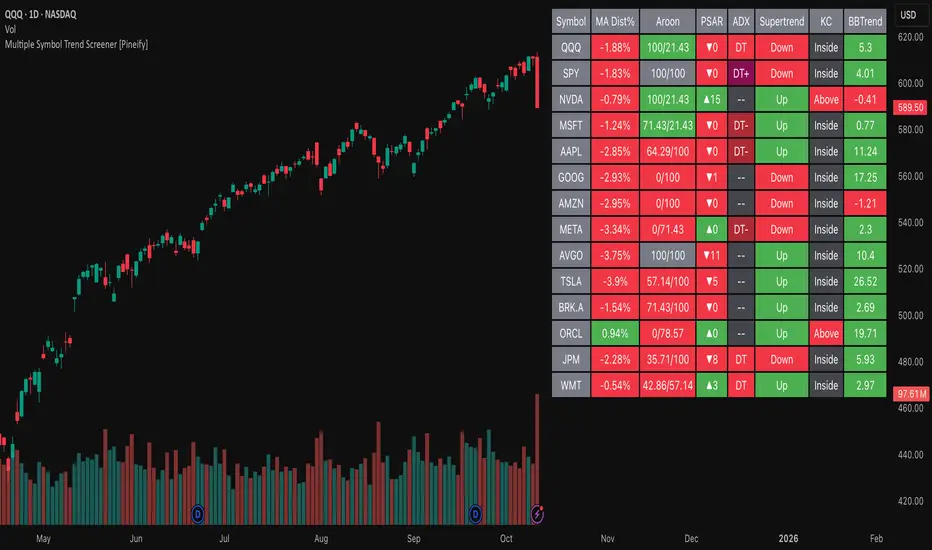
Atlantean Sideways / Range Regime DetectorPurpose
When using trend based indicators, you can skip the false signals when there is a sideways action, protecting you from the false signals.
Flags likely sideways/range phases using three checks:
Weak trend (ADX from DMI)
Price compression (Bollinger Band Width, normalized)
Low volatility (NATR = ATR/Price%)
Logic
isSideways = (ADX < adxThresh) AND (bbNorm < 0.25) AND (NATR < natrMax)
When true: bars + background turn teal and a provisional Range High/Low (rolling rangeWin) is drawn.
Key Inputs
DMI: diLen(22)
Optimized for 15 mins Bitcoin, could change it to 14 for more general approach
ADX: adxSmooth(14), adxThresh(18)
Volatility: lenATR(14), natrMax(1.8)
Visuals: rangeWin(20), bar/range toggles
Quick Tuning
More signals: raise adxThresh to 20–25, raise natrMax to 2.5–4.0, increase BB cutoff by editing bbNorm < 0.25 --> 0.35–0.50.
Smoother range lines: increase rangeWin to 30–40.
Use Cases
Mean reversion inside teal ranges.
Breakout prep when price closes outside the drawn range after teal ends. Could be used as a signal although not suggested.
Filter trend systems: skip trades when sidewaysCond is true. This is the main purpose, for it to be combined with trend based indicators, like Supertrend.
Alert
“Sideways Detected” triggers when isSideways is true.
Script could be expanded upon your requests.