RVOL Color-Coded VolumeRVOL Color-Coded Volume Indicator
This tool visualizes volume intensity through color-coded bars in a separate panel, making it easy to identify significant market moves driven by unusual volume.
Key Features:
- Displays volume bars with varying colors and intensities based on RVOL (Relative Volume)
- Shows a customizable moving average line for volume reference
- Includes alert conditions for different RVOL thresholds
Color System:
Blue shades (Bullish):
- Light: Normal volume (RVOL < 1)
- Medium: Above average volume
- Dark: Heavy buying volume
- Solid: Extreme volume surge
Pink shades (Bearish):
- Light: Normal volume (RVOL < 1)
- Medium: Increased selling
- Dark: Heavy selling
- Solid: Extreme selling pressure
Gray shades (Neutral):
- Used when opening and closing prices are equal
- Intensity varies with RVOL level
Additional Features:
- Dotted threshold lines for easy reference
- Background highlighting for extreme volume events
- Data window shows exact RVOL values
- Multiple alert conditions for volume thresholds
The indicator helps traders spot potential trend changes and momentum shifts by highlighting unusual volume patterns without interfering with price analysis.
Buscar en scripts para "volume"

Highest Volume* 지표 설명
이 지표는 다양한 기간 동안의 최대 거래량을 시각적으로 표시하여 거래자들이 중요한 거래량 패턴을 쉽게 식별할 수 있도록 도와줍니다. 30, 60, 90, 120 캔들 기간 동안의 최대 거래량을 감지하고, 이를 차트 상에 색상 코드로 표시합니다.
다중 기간 분석: 30, 60, 90, 120 캔들 기간에 대한 최대 거래량을 동시에 추적합니다.
기간에 따른 색상 표시: 기간이 길어질수록 표시되는 색상이 짙어집니다.
* 주요 기능
거래량 급증 감지: 갑작스러운 거래량 증가를 빠르게 포착할 수 있습니다.
* 부가 설명
초록색 배경: 최근 120 캔들 중 최대 거래량
노란색 배경: 최근 90 캔들 중 최대 거래량 (120 캔들 최대가 아닌 경우)
주황색 배경: 최근 60 캔들 중 최대 거래량 (90, 120 캔들 최대가 아닌 경우)
빨간색 배경: 최근 30 캔들 중 최대 거래량 (60, 90, 120 캔들 최대가 아닌 경우)
* Indicator Description
This indicator visually displays the maximum trading volume over various periods, helping traders easily identify important volume patterns. It detects the highest volume over 30, 60, 90, and 120 candle periods and represents this on the chart using color codes.
Multi-period analysis: Simultaneously tracks the maximum volume for 30, 60, 90, and 120 candle periods.
Color display according to period: The color becomes darker as the period gets longer.
* Key Features
Rapid volume surge detection: Quickly captures sudden increases in trading volume.
* Additional Explanation
Green background: Highest volume among the most recent 120 candles
Yellow background: Highest volume among the most recent 90 candles (when not the highest in 120 candles)
Orange background: Highest volume among the most recent 60 candles (when not the highest in 90 or 120 candles)
Red background: Highest volume among the most recent 30 candles (when not the highest in 60, 90, or 120 candles)

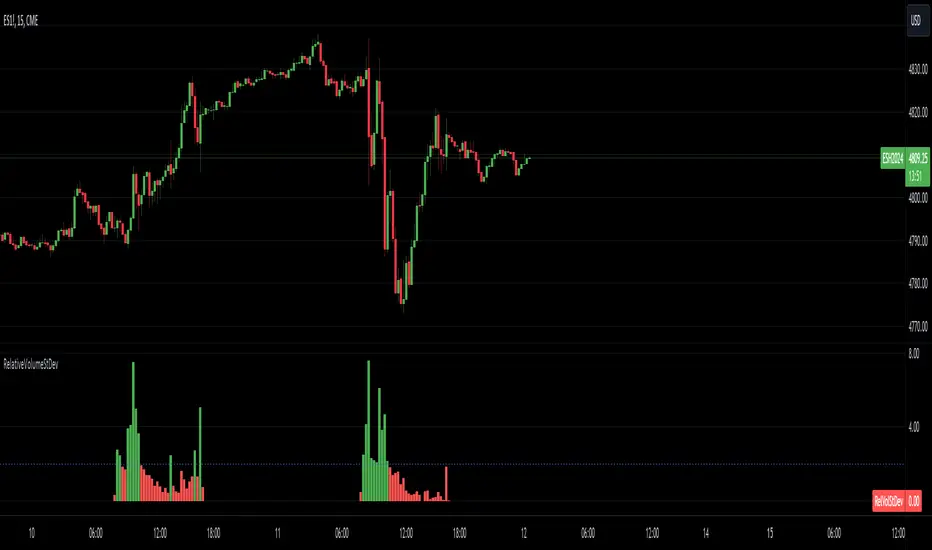
Relative Volume Standard DeviationThe Relative Volume Standard Deviation indicator is a powerful tool designed for traders seeking insights into volume dynamics. This indicator assesses the deviation of a security's trading volume from its moving average, shedding light on potential shifts in market sentiment.
Key Features:
-Length: Tailor the indicator's sensitivity by adjusting the length of the moving average.
-Number of Deviations: Customize the analysis by specifying the number of standard deviations to consider.
-Show Negative Values: Toggle the visibility of negative values in the plot for a comprehensive view.
How it Works:
-Moving Average Calculation: The script computes the simple moving average (SMA) of the trading volume over the specified length, providing a baseline for comparison.
-Standard Deviation Analysis: It calculates the standard deviation of the volume, identifying deviations from the average volume.
-Relative Volume Standard Deviation: The indicator then normalizes the difference between the volume and its moving average by the calculated standard deviation, producing a relative measure of volume deviation.
-Visual Representation: The result is visually represented on the chart using columns. Green columns signify relative volume standard deviation values greater than or equal to the specified number of deviations, while red columns represent values below this threshold.
-Enhancements:
Show Deviation Level: Optionally, a dashed horizontal line at the specified deviation level adds an extra layer of analysis, aiding in the identification of significant deviations.
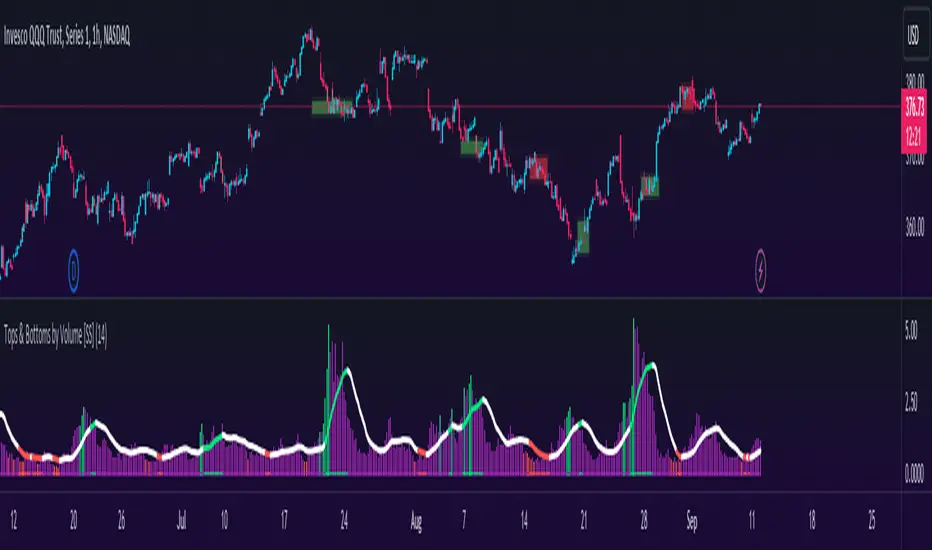
Tops & Bottoms by Volume [SS]Hey everyone,
Releasing this indicator that helps you time entries by alerting to potential tops and bottoms in the market.
Background to the indicator:
I was playing around with things that signalled reversals / tops and bottoms in SPSS and R using Pivot Points to mark tops and bottoms. Happened to come across a generally statistically significant relationship between sell to buy volume that was tracked over 10 to 50 candles back and pivot highs and pivot lows.
So I put it into a beta version of an indicator to see how it looked and was a bit surprised.
Since then, I have went back and narrowed down the details of what works/what doesn't work and this is the tentative result!
What it does / How to Use:
It tracks the cumulative buy vs sell volume. Buy volume is cumulated as close > open (or green candles) and sell is open > close (or red candles).
It then cumulates this over a user-defined period (defaulted to 14). It then looks back to see the highest vs lowest areas of sell and buy volume and makes determinations based on this relationship.
The relationship was determined by me using my own analysis and programmed into the indicators algorithm (using highest vs lowest function in pine).
It will plot areas of potential reversal to the upside as green on the histogram or red for a downside reversal. Once this becomes significant enough to signal an actual bottom or top, it will then change the SMA colour from white to green (for bottom) or red (for top).
Your entries generally should be once the SMA turns back to white. So from green to white, you would enter long or inverse for red to white (enter short).
Settings and Customizability:
Here are the key points to keep in mind if you are using this indicator:
Your lookback length should be between 10 to 50. I have left it open for you to modify it below and above this lookback period; however, this is the major periods deemed to be significant in identifying tops and bottoms. Thus, I advise against operating outside of those parameters.
You can toggle between smoothed look or historgram with SMA. The strength in this indicator comes from using the SMA and watching the SMA for signals of reversals, so if you want to filter out the background noise, you can simply look at the plotted SMA. If you want a more responsive indication of impending reversals, leave the smoothed option off and view the histogram in conjunction with the SMA.
The indicator will change the candle colour to red for bearish reversal and green to bullish reversal. This is based on the SMA. You can toggle this off and/or on as desired.
It is recommended to leave ETH (extended trading hours) turned off and RTH turned on.
Please read the instructions carefully.
If you require further assistance, I have posted a tutorial video.
Please be sure you are reading and/or watching carefully.
If you have questions, please feel free to post them below. But bear in mind I likely will not respond if it is already addressed in the description above (this happens often).
Also, feel free to leave your comments or suggestions below as well.
Thanks for checking this out. If you are interested in volume based trading, I suggest also checking out my Buyer to Seller volume indicator which cumulates total buying vs selling volume over a designated lookback period. Both of these used in conjunction are very powerful tools for volume based traders! ( Available here )
NOTE:
The boxes drawn in the chart are my own for demonstration purposes. I unfortunately cannot get the indicator to overlay the boxes on the chart in a separate viewing pane. That is why I opted to use the barcolor function to change the candle color instead :-).
Thanks again everyone and safe trades!
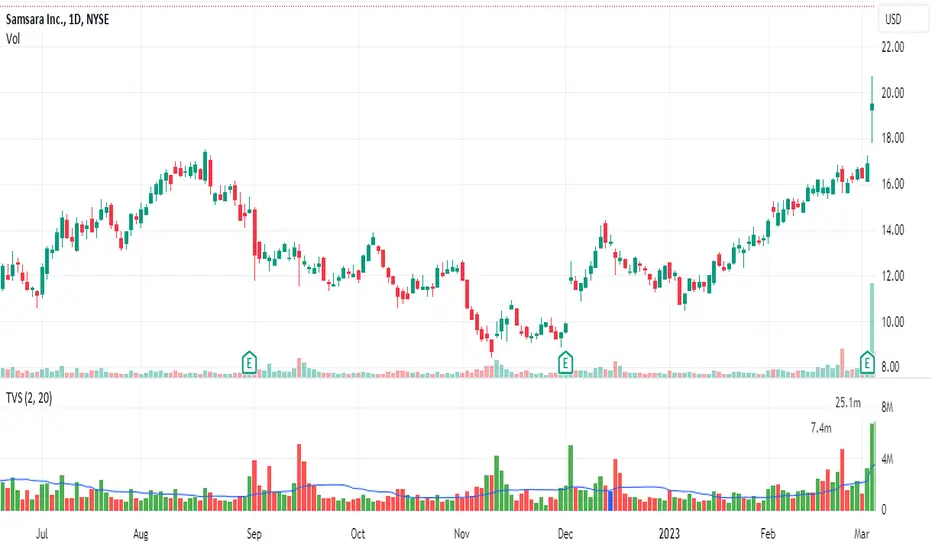
Truncate Volume SpikesTruncates or caps the height of the volume bar. Many times, there is a day where the volume eclipses the recent volume and makes the rest of the volume compressed and difficult to see.
This script cuts off the volume at a user defined multiple of average daily volume and places a label above and to the left showing the true volume.
My one gripe is that it doesn't yet handle overlapping labels. At some point, I will see if I can fix that.
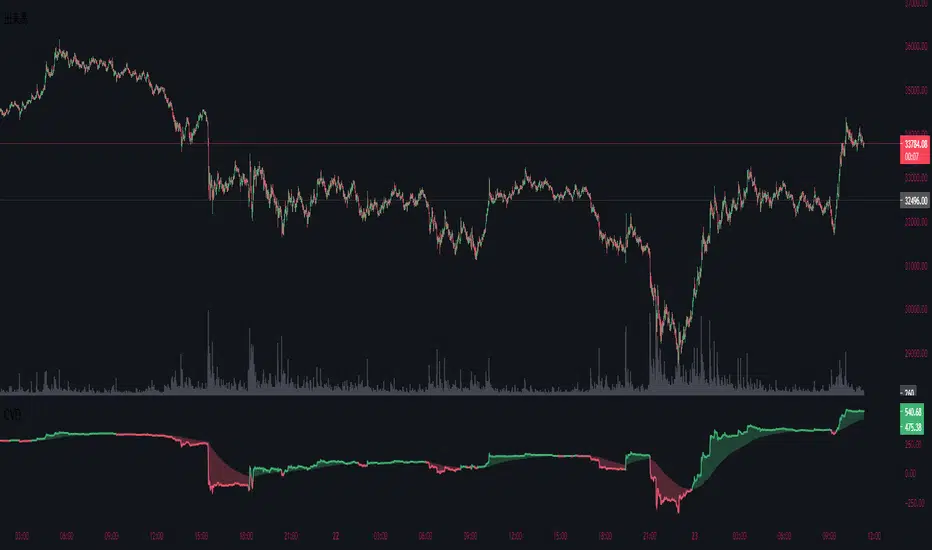
Cumulative Volume DeltaThis indicator is called Cumulative Volume Delta (CVD), and it is the cumulative difference between buying and selling pressure.
Note, however, that it is not an exact CVD, because Pine Script does not allow you to get the Bid Volume and Ask Volume.
Instead, it uses volume and candlestick length to determine the pressure.
Example: Volume is 100, price change is +1.0% → Buying pressure is 1
Volume is 100, price change is -0.5% → Selling pressure is 0.5
このインジケーターは、Cumulative Volume Delta(CVD)と呼ばれるもので、買い圧力と売り圧力の差を累積したものです。
しかし、Pine Scriptでは買い圧力と売り圧力(Bid VolumeとAsk Volume)を取得することはできないため、正確なCVDではないことに注意してください。
代わりに出来高とローソク足の長さで圧力を判断判断しています。
例:出来高が100、価格の変動が+1.0% → 買い圧力は1
出来高が100、価格の変動が-0.5% → 売り圧力は0.5
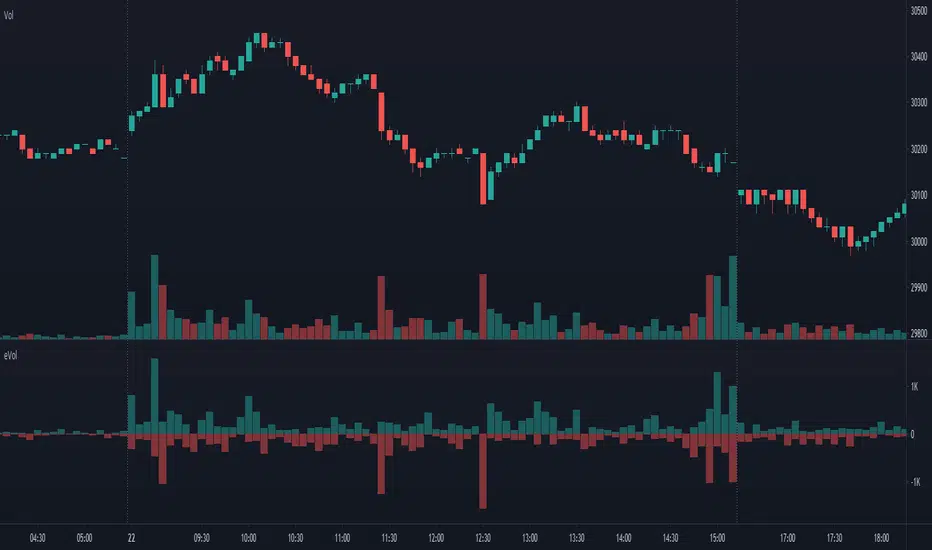
Estimated Up Down VolumeThis indicator plot estimated Up volume and Down volume.
Adjust colors to the default volume indicator.
Performante's Average Ethereum Volume IndicatorPerformante's Ethereum Volume Indicator takes the volume from the biggest exchanges and plots the average volume.

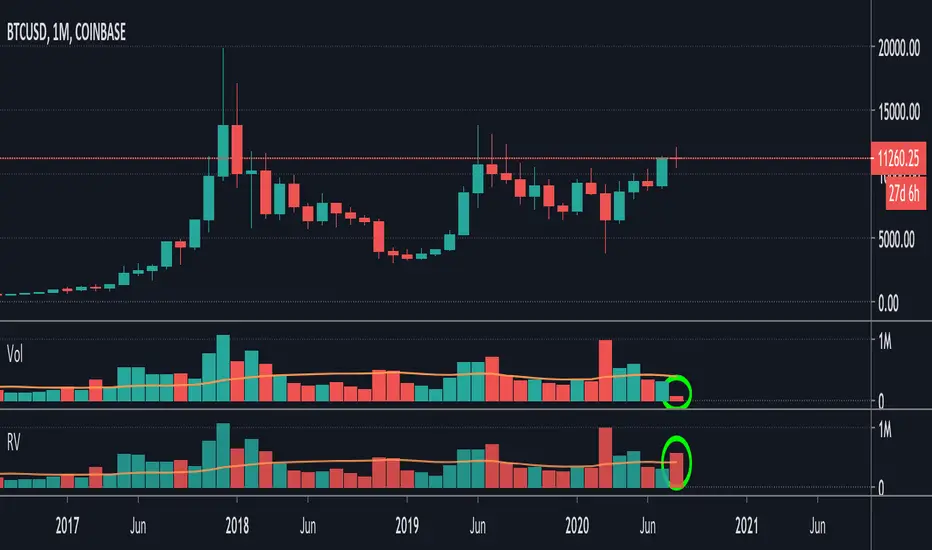
Relative VolumeIt is difficult to know how much volume is going on DURING the last bar,
therefore this "Relative Volume" (RV) script, previous bars are as usual, but the last one
adjusts the measured volume by comparing how much time passed and multiplying
this with the volume.
Examples:
Here (5 minute bar) there are 31 sec passed of the 5 minutes
The standard volume show little volume (since there is only 31s passed)
The "RV" multiplies this so you'll see how much this volume would be over 5 minutes,
IF everything goes the same for the rest of the 5'.
1' 5sec passed:
(so relatively more volume)
3' 4sec passed:
(With about 2' to go, you see there is a lot going on with the volime,
while seeing the standard volume, nothing much...)
Little 4' passed:
4,5':
Almost 5' gone:
Important:
This "RV" volume can diminish when during the bar the volume fades.
I think this can help evaluating the volume during the last bar
W example:
M example:
(You can clearly see that during the first 4 days there is a lot going on!)
Investonomer - BS VolumeBuy Sell Volume Indicator is a free indicator which can be used with any instrument (stock, index or CFD) where volume information is available on TradingView.This indicator shows us a volume based view of the market activity and it helps us distiguish whether buyer are aggressive or sellers are. Basically, this indicator plots first plots the buyer volume in green. Then the seller volume is printed in red.
If Sellers are more, you will red only, whereas if buyers are more, you will selling volumes and then extra green over it which shows how many buyers are there in the market.

Performante's Average Bitcoin Volume IndicatorPerformante's Bitcoin Volume Indicator takes the volume from the biggest exchanges and plots the average volume.
Happy Trading!

BBP (Bittex, Poloniex, Bitfinex) + standart volumeThe script wrote for pairs of crypto currency with XXX USD. On others it does not work. By and large, it is suitable only for analysis of TOP coins.
What it consists of:
The script pulls volumes from exchanges: Bitfinex, Bittrex, Poloniex + the volume of the coin itself through the dollar indicator normalized.
Based on the volume from the indicator "dollar normalized volume"
Works with pairs XXX USD (do not confuse with USDT)
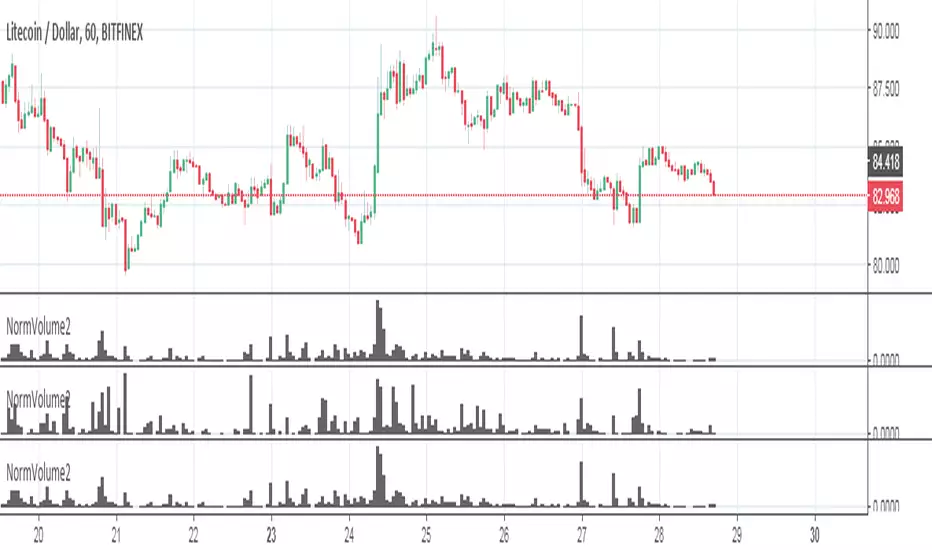
Options Volume IndicatorShows the RSI volume based on options volume. Useful for comparing against asset buy and sell signals to see strength of demand for recent options.

Custom Monthly Volume Profile [Multi-Timeframe]This indicator renders a high-precision Monthly Volume Profile designed for intraday traders and practitioners of Auction Market Theory. Unlike standard volume profiles, this script utilizes Multi-Timeframe (MTF) data request capability to build the profile from lower timeframe data (e.g., 5-minute bars) while displaying it on your trading timeframe.
This tool is optimized to keep your chart clean while providing critical developing levels (POC, VAH, VAL) and historical context from the previous month.
Key Features:
1. Dynamic "Auto-Scaling" Width One of the biggest issues with monthly profiles is visual clutter.
Early Month: The profile starts wide (default 10% width) so you can clearly see the developing structure when data is scarce.
Late Month: As volume accumulates, the profile automatically shrinks (scales down to 2% width) to prevent the histogram from obscuring price action.
Note: This can be toggled off for a static width.
2. Developing & Static Levels
Current Month: Displays real-time Developing Point of Control (dPOC), Value Area High (dVAH), and Value Area Low (dVAL).
Previous Month: Automatically locks in the levels from the previous month at the close, providing immediate support/resistance references for the new month.
3. Time-Filtered Alerts Avoid waking up to notifications during low-volume overnight sessions. This script includes a Session Filter (Default: 0830-1500).
Alerts for crossing POC, VAH, or VAL will only trigger if the price cross occurs within the user-defined time window.
4. Calculation Precision
Multi-Timeframe Data: The profile is built using lower timeframe data (Input: Calculation Precision) rather than just the current chart bars. This ensures the Volume Profile shape remains accurate even when viewing higher timeframes.
Row Size: Fully adjustable "Tick/Row Size" to control the resolution of the volume buckets.
Settings Overview:
Calculation Precision: Determine the granularity of the data (e.g., "5" for 5-minute data).
Row Size: Controls vertical resolution (Lower = higher detail).
Value Area %: Standard 70% default, fully adjustable.
Auto-Width: Set the Start % (Day 1) and End % (Day 31).
Alerts: Toggle Current or Previous month alerts and define the active time session.
Visual Customization:
Customize colors for the Histogram (Value Area vs. Outer Area).
Customize line width and colors for POC, VAH, and VAL.
Supports Right or Left alignment.
Disclaimer: This tool is for informational purposes only. Past performance and volume levels do not guarantee future price action.

Weekly Volume USDT## Description
This Pine Script indicator displays the trading volume for each day of the current week (Monday through Sunday) in a clean table format on your TradingView chart. The volume is calculated in USDT equivalent and displayed in the top-right corner of the chart.
## Features
- **Weekly Volume Breakdown**: Shows individual daily volumes from Monday to Sunday
- **USDT Conversion**: Automatically converts volume to USDT using the average price (open + close / 2)
- **Smart Formatting**:
- Large numbers are formatted with K (thousands) and M (millions) suffixes
- Example: 1,234,567 → 1.23M USDT
- **Clean Table Display**: Fixed position table in the top-right corner
- **Current Week Focus**: Displays volumes for the current week only
- **Future Days Handling**: Days that haven't occurred yet in the current week show as "-"
## How It Works
1. The indicator calculates the average price for each day using (Open + Close) / 2
2. Multiplies the daily volume by the average price to get USDT-equivalent volume
3. Displays the results in an easy-to-read table format
## Use Cases
- **Volume Analysis**: Quickly identify which days of the week have the highest trading activity
- **Pattern Recognition**: Spot weekly volume patterns and trends
- **Trading Decisions**: Use volume information to inform your trading strategies
- **Market Activity Monitoring**: Keep track of market participation throughout the week
## Installation
Simply add this indicator to your TradingView chart and it will automatically display the weekly volume table in the top-right corner.
## Tags
#volume #weekly #USDT #table #analysis #trading #cryptocurrency

Forex Multi Exchange VolumeHi traders! Forex Multi Exchange Volume (FMEV) aggregates and plots trading volumes for supported forex pairs over multiple different major forex exchanges.
Supported exchanges
- FXCM
- OANDA
- FOREX.COM
- PEPPERSTONE
- GLOBALPRIME
Limitations
Because of the fact that FMEV is pulling data from from multiple different exchanges and is computationally intensive it can take a couple of seconds to load while charting certain forex pairs.

Noro's Multi-exchange VolumeThe sum of volumes (5 different exchanges) at the same time. The exchanges can be chosen. Less than five exchanges are possible. For this purpose it is necessary to erase the text in the field.

5 min volume scalperThis scalper try to do it by volumes
The exit either by take profit or the signals, make the TP fit for your need so you will get better exit points
the len control the length so higher will be less signals lower is more
alerts inside
you free to change this code and do what ever you want with it
I hope you can make it better:)

BTC Combined VolumeI edited an existing script to include Bitmex volume. I'm no expert at this but I hope it works!
Cheers,
G

Candle Color Volumescript baseado na alteração das cores do candle conforme o volume de trocas.
script based on changing the colors of the candle according to the volume.

BTC bar volume colorThis Pine Script indicator colors BTC price bars based on aggregated real trading volume from dozens of major spot and perpetual futures exchanges.
How it works briefly:
Collects and sums spot volume from ~20 exchanges
Collects and sums perp/futures volume from many platforms (with unit adjustments)
Computes a combined volume z-score over the last 100 bars
Scales the z-score into a range and maps it to transparency (higher volume → less transparent/more opaque bars)
Colors bars lime green for up candles and red for down candles
Result: Bars appear brighter and more solid on high-volume moves, fainter and more transparent on low-volume moves
Main purpose: Visually highlight genuine high-participation price action vs. low-conviction or "fake" moves on thin volume. Optional black background setting included.

RTH Volume Candle DeltaOverview
This indicator is designed specifically for RTH (Regular Trading Hours) intraday traders who scalp the E-mini S&P 500 (ES), Nasdaq (NQ), and other high-liquidity futures. It solves a major flaw in time-based charts: the inability to see the "Speed of the Tape." By using a unique Transparency Heatmap, it simulates MotiveWave-style Constant Volume Bars while keeping your candles fixed to the time-based X-axis to maintain alignment with indicators like VWAP and EMAs.
The Power of RTH (Regular Trading Hours)
This script is optimized for the high-liquidity environment of the US Regular Session.
During RTH: The volume distribution is statistically significant, allowing the script to accurately identify institutional "sweeps."
During ETH (Overnight): Volume is often too thin for reliable delta analysis. I have included a "Hide Overnight" toggle to keep your chart clean and focused on the liquidity that matters.
Core Logic 1: Volume Partitioning (The Heatmap)
The script partitions volume into two visual states based on your target (Default: 1000V):
Normal Volume (< Target): These candles are dimmed (High Transparency). They represent background noise where the volume target has not yet been reached within that time slice.
Burst Volume (> Target): These candles become solid (Opaque). If a single 15s bar exceeds 1000V, it highlights a Velocity Peak—this is where institutional "Big Money" is actively consuming liquidity.
Core Logic 2: Effort-Based Delta (1s Precision)This is the "engine" of the script. Rather than using simple Close-Open delta, it fetches 1-second sub-bar data (the highest precision available without tick data) and applies an Effort vs. Result formula:$ SET:DELTA = Volume \times \frac{(Close - Low) - (High - Close)}{High - Low}$$Buyer Effort: $(Close - Low)$ — How effectively buyers lifted price from the floor before the close.Seller Effort: $(High - Close)$ — How effectively sellers pushed price down from the ceiling.Adaptive Light-Up: The candle "Lights Up" (White/Yellow) only when the Delta is 1.5x greater than the MA 20 of recent deltas. This filters out standard two-way trade and highlights aggressive initiative.
How to Trade with this Indicator
Spotting Absorption: If you see a Solid (Burst) candle with a small body and "Normal" color, a limit order "Wall" is likely absorbing the market orders.
Confirming the Drive: A Solid White/Yellow candle at a key level (VWAP, PDH, or Opening Range) is a high-probability signal that aggressive money is driving the breakout.
Multiplier Labels: The labels provide an "x Multiplier" (e.g., x4.2), telling you exactly how many 1000V rotations occurred within that single time-bar.
Final Recommendations for Users
ES (S&P 500): 1000V is the standard. On a 1m chart, set it to 4000V.
NQ (Nasdaq): 400V - 500V is recommended due to thinner liquidity.
Setup: For the best experience, hide the default TradingView candle bodies in your chart settings.

Cumulative Volume Histogram with Trading StylesThe Cumulative Volume indicator analyzes volume flow dynamics by separating positive (bullish) and negative (bearish) volume into distinct histograms. It converts raw volume data into actionable signals by applying multiple calculation modes and trading style presets for different market conditions.
Key Features
- Dual Histogram Display : Separates volume into positive (blue) and negative (blue) columns
- Four Trading Style Presets : Optimized settings for different market environments
- Minimalist Color Coding : Columns change shade (RoyalBlue to SlateBlue) based on momentum direction
Trading Style Presets
1. Manual Mode
- Period : User-defined (default: 14)
- Combined : Yes/No (default: Yes)
- Relative : Yes/No (default: Yes)
- Best for : Custom strategy development
2. Range Trading Mode
- Period : 10 (shorter for faster signals)
- Combined : Yes
- Relative : Yes
- Best for : Sideways markets, identifying support/resistance levels
3. Trend Following Mode
- Period : 20 (longer for smoother signals)
- Combined : Yes
- Relative : Yes
- Best for : Trending markets, reduces whipsaw
4. News Trading Mode
- Period : 5 (very short for immediate reactions)
- Combined : Yes
- Relative : No (absolute volume works better for news)
- Best for : High-volatility news events, capturing volume spikes
Cumulative Volume Histogram Formula
The indicator calculates two main components:
1. Volume Classification
If Close(t) > Close(t-1):
Positive_Volume(t) = Volume(t) / 100
Negative_Volume(t) = 0
Else:
Positive_Volume(t) = 0
Negative_Volume(t) = Volume(t) / 100
2. Moving Sums (equivalent to SMA × Period)
Sum_Positive = SMA(Positive_Volume, Period) × Period
Sum_Negative = SMA(Negative_Volume, Period) × Period
Sum_Total_Volume = SMA(Total_Volume/100, Period) × Period
Where:
SMA() is Simple Moving Average
Period = User-defined or preset value (14, 10, 20, or 5)
