ZeroDegen Mega Pro Pack v2═══════════════════════════════════════════════════════════════════════════════
ZERODEGEN MEGA PRO PACK v2 — Multi-Mode Trading System
═══════════════════════════════════════════════════════════════════════════════
Professional trading indicator with 11 modes for crypto markets. Clear BUY/SELL signals, real-time market analysis, and institutional-grade filters.
🎯 WHAT IT DOES
Analyzes price action using multi-factor confirmation:
- EMA crossovers (9/21) for trend direction
- RSI momentum filtering
- ADX trend strength validation
- Volume confirmation
- Higher timeframe bias (1H trend filter)
- Institutional concepts: Liquidity sweeps, Fair Value Gaps
Generates clear BUY and SELL signals directly on your chart with a real-time status panel showing all market conditions at a glance.
📊 11 TRADING MODES
SCALP (15m): Standard, Aggressive, Conservative
TREND (1H-4H): Standard, Cloud, Institutional
INSTITUTIONAL: Liquidity Engine
MIXED: Pro, Reversal, Auto Engine, Automation + Confidence
Switch modes with one click to match market conditions.
⚡ KEY FEATURES
✓ Clear visual BUY/SELL/EXIT signals
✓ Real-time status panel with all indicators
✓ Smart filters (Volume, ADX, ATR, Range)
✓ HTF Bias display (1H trend direction)
✓ Institutional Confidence score
✓ Works on any crypto pair
✓ TradingView alert-ready
📈 RECOMMENDED USAGE
Timeframes: 15m (scalp), 1H (swing), 4H (trend)
Markets: BTC, ETH, SOL, and other liquid crypto pairs
🔐 HOW TO GET ACCESS
Visit: xeroc00l.org
- Monthly: $59/mo
- Quarterly: $149 (save 15%)
- Lifetime: $497 (one-time)
After payment, send your TradingView username to zerocool@xeroc00l.org — access granted within 24 hours.
🚀 COMING SOON
We're actively developing additional features including bot integration, automated execution, and a private trading community. Subscribe now and get access to all future updates.
Learn more: xeroc00l.org
⚠️ LEGAL DISCLAIMER
This indicator is provided for educational and entertainment purposes only. It is not financial advice and should not be construed as a recommendation to buy, sell, or hold any cryptocurrency or financial instrument.
Trading cryptocurrencies and leveraged products involves substantial risk of loss and is not suitable for all investors. Past performance is not indicative of future results. You should not trade with money you cannot afford to lose.
The creators of ZeroDegen are not licensed financial advisors, brokers, or dealers. By using this indicator, you acknowledge that all trading decisions are your own responsibility and you agree that ZeroDegen and its creators are not liable for any losses incurred.
Always do your own research and consider consulting a licensed financial professional before making investment decisions.
© 2025 ZeroDegen | For entertainment purposes only
Indicadores y estrategias

Impulsive Trend Detector [dtAlgo]This advanced Pine Script indicator identifies and tracks impulsive price movements based on Break of Structure (BOS) and Change of Character (CHoCH) concepts from Smart Money trading methodology.
The indicator automatically detects pivot highs and lows, then monitors when price breaks these key levels to signal potential impulsive moves. BOS indicates continuation in the current trend direction, while CHoCH signals potential trend reversals. Each detected move is measured from the break point to the next opposing pivot, providing accurate percentage calculations that match TradingView's measuring tool.
Impulsive moves are categorized into four levels based on magnitude (Level 1: 5-10%, Level 2: 10-15%, Level 3: 15-20%, Level 4: 20%+), with color-coded visual labels and connecting lines displayed directly on the chart.
Comprehensive Session Analysis:
Track moves across 11 distinct trading sessions in Eastern Time: Pre-London/NY, London/NY overlap, NY (with Power Hour and End subdivisions), Sydney, Asia, Sake Time, Asia/London overlap, London, Weekend, and No Session periods.
Three Dynamic Tables provide:
Real-time statistics (bullish/bearish, BOS/CHoCH, levels)
Session breakdown with move counts and average percentages
Event log showing last 10 moves with date, day, session, direction, type, level, percentage, duration, and bar count
Perfect for Smart Money traders seeking data-driven insights into market structure behavior across global trading sessions.

Trend Targets [Philosopher] Pro Alerts & Live DashTrend Targets Pro: Advanced Trend Analysis & Live Risk Management
Trend Targets Pro is a comprehensive trend-following ecosystem designed for traders who demand precision, automated risk management, and real-time performance tracking. By merging multi-layered trend filtering with dynamic volatility-based targets, this tool transforms complex price action into a clear, actionable roadmap.
Core Methodology
The script utilizes a unique "Dual-Filter" logic to identify high-probability trend shifts:
The Baseline: A sophisticated combination of Supertrend logic smoothed by WMA (Weighted Moving Average) and EMA (Exponential Moving Average). This creates a "Trend Baseline" that filters out market noise and identifies the true directional bias.
Confirmation Rejections: The script tracks price "rejections" against the baseline. Only after a user-defined confirmation count is met does the script signal a continuation, ensuring you aren't entering on minor fluctuations.
Key Features
🚀 Automated Trade Architecture: Upon a trend shift (Bullish/Bearish), the script instantly calculates and draws an Entry Line, an ATR-based Stop Loss, and three tiered Take Profit levels (TP1, TP2, TP3).
📊 Live Performance Dashboard: Track your current session in real-time. The on-chart HUD displays Total Trades, Profitable Trades, and Lost Trades, giving you immediate feedback on the current market's compatibility with the strategy.
🎯 Dynamic Visual Feedback:
Trend-Colored Bars: The entire chart atmosphere adapts to the trend.
Live Labels: Targets dynamically update and change color (Green/Red) when hit, providing "at-a-glance" trade management.
Rejection Signals: Visual triangle markers (▲/▼) indicate potential continuation points within an existing trend.
🔔 Institutional-Grade Alert System:
Entry Alerts: Includes Entry, SL, and all 3 TP prices.
Execution Alerts: Instant notifications when any TP or SL is triggered.
Weekly Reports: Automatically generates a performance summary every Saturday to help you review your weekly net points.
Asset-Specific UI: Built-in emoji support for Gold (XAU), BTC, Forex, and Indices for better readability in Telegram/Discord webhooks.
Risk Management at its Core
The script is built for professional risk-to-reward ratios. By using ATR (Average True Range) for target calculation, the "Philosopher" edition ensures your stops and targets are mathematically proportional to the current market volatility.
Risk Warning included in alerts: "Trading involves high risk. Secure your trade at TP1 and maintain strict risk management."
How to Use
Trend Detection: Wait for a color change in the Baseline or a Plotshape label.
Execution: Use the calculated TP/SL levels provided by the dynamic labels.
Optimization: Adjust the "Supertrend Factor" for higher timeframes and the "Confirmation Count" to filter out choppy markets.
Technical Specifications:
Version: Pine Script™ v6 (Latest)
Overlay: Enabled
Alerts: Fully dynamic (supports placeholders)
Disclaimer
This indicator is for educational and informational purposes only. Past performance does not guarantee future results. Always trade within your risk limits.

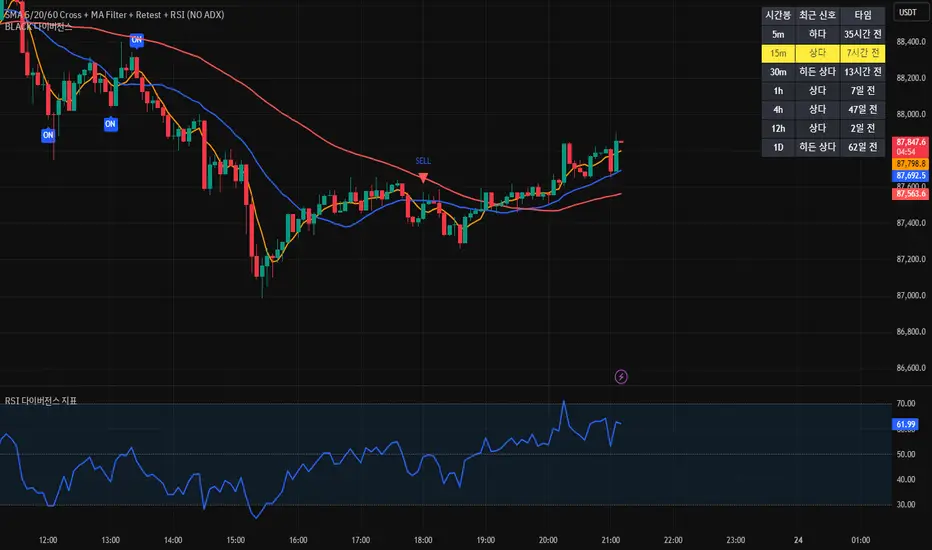
[BLACK] DivergenceDivergence
RSI Filter
EMA Filter
Unconfirmed Divergence Display
Confirmed Unconfirmed Alerts
Boards by Timeframe
다이버전스
RSI필터 EMA필터
미확정 다이버전스 표시
확정 미확정 얼러트
각 시간봉 다이버전스 보드
Instant Start EMA RibbonHave you noticed that EMAs on Tradingview start to appear on chart after the number of candles required by the EMA has fulfilled?
Example, 200 EMA shows up only when 200 candles have been printed on the canvas irrespective of the timeframe.
You might also have noticed that in some other charting software, the EMAs start from the very first candle of the instrument/asset class, a good example is a newly listed stock. And then the EMA automatically aligns itself once the amount of candles required by the EMA is fulfilled.
So if you want similar behavior of EMAs on Tradingview, you can use this "Instant Start EMA Ribbon" specifically coded in Pinescript to exactly and accurately mimic the behavior of EMAs like the other software. You can check that EMAs with this custom indicator start from the very first candles after listing of the instrument/asset class. This indicator will optimize the EMAs and work as a normal EMA once the amount of candles required are fulfilled, until then, it will use custom parameters to calculate the EMAs (that is the available current candle data).
Tip: You can change the values and colors of EMAs from the indicator settings.
Disclaimer/Warning: This indicator does not provide Buy/Sell signals or nor is an investment advice. This indicator solely for the purpose of study of price and Exponential Moving Averages. Users are responsible for their own actions, profit/loss of the users is not the liability of author.

Trend Targets [Philosopher] Pro Alerts & Live DashTrend Targets Pro: Advanced Trend Analysis & Live Risk Management
Trend Targets Pro is a comprehensive trend-following ecosystem designed for traders who demand precision, automated risk management, and real-time performance tracking. By merging multi-layered trend filtering with dynamic volatility-based targets, this tool transforms complex price action into a clear, actionable roadmap.
Core Methodology
The script utilizes a unique "Dual-Filter" logic to identify high-probability trend shifts:
The Baseline: A sophisticated combination of Supertrend logic smoothed by WMA (Weighted Moving Average) and EMA (Exponential Moving Average). This creates a "Trend Baseline" that filters out market noise and identifies the true directional bias.
Confirmation Rejections: The script tracks price "rejections" against the baseline. Only after a user-defined confirmation count is met does the script signal a continuation, ensuring you aren't entering on minor fluctuations.
Key Features
🚀 Automated Trade Architecture: Upon a trend shift (Bullish/Bearish), the script instantly calculates and draws an Entry Line, an ATR-based Stop Loss, and three tiered Take Profit levels (TP1, TP2, TP3).
📊 Live Performance Dashboard: Track your current session in real-time. The on-chart HUD displays Total Trades, Profitable Trades, and Lost Trades, giving you immediate feedback on the current market's compatibility with the strategy.
🎯 Dynamic Visual Feedback:
Trend-Colored Bars: The entire chart atmosphere adapts to the trend.
Live Labels: Targets dynamically update and change color (Green/Red) when hit, providing "at-a-glance" trade management.
Rejection Signals: Visual triangle markers (▲/▼) indicate potential continuation points within an existing trend.
🔔 Institutional-Grade Alert System:
Entry Alerts: Includes Entry, SL, and all 3 TP prices.
Execution Alerts: Instant notifications when any TP or SL is triggered.
Weekly Reports: Automatically generates a performance summary every Saturday to help you review your weekly net points.
Asset-Specific UI: Built-in emoji support for Gold (XAU), BTC, Forex, and Indices for better readability in Telegram/Discord webhooks.
Risk Management at its Core
The script is built for professional risk-to-reward ratios. By using ATR (Average True Range) for target calculation, the "Philosopher" edition ensures your stops and targets are mathematically proportional to the current market volatility.
Risk Warning included in alerts: "Trading involves high risk. Secure your trade at TP1 and maintain strict risk management."
How to Use
Trend Detection: Wait for a color change in the Baseline or a Plotshape label.
Execution: Use the calculated TP/SL levels provided by the dynamic labels.
Optimization: Adjust the "Supertrend Factor" for higher timeframes and the "Confirmation Count" to filter out choppy markets.
Technical Specifications:
Version: Pine Script™ v6 (Latest)
Overlay: Enabled
Alerts: Fully dynamic (supports placeholders)
Disclaimer
This indicator is for educational and informational purposes only. Past performance does not guarantee future results. Always trade within your risk limits.

Sector Rotation ULTIMATE: 7 Narrativas IndependientesSector Rotation ULTIMATE: Crypto Narrative Rotation (7 Independent Sectors)
Advanced indicator displaying the relative strength of major crypto sectors through 7 independently normalized lines (0-100):
• Layer1 (ETH, SOL, BNB, TON, etc.) - Pink
• Enterprise (XRP, HBAR, XLM, QNT, VET) - Yellow
• DeFi (UNI, AAVE, MKR, LDO, CRV, etc.) - Cyan
• Memecoins (SHIB, DOGE, PEPE, WIF, FLOKI, BONK) - Green
• AI (TAO, FET, ICP, GRT, etc.) - Orange
• L2 / Scalability (ARB, OP, MATIC, STRK) - Purple
• RWA + Infra (ONDO, LINK) - Brown
Each sector sums the dominance of its top coins (40 total) and is normalized independently so the lines cross constantly, revealing real capital rotations.
- Colored fills to visually highlight the leading sector
- Works perfectly on any timeframe (clean daily data, no intraday noise)
- Ideal for spotting altseason, sector rotations, and entry timing
Use on CRYPTOCAP:TOTAL. The definitive narrative oscillator for 2026!
#Crypto #Altcoins #SectorRotation #DeFi #Memecoins #AI #RWA

Volume-Weighted Fibonacci PivotThis indicator automatically plots dynamic Fibonacci retracement and extension levels based on a volume-weighted pivot point within a user-defined lookback period or date range. It intelligently calculates a central "pivot" price biased toward high-volume bars, then draws symmetric levels both upward (extensions) and downward (retracements) for balanced confluence analysis.
How It Works (Technical Methodology)
Lookback Period Determination
Multiple filter modes control the data range used for calculations:
"Last X Bars": Fixed number of recent bars (default 400, max 4999).
"Manual Date": User-specified start date.
"Interactive (Chart)": Confirmed start date via input.
"None": Full available history (falls back to max bars).
Optionally, when using "Last X Bars", calculations can pull data from a higher/lower user-selected timeframe via request.security() for multi-timeframe alignment.
A dotted vertical line marks the start point in date-based modes.
Range and Pivot Calculation
Within the selected period:
Highest high and lowest low define the full price range.
Average volume is computed across the period.
Volume-Weighted Pivot: Average close price only from bars where volume > average volume (fallback to simple midpoint if no high-volume bars).
This creates a "smart" central pivot that leans toward areas of greater participation, often aligning with institutional activity.
Fibonacci Level Generation
User-configurable ratios (default: 0.236, 0.382, 0.5, 0.618, 0.786, 1.0, 1.272, 1.414, 1.618).
Levels are calculated symmetrically around the volume-weighted pivot:
Upward: Pivot + (Range × Ratio × Correction Factor) – teal/cyan shades.
Downward: Pivot - (Range × Ratio × Correction Factor) – red shades.
Correction Factor (default 0.5): Scales level spacing for tighter/wider grids without altering ratios.
Only the user-defined number of active lines (default 9) are drawn.
Visual Construction
Central Pivot Line: Thick yellow horizontal line with label showing exact price.
Up/Down Levels: Dashed lines extended into the future, labeled with ratio direction ("Up" or "Dn").
All objects redraw only on the last bar for performance, clearing previous drawings.
Multi-Timeframe Option
When enabled with "Last X Bars":
Pulls high/low/volume data from specified timeframe.
Aligns the pivot and levels to higher-timeframe structure while displaying on current chart – ideal for intraday traders seeking HTF confluence.
How to Use
This tool provides clean, volume-aware Fibonacci grids for identifying potential support/resistance, reversal zones, and targets.
Volume-Weighted Pivot: Often acts as a strong mean reversion level or fair value area.
Upward Levels (Teal): Potential resistance/extensions in bullish moves; watch for reactions on retests.
Downward Levels (Red): Potential support/retracements in bearish moves.
Confluence: High probability when price reacts at levels aligning with other tools (order blocks, pivots, volume profile).
Correction Factor: Lower values (<0.5) for tighter grids in ranging markets; higher (>0.5) for trending markets.
Multi-Timeframe Mode: Use on lower charts (e.g., 15m) with HTF input (e.g., 4H or Daily) to project major structure levels.
Common Setups:
Pullbacks to 0.618–0.786 zones for continuation entries.
Breaks beyond 1.0–1.618 for extension targets.
Reactions near pivot line for mean reversion trades.
Adjust ratios and active line count to match your preferred Fibonacci style (classic retracement vs. extensions).
Disclaimer
This indicator is a technical analysis tool and should be used in conjunction with other forms of analysis. Past performance does not guarantee future results. Always use proper risk management.

Gold Asia Session Highlighter [IST]Here is a polished description and guide for your Gold Asia Session Highlighter. You can use this text for a YouTube description, a Telegram post, or a PDF guide to explain the tool to others.
Gold Asia Session Highlighter (IST) | Visual Indicator
This is a custom TradingView indicator designed to simplify the Gold Asia Strategy. Instead of automating trades, this tool purely handles the visuals. It automatically highlights the correct Asia Session time window (adjusting for Winter/Summer hours) and marks the exact points where you should draw your Fixed Range Volume Profile (FRVP) tool.
Perfect for: Traders who prefer to draw their own FRVP levels manually but want to ensure they are using the exact, error-free time range every single day.
Features
✅ Automatic Time Zone: Strictly calculated using IST (Indian Standard Time), so you don't need to convert time zones manually.
✅ Smart Season Detection: Automatically switches between Winter Session (04:30 – 06:25) and Summer Session (03:30 – 05:25) based on the current month.
✅ Visual Guidance: Highlights the session background and places "START" and "END" labels on the exact candles.
✅ Zero Clutter: Clean visuals with no moving averages or strategy lines—just the session box.
How to Use It
Add to Chart: Apply the script to your Gold (XAUUSD) 5-minute chart. You will see a blue highlighted box appear during the Asia session.
Locate the Labels:
Look for the blue START label (bottom of the candle).
Look for the red END label (top of the candle).
Draw Your FRVP:
Select the Fixed Range Volume Profile tool from your TradingView toolbar.
Click exactly on the START candle.
Drag and release exactly on the END candle.
Trade: You now have the exact Value Area High (VAH), Value Area Low (VAL), and Point of Control (POC) for the day. Use your breakout strategy as usual!

TiRadarHUD Radar that provids for the ability to input manual levels in addition to tracking multiple EMAs.

4MA / 4MA[1] Forward Projection with 4 SD Forecast Bands4MA / 4MA Projection + 4 SD Bands + Cross Table is a forward-projection tool built around a simple moving average pair: the 4-period SMA (MA4) and its 1-bar lagged value (MA4 ). It takes a prior MA behavior pattern, projects that structure forward, and wraps the projected mean path with four Standard Deviation (SD) bands to visualize probable future price ranges.
This indicator is designed to help you anticipate:
Where the MA structure is likely to travel next
How wide the “expected” future price corridor may be
Where a future MA4 vs MA4 crossover is most likely to occur
When the real (live) crossover actually prints on the chart
What you see on the chart
1) Live moving averages (current market)
MA4 tracks the short-term mean of price.
MA4 is simply the previous bar’s MA4 value (a 1-bar lag).
Their relationship (MA4 above/below MA4 ) gives a clean, minimal read on trend alignment and directional bias.
2) Projected MA path (forward curve)
A forward “ghost” of the MA structure is drawn ahead of price. This projected curve represents the indicator’s best estimate of how the moving average structure may evolve if the market continues to rhyme with the selected historical behavior window.
3) 4 Standard Deviation bands (predictive future price ranges)
Surrounding the projected mean path are four SD envelopes. Think of these as forecast corridors:
Inner bands = tighter “expected” range
Outer bands = wider “stress / extreme” range
These bands are not a guarantee—rather, they’re a structured way to visualize “how far price can reasonably swing” around the projected mean based on observed volatility.
4) Vertical projection lines (most probable cross zone)
Within the projected region you’ll see vertical lines running through the bands. These lines mark the most probable zone where MA4 and MA4 are expected to cross in the projection.
In plain terms:
The projected MAs are two curves.
When those curves are forecasted to intersect, the script marks the intersection region with a vertical line.
This gives you a forward “timing window” for a potential MA shift.
5) Cross Table (top-right)
The table is your confirmation layer. It reports:
Current MA4 value
Current MA4 value
Whether MA4 is above or below MA4
The most recent BUY / SELL cross event
When a real, live crossover happens on the actual chart:
It registers as BUY (MA4 crosses above MA4 )
Or SELL (MA4 crosses below MA4 )
…and the table updates immediately so you can confirm the event without guessing.
How to use it
Practical workflow
Use the projected SD bands as future range context
If price is projected to sit comfortably inside inner bands, the market is behaving “normally.”
If price reaches outer bands, you’re in a higher-volatility / stretched scenario.
Use vertical lines as a “watch zone”
Vertical lines do not force a trade.
They act like a forward “heads-up”: this is the most likely window for an MA crossover to occur if the projection holds.
Use the table for confirmation
When the crossover happens for real, the table is your confirmation signal.
Combine it with structure (support/resistance, trendlines, market context) rather than trading it in isolation.
Notes and best practices
This is a projection tool: it helps visualize a structured forward hypothesis, not a certainty.
SD bands are best used as forecast corridors (risk framing, range planning, and expectation management).
The table is the execution/confirmation layer: it tells you what the MAs are doing now.

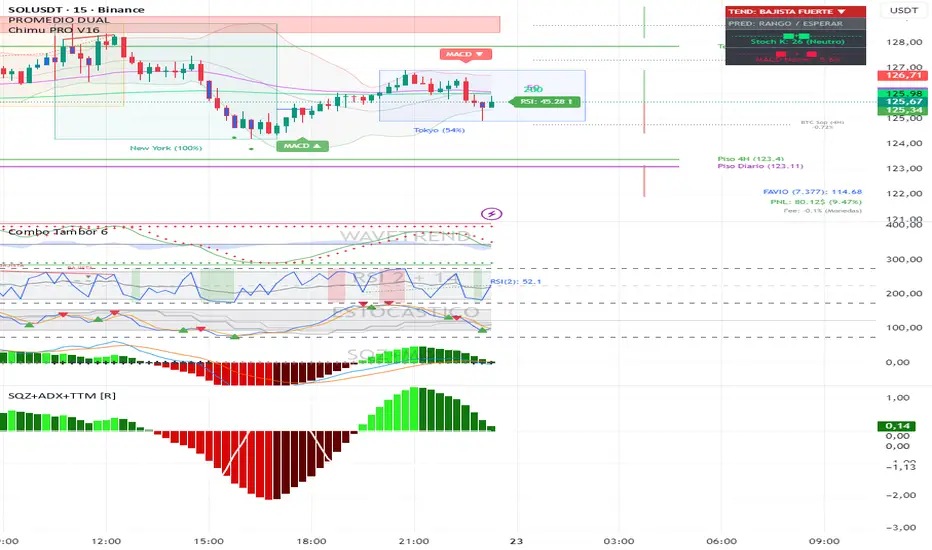
Squeeze + ADX + TTM [V6]Execution speed: The TradingView engine processes v6 scripts much faster.
Stability: By using standard functions like ta.sma or ta.linreg, the indicator is less prone to calculation errors on lower timeframes.
Clarity: I've reorganized the ADX calculation within a function to make it more readable if you decide to modify it later.
Delta Pressure SpectrumWhat this indicator is (brief)
Delta Pressure Spectrum (DPS-3) is a volume-pressure oscillator that estimates buy vs sell imbalance (a delta proxy), then normalizes it into a robust z-score so “significant” pressure means the same thing across different volatility regimes and market conditions. It visualizes that pressure as delta candles + a histogram, and only “lights up” with three breach tiers (plus an ultra-rare white core) when the move is statistically extreme for the current environment.
How to use it:
1) Read it like a pressure gauge, not an entry signal
-Histogram/candle height = intensity of net pressure (buy-dominant vs sell-dominant).
It’s best at telling you: “Is this move real pressure or just price wiggling?”
2) The 3 tiers tell you “how abnormal” the pressure is
-Tier-1 (weak breach): meaningful but common; “something’s happening.”
-Tier-2 (strong breach): rare enough to care; often aligns with real expansions / squeezes / liquidation events.
-Tier-3 (extreme breach): statistically extreme; often shows climactic behavior (either continuation impulse or blow-off/flush conditions).
-White core: only when Tier-3 overshoots hard—treat as “exceptional event.”
Key idea: tiers are adaptive. Tier-2 on BTC 1m and Tier-2 on ES 1h should both represent “strong for that regime.”
3) Best ways to trade with it (high-signal)
-Trend continuation confirmation: In an uptrend, repeated Tier-2/Tier-3 on the up side = real demand; avoid fading unless structure breaks.
-Exhaustion / climax watch: Tier-3 + white core after an extended run = “crowded pressure.” That can precede either: continuation (if structure holds), or reversal / mean reversion (if structure fails).
So you use it as a warning light, then let price structure confirm.
-Compression → expansion detection:
-Quiet baseline for a while, then sudden Tier-2/Tier-3 = expansion regime shift.
-Divergence (use carefully): Price makes new high, DPS-3 fails to reach prior tier intensity → weakening participation. This is most useful on HTFs or at major levels.
4) What the alerts should mean (how you set them)
-Tier-3 breach alerts: your “something serious just hit the tape” alert.
-Pressure flip alerts: best used as contextual reversal confirmation (it requires strong context in your logic).
-White core alert: extremely rare “event mode” notification—use sparingly.
5) One simple rule that keeps you out of trouble
-Don’t fade Tier-2/Tier-3 pressure just because it’s extreme. Fade only when price structure says the move failed (break of trend / reclaim failure / key level loss). DPS-3 tells you strength, structure tells you directional validity.

Volume + VWAP + Prior Session Levels DashboardVolume Spike + VWAP + Session Levels Dashboard
This indicator is a real-time market context dashboard designed to help traders quickly understand participation, value, and key reference levels without cluttering the chart with multiple indicators.
Instead of plotting lines or signals, the script summarizes critical intraday information into a compact on-chart table, allowing traders to make faster, more informed decisions based on how active the market is, where fair value is, and where important reference levels exist.
Core Concepts Used
This script is built on three widely used market principles:
Relative Volume Participation
Volume-Weighted Average Price (VWAP)
Prior Session Reference Levels
The indicator does not attempt to predict direction. Its purpose is to provide objective context that traders can combine with their own strategies.
How the Indicator Works
1. Volume Spike Analysis (Relative Volume)
Rather than showing raw volume, the script measures how unusual the current bar’s volume is compared to recent activity.
A moving average of volume is calculated using a user-defined lookback period.
Current volume is divided by this average to produce a volume multiple (for example, 2.0× normal volume).
This multiple is translated into a descriptive strength label, ranging from Below Threshold to Legendary.
This approach helps traders immediately recognize when participation is significantly above normal, which often coincides with institutional activity, breakouts, or important reactions near key levels.
2. Daily VWAP (Current and Prior Day)
VWAP (Volume-Weighted Average Price) represents the average price traded, weighted by volume, and is commonly used as a measure of fair value.
This script calculates VWAP internally by:
Accumulating price × volume throughout the day
Dividing by total volume
Automatically resetting at the start of each new trading day
The dashboard displays:
Current day VWAP – real-time session fair value
Prior day VWAP – an important reference from the previous session
Traders often use these levels to evaluate whether price is trading at a premium, discount, or near equilibrium.
3. Previous Day High and Low
The indicator also displays:
Previous day high
Previous day low
These levels frequently act as liquidity targets, support/resistance zones, or reaction points, especially during intraday trading sessions.
Dashboard Design
All information is presented in a two-column dashboard showing:
Metric name
Current value or status
The dashboard can be positioned in any corner of the chart and updates in real time, allowing traders to maintain awareness without constantly switching indicators or timeframes.
How to Use This Indicator
This script is best used as a decision-support tool, not a standalone trading system.
Typical uses include:
Identifying abnormally high volume near important price levels
Evaluating price position relative to VWAP
Monitoring reactions around prior day highs and lows
Staying oriented during fast market conditions without chart clutter
The indicator works on any timeframe and adapts automatically to the instrument’s trading session.
Customization Options
Users can:
Adjust the volume moving average length to define what “normal” volume means
Choose the price source used for VWAP calculation
Change the dashboard’s on-screen position
Summary
The Volume Spike + VWAP + Session Levels Dashboard provides a clear, objective snapshot of market conditions by combining participation, value, and reference levels into a single visual tool. It is designed to help traders answer a simple but critical question:
“Is the market doing something meaningful right now — and where?”
This indicator focuses on context, clarity, and usability for traders who want insight without unnecessary complexity.

S&D Trend Pullback StrategyThis is simple indicator for myself to alert me when in trend pullback and entry.
Use in M5 chart.
SL put 30-50pips
TP can set 30-90pips

CCI Standard DeviationCCI Standard Deviation – Asymmetric Volatility-Adjusted Trend Filter (CCI SD)
The Commodity Channel Index (CCI), created by Donald Lambert in 1980, measures how far the typical price deviates from its statistical average to identify cyclical momentum and trend strength.
The standard formula is:
CCI = (Typical Price − SMA(Typical Price, n)) / (0.015 × Mean Deviation)
where Typical Price = (High + Low + Close)/3.
CCI is unbounded and centered around zero: sustained readings above zero indicate bullish momentum, below zero bearish. Classic interpretations often use zero-line crosses or fixed levels (±100, ±200, ±250), but these can be unreliable when CCI volatility changes across market regimes.
This indicator was developed to create a more disciplined trend-following tool that aligns with my core risk principle: “always protect to the downside.”
Starting from the standard CCI zero-line concept for trend direction, I experimented with standard deviation bands to make the oscillator volatility-adjusted. I then applied deliberate asymmetry: requiring the lower 1σ envelope (CCI − stdev) to cross above a positive threshold for bullish confirmation (high-probability entry only in robust trends), while exiting immediately on any raw CCI weakness below a negative threshold (quick downside protection). User inputs for both thresholds were added to allow fine-tuning and adaptability across different assets and timeframes.
An optional DEMA-smoothed version of the lower envelope provides additional clarity when desired.
Extreme zones
raw CCI ±240 and lower envelope > 200 or < –200 - are highlighted with background shading to flag rare acceleration or capitulation phases.
How it works
Standard CCI calculated on typical price (default length 38).
Rolling standard deviation of the CCI itself (default length 13) measures the oscillator’s recent volatility.
Lower envelope = CCI − stdev (dn).
Optional DEMA smoothing (default length 12) can be toggled.
Trend logic:
Bullish regime only when lower envelope
→ Long Threshold (default +10)
→ statistical proof of strength
Bearish/neutral immediately when raw CCI
→ Short Threshold (default –25)
→ fast downside protection
Origin and development
The indicator emerged from wanting a cleaner, more reliable CCI for trend direction. After testing volatility-adjusted versions, the asymmetric design proved superior:
it enters only high-conviction uptrends and exits rapidly on weakness, significantly reducing whipsaws while preserving trend capture.
Parameters were optimized through extensive backtests on major assets (BTC, ETH, SOL and many more Cryptos; Magnificent 7 stocks, QQQ, SPX, gold).
The defaults were selected for the best average Sortino ratio and lowest maximum drawdown across this broad universe, ensuring robustness and avoiding single-asset overfitting.
How to use it
Green triangle below bar
→ lower envelope crosses above Long Threshold
→ high-conviction bullish trend confirmed
→ enter or add to longs
Magenta triangle above bar
→ CCI crosses below Short Threshold
→ exit longs or go cash/short
While lower envelope remains above Long Threshold
→ hold bullish positions
Extreme background shading (dn >200 or CCI ±240)
→ rare high-attention zones (potential acceleration or exhaustion)
Recommended defaults
CCI length: 38
SD length: 13
Long threshold: +10
Short threshold: –25
Optional MA length: 12 (DEMA of lower envelope)
All visual elements (bar coloring, signals, background, smoothed line) are toggleable for personal preference.
This indicator is designed as a trend-strength and risk-management filter and is not intended as a standalone trading system.
Disclaimer:
This is not financial advice. Backtests are based on past results and are not indicative of future performance.

Logarithimic Regression Fib Deviation BandsOverview
This indicator builds a logarithmic regression growth curve and wraps it in Fibonacci-scaled deviation bands to create a long-horizon valuation corridor. It is designed for assets where percentage moves matter more than absolute price moves (for example Bitcoin and other crypto assets), and it remains readable thanks to rainbow band colouring and right-offset labels .
What this indicator does
1) Fits a regression midline in log price space
The midline is a best-fit curve for the asset’s long-term trend
Because the regression is performed on log(price) , the trend behaves in percentage terms rather than linear price terms
This makes the curve suitable for multi-cycle and exponential-growth markets
2) Measures deviation around the midline
The indicator calculates the residual distance between price and the regression midline in log space
A single expanding deviation measure is derived from these residuals
Deviation can be calculated using either:
Expanding standard deviation (smoother, more robust)
Expanding maximum deviation (widest possible corridor)
3) Builds Fibonacci-scaled deviation bands
Upper and lower bands are placed at Fibonacci multiples of the deviation
Included levels:
0.236, 0.382, 0.500, 0.618, 0.786
1.000, 1.272, 1.618, 1.786, 2.000
Extended levels above 2.0: 2.272, 2.414, 2.500, 2.618, 2.720, 3.000
Bands are calculated in log space and then converted back to price space for plotting
4) Keeps the chart clean and readable
Upper bands have individual visibility toggles
Lower bands have:
A master enable / disable switch
Individual per-level toggles
Sensible defaults are used (only the most commonly relevant lower levels are enabled by default)
All labels are offset to the right so they do not overlap current price action
Why this indicator is useful
This tool is designed for context, structure, and regime awareness , not short-term entry signals.
Long-term valuation context
Helps visualise where price sits relative to a fitted growth curve
Cycle extremes
Upper Fibonacci deviation bands highlight historically stretched conditions and potential blow-off zones
Mean-reversion and discount zones
Lower bands highlight historically depressed conditions and deep drawdown regions
Consistency across time
Because the model operates in log space, all distances are interpreted as percentages, making behaviour comparable across multiple cycles
How it works (plain English)
Price is converted to log(price)
A regression is fitted to log(price) using an anchored time axis
Two time modes are available:
Days : log(price) vs linear time (exponential curve in price space)
Log(Days) : log(price) vs log(time), which often behaves like a power-law corridor over very long histories
Residuals (distance from the midline) are measured in log space
A deviation width is calculated from those residuals
Fibonacci ratios are applied to that deviation to create the band levels
Bands are converted back to normal price and plotted
Inputs guide
Model timeframe
Regression and deviation are calculated on a chosen timeframe (default Daily) and displayed on all chart timeframes
Time axis mode
Days = exponential-style trend
Log(Days) = power-law-style trend (often better for very long cycles)
Deviation model
Expanding StdDev = smoother, more statistically robust corridor
Expanding MaxAbs = widest possible corridor
Midline shift (%)
Shifts the entire corridor up or down by a constant percentage (useful for centring the model across different assets)
Lower band controls
Master toggle plus per-level toggles allow you to show only the lower levels that are relevant for the current regime
Label offset
Moves labels into the future by a fixed number of bars so they do not interfere with live price action
Typical usage ideas
Use Log(Days) + Expanding StdDev as a default for multi-cycle assets
Treat upper bands as risk or stretch zones , not automatic sell signals
Treat lower bands as discount or stress zones , not automatic buy signals
Enable deeper lower bands only when price action approaches those regions
Notes and limitations
This indicator is not a prediction tool
Bands evolve as more historical data becomes available
Results may vary depending on the amount and quality of historical data for a given symbol

Smart Money Flow - Institutional OI & Volume Analyzer [Pro]# 🎯 Nifty Smart Money Flow - Institutional OI & Volume Analyzer
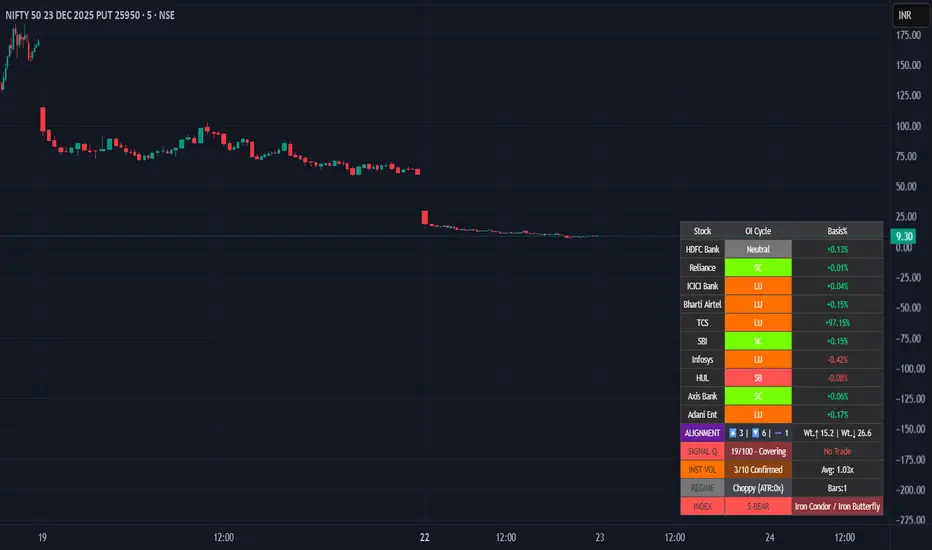
## What It Does
Professional-grade indicator that tracks **Open Interest (OI) cycles, volume footprints, and basis analysis** across Nifty 50's top 10 heavyweight stocks (representing ~54% of index weight). Identifies institutional accumulation/distribution using **4-quadrant OI analysis** combined with volume surge detection and ATR-based regime filtering.
## 🔥 Key Features
### Institutional-Grade Analytics
- **OI Cycle Detection**: Identifies Long Buildup (LB), Short Covering (SC), Short Buildup (SB), and Long Unwinding (LU) for top 10 Nifty constituents
- **Volume Validation Layer**: Detects institutional footprints via volume spikes >150-200% of 20-period MA
- **Cost of Carry Analysis**: Real-time basis tracking between spot and futures prices
- **Signal Quality Score (0-100)**: 4-component scoring system measuring alignment strength, weighted momentum, trend purity, and basis confirmation
### Advanced Regime Detection
- **Percent-Based ATR Filter**: Normalized volatility comparison prevents false signals across different price levels
- **Consecutive Bar Confirmation**: Requires 3+ bars of sustained signal before regime classification
- **Dynamic Strategy Recommendations**: Suggests optimal option structures (Call/Put Spreads, Iron Condor, Straddle) based on market regime
### Smart Money Divergence Alerts
- **Top Stock Divergence Detection**: Warns when heavyweight stocks (HDFC, Reliance, ICICI) contradict index signal
- **Pareto Principle Application**: Weights top 3 stocks (~30% index weight) for maximum predictive accuracy
## 📊 Visual Dashboard
Clean, dark-theme optimized table displaying:
- Individual stock OI cycles with color coding
- Basis/premium percentages for each heavyweight
- Alignment metrics (Bullish/Bearish/Neutral count)
- Quality score with position sizing guidance (Full Size/Spreads Only/No Trade)
- Institutional volume confirmation count
- Real-time regime status with ATR ratio
## 💡 How To Use
### For Intraday Traders (1m-15m)
1. Enable "Institutional Volume Filter" for noise reduction
2. Wait for Quality Score ≥60 for directional trades
3. Use regime-based structure recommendations (displayed in INDEX row)
### For Swing/Positional Traders (1H-Daily)
1. Focus on consecutive bar count ≥3 for trend confirmation
2. Check for divergence warnings before major positions
3. Use basis analysis to time entries (premium = bullish sentiment)
### For Options Traders
1. **Quality Score 60-100**: Full size directional (Buy Calls/Puts)
2. **Quality Score 30-60**: Spreads only (Call Spread/Put Spread)
3. **Quality Score 0-30**: Avoid directional; use Iron Condor in choppy regime
## ⚙️ Customization Options
- **10 Toggle Switches**: Show/hide individual stocks for cleaner dashboard
- **Volume Threshold**: Adjust institutional detection sensitivity (default 1.5x)
- **Regime ATR Length**: Fine-tune volatility measurement period (default 14)
- **Alignment Thresholds**: Set minimum bullish/bearish stock count for signals (default 5/10)
## 📈 Best For
- Nifty 50 Index traders (Futures & Options)
- Bank Nifty analysis (3 major banks included)
- Institutional flow tracking
- Multi-stock correlation analysis
- Regime-based strategy adaptation
## 🚨 Alerts Included
✅ Strong Bullish Signal (7+ stocks aligned + volume confirmation)
✅ Strong Bearish Signal (7+ stocks aligned + volume confirmation)
✅ Divergence Warning (Top stocks contradict index move)
✅ Institutional Volume Surge (7+ stocks with volume spikes)
## 📚 Technical Foundation
Based on institutional trading principles:
- **Order Flow Analysis**: Price + OI correlation for position identification
- **Smart Money Concepts**: Volume profile + basis analysis for institutional tracking
- **Regime Filtering**: Adaptive strategy selection based on volatility environment
- **Weighted Aggregation**: Pareto principle ensures top stocks drive signal quality
## 🔧 Version History
- v6.0: Initial release with 10-stock coverage
- Optimized request.security() calls: 30 total (3 per stock)
- Dynamic table rendering with barstate.islast efficiency
## 📌 Important Notes
- **Data Source**: NSE India (Spot + Futures + OI)
- **Update Frequency**: Real-time (dependent on chart timeframe)
- **Best Timeframes**: 5m, 15m, 1H, Daily
- **Avoid**: Pre-market hours (OI data may be stale)
---
**Category**: Volume / Order Flow
**Market**: NSE India - Nifty 50
**Timeframe**: Multi-timeframe (1m to Daily)
**Complexity**: Advanced (suitable for intermediate to professional traders)
## Tags (for SEO)
#nifty50 #orderflow #openinterest #institutional #smartmoney #volume #regime #niftyfutures #niftyoptions #oi #banknifty #heavyweights #basis #costofcarry #divergence #qualityscore #nseindia #optionstrading #algorithmic #quantitative
Volume Flow Bubbles [SunnyAlgo]# Volume Flow Bubbles
## What This Indicator Shows
This indicator visualizes **order flow** by displaying buy and sell volume as colored bubbles directly on your chart. It uses Lower Timeframe (LTF) data to show granular volume activity within each candle.
Perfect for **scalping** and **intraday trading** on any timeframe including Range bars.
---
## How to Read the Bubbles
### Colors
- **Green bubbles** = Buying pressure (bulls absorbing at lows)
- **Red bubbles** = Selling pressure (bears distributing at highs)
### Size
Bubble size reflects volume magnitude:
| Size | Volume Level |
|------|--------------|
| Huge | ≥70% of bar's max volume |
| Large | 40-70% |
| Normal | 20-40% |
| Small | 10-20% |
| Tiny | <10% |
### Position
- Buy bubbles appear **near the low** of each LTF candle (where buyers stepped in)
- Sell bubbles appear **near the high** (where sellers distributed)
---
## Entry Signals
### LONG Signal (▲)
Appears when ALL conditions align:
1. **Imbalance** - Price breaking out of consolidation
2. **Bullish trend** - EMA 9 > EMA 21
3. **Big buy print** - Large green bubble (volume > 3x average)
4. **CVD rising** - Cumulative Volume Delta confirms buying
### SHORT Signal (▼)
Appears when ALL conditions align:
1. **Imbalance** - Price breaking down
2. **Bearish trend** - EMA 9 < EMA 21
3. **Big sell print** - Large red bubble
4. **CVD falling** - Cumulative Volume Delta confirms selling
---
## Order Flow Patterns
| Pattern | What You See | Meaning |
|---------|-------------|---------|
| Absorption | Large green bubbles at lows, price holds | Buyers defending level - look for longs |
| Distribution | Large red bubbles at highs, price stalls | Sellers offloading - look for shorts |
| Breakout | Mostly green bubbles, increasing size | Strong buying momentum |
| Breakdown | Mostly red bubbles, increasing size | Strong selling momentum |
| Balance | Mixed small bubbles, no dominant color | Consolidation - wait for breakout |
---
## Settings Guide
### Lower Timeframe Settings
| Your Chart | Recommended LTF |
|------------|-----------------|
| 5 min | 1 min |
| 15 min | 1-3 min |
| 1 hour | 5-15 min |
| Range bars | 1 min |
### Key Parameters
- **Max Bubbles Per Bar** - Increase for more detail, decrease for cleaner charts
- **History Bars** - How many bars back to display bubbles
- **Big Print Threshold** - Sensitivity for detecting large volume (default 3x)
- **Balance Threshold** - ATR multiplier for detecting consolidation
- **Imbalance Multiplier** - ATR multiplier for detecting breakouts
---
## Alerts
6 built-in alerts available:
- Long Entry Signal
- Short Entry Signal
- Bullish Imbalance
- Bearish Imbalance
- Big Buy Print
- Big Sell Print
---
## Tips for Best Results
1. **Look for size clusters** - Multiple large bubbles at same price = institutional interest
2. **Watch color dominance** - More green = buyers winning, more red = sellers winning
3. **Combine with support/resistance** - Bubbles at key levels are more significant
4. **Use on liquid markets** - Works best on high-volume instruments
5. **Enable "Bring to Front"** - In TradingView visual settings for best bubble visibility
---
## How It Works
The indicator fetches lower timeframe candle data and splits each candle's volume into:
- **Buy Volume** = (Close - Low) / (High - Low) x Volume
- **Sell Volume** = (High - Close) / (High - Low) x Volume
This approximates order flow based on where price closed within the candle range.
---
*Created by SunnyAlgo*

Option ScalperUpdate: A good indicator must be able to detect what type of current market is: trending, range bound, or whipsawing. Based upon market type, signals should be either short living, long lasting or avoided at all. This is what this current updated version does best.

Gold ORB Strategy (3/5/15/30 Min)It's a multi-mode Opening Range Breakout system for Gold futures that automates the detection of the 7:20-7:23 AM CT opening range and provides clear visual signals for four different trading styles.
In Plain English:
"It draws a box around gold's first 3 minutes of trading, then alerts you when price breaks out with confirmation from volume, VWAP, and moving averages. It automatically calculates your entry, stop, and target prices based on your chosen strategy style."
What Makes It Unique:
4 Trading Personalities in One Tool:
Aggressive = "I want every breakout, I'll manage the fakeouts"
Confirmed = "Show me only moves that close beyond the range"
Retest = "I want the pullback entry for better R:R"
Fibonacci = "Let me buy the dip after the initial move"
Smart Confluence Filtering:
Doesn't just show every breakout
Checks if VWAP agrees (trend filter)
Verifies EMA alignment (momentum filter)
Flags volume spikes (conviction filter)
Complete Trade Management:
Automatically calculates stops (3 different methods)
Shows profit targets based on your R:R preference
Labels stick to price levels as you scroll
Visual dashboard shows all key info at a glance
What It's NOT:
Not a "buy here, sell there" robot - you still need to read the market
Not foolproof - no strategy works every day
Not optimized yet - you'll need to backtest and adjust settings for your style
The Real Value:
It takes a proven strategy from your research and makes it systematic and repeatable. Instead of manually drawing boxes and calculating stops every morning, it does the math and shows you exactly where the setup is.

MNQ Reversal Signals (HP/MP) + Traffic Light Regime FilterWhat we’re building
A 1-minute MNQ overlay indicator that does two things:
Generates trade signals (Long/Short) using a structured “reversal + confirmation” logic, plus optional filters.
Decides if we’re allowed to trade at all using a simple Traffic Light regime gate (GREEN / ORANGE / RED).
The goal is to only participate when conditions are favorable, avoid forcing trades, and keep decision-making consistent.
What we want to achieve
A rules-based system that:
Waits for high-quality setups (reversal-style signals, not random chop).
Uses a market regime filter to avoid trading during impulse / chaos.
Produces clear, repeatable entries: HP / MP Long or Short.
Enforces strict discipline: no “coerced” trades, no “I think it’ll work” entries.
Signal logic (V36-style structure)
1) Standard trend signal (EMA crossover)
Fast EMA (9) vs Slow EMA (21):
Long signal = fast crosses above slow
Short signal = fast crosses below slow
Optional RSI filter:
Longs require RSI above threshold
Shorts require RSI below threshold
2) Reversal signals (the ones we actually care about)
These are pattern + location + confirmation signals:
Mid-Probability (MP) Reversal
Long MP: deep pullback below slow EMA + hammer-type candle + EMAs bearish (fast < slow)
Short MP: deep extension above slow EMA + shooting-star-type candle + EMAs bullish (fast > slow)
High-Probability (HP) Reversal
HP is MP plus confirmation:
Long HP: after an MP long, the next 3 candles hold the low
Short HP: after an MP short, the next 3 candles hold the high
So HP = “reversal happened” + “market proved it didn’t immediately fail.”
Traffic Light gate (the trade permission system)
This block measures volatility regime + impulse behavior using:
ATR vs ATR baseline (volatility regime)
True Range vs TR baseline (impulse / expansion)
Count of recent TR expansion events over a rolling window (default 50 bars)
Colors mean:
GREEN (LFG): conditions stable enough to trade
ORANGE (OKISH): tradeable, but not perfect
RED (BAD): impulse / unstable → we do nothing
Our trading rule with the traffic light:
✅ We only take trades when Traffic Light is GREEN or ORANGE.
❌ We do not trade on RED.
❌ We don’t trade the “L” ever. (No “always-on”/baseline entries—only the defined MP/HP signals)
The execution rule-set (how we behave)
We do not chase.
We do not force entries (“coerced trades” are banned).
We wait for the system to print a valid setup:
MP Long / HP Long OR MP Short / HP Short
AND Traffic Light = GREEN or ORANGE
If it’s RED: no trade, even if a signal appears.
That’s it: signal + permission. No improvisation.
Educational Use Only — Not Financial Advice
This script/indicator is provided for educational and informational purposes only. It is not financial, investment, trading, tax, or legal advice, and nothing here should be interpreted as a recommendation to buy, sell, or hold any security, futures contract (including MNQ), options, crypto, or any other instrument.
Risk Warning: Trading involves substantial risk and you may lose some or all of your capital. Past performance is not indicative of future results. Any examples or “signals” are hypothetical and may not reflect real-world execution, slippage, commissions, liquidity, outages, or data-feed differences.
No Guarantees: This script may produce false, delayed, missing, or inaccurate signals due to market conditions, chart settings, timeframe differences, data quality, broker feeds, platform limitations, or coding constraints. It is provided “AS IS” without warranties of any kind.
Your Responsibility: You are solely responsible for all trading decisions, risk management, order placement, and compliance with applicable laws/rules.
Limitation of Liability: To the maximum extent permitted by law, the author/creator disclaims any liability for any losses or damages (including trading losses, lost profits, indirect or consequential damages) arising from the use of or reliance on this script.
By using this script, you acknowledge and accept this disclaimer.

Dip Hunter Pro [Sahebson]🎯 Overview
Dip Hunter Pro is an advanced multi-factor screening system designed to identify optimal "buy the dip" opportunities in any market. Instead of blindly buying every red candle, this indicator uses a sophisticated combination of market conditions to filter out noise and highlight only the highest-quality dip setups.
Whether you're a swing trader looking for entries or a long-term investor wanting to accumulate at better prices, Dip Hunter Pro helps you time your purchases with precision.
✨ Key Features
🔍 Multi-Factor Analysis
Unlike simple price-based indicators, Dip Hunter Pro analyzes 5 key market dimensions simultaneously:
Price Action - Identifies meaningful pullbacks from recent highs
Volume Confirmation - Ensures institutional participation
Volatility Spike - Detects capitulation and panic selling
Market Structure - Confirms bearish-to-bullish transition zones
Trend Context - Optional filter to buy dips in uptrends only
💪 Signal Strength Meter
Not all dips are created equal. The built-in strength scoring system (0-6) helps you prioritize:
STRONG (5-6): High conviction setups
MODERATE (3-4): Standard opportunities
WEAK (1-2): Lower probability setups
🌡️ Visual Heat Meter
Real-time visual feedback showing current market conditions at a glance. Quickly assess whether the market is approaching dip territory.
🤖 Bot-Ready Alerts
JSON-formatted webhooks for automated trading
Compatible with 3Commas, Cornix, Alertatron, and custom bots
Includes ticker, exchange, price, dip %, volume ratio, and signal strength
Human-readable + machine-parseable format
🎨 Fully Customizable
Adjustable sensitivity for all parameters
Optional trend filter for conservative entries
Customizable colors and display options
Entry line visualization
📈 How To Use
Reading Signals
Green Triangle (▲): Dip detected — potential buy opportunity
Check Strength: Higher score = higher conviction
Confirm Context: Use with your own analysis for best results
Recommended Workflow
1. Wait for signal (green triangle)
2. Check signal strength (aim for 4+)
3. Verify on higher timeframe
4. Set your stop loss below recent low
5. Scale in if signal strength is high
Best Practices
✅ Use on liquid assets (SPY, QQQ, BTC, major stocks)
✅ Higher timeframes (1H, 4H, Daily) = more reliable signals
✅ Combine with support/resistance levels
✅ Wait for candle close before acting
✅ Use proper position sizing
❌ Don't catch falling knives — let the signal confirm first
❌ Don't ignore the overall trend
🔔 Alert Setup
Available Alerts
Alert NameWhen It Triggers🎯 Dip Buy SignalAny valid dip signal💪 Strong Dip SignalOnly strength ≥5 signals⚡ Dip Alert (Compact)Minimal format for bots
