Indicadores y estrategias

Developing Midpoint TrackerDeveloping Midpoint Tracker (DMT)
Original Concept: This indicator tracks key midpoint levels from either session opens or custom timeframe periods, providing precise reference levels for intraday trading decisions.
Dual Tracking Modes:
Session Mode: Tracks midpoints from a specific session start time (e.g., 1800 ET electronic trading open) with full timezone support
Timeframe Mode: Tracks midpoints from any custom timeframe (15m, 1H, 4H, etc.) using higher timeframe OHLC data via request.security()
Core Calculations:
The indicator calculates three distinct midpoint levels:
Open-to-High Midpoint: (Session/Timeframe Open + Highest High) / 2
Open-to-Low Midpoint: (Session/Timeframe Open + Lowest Low) / 2
High-to-Low Midpoint: (Highest High + Lowest Low) / 2
Visual Features:
Horizontal lines extending from the reference period start with customizable colors, styles, and extension length
Smart collision detection prevents duplicate lines at identical price levels
Price labels with transparent backgrounds showing exact values
Optional reference open price line
Real-time info table displaying current mode and all calculated levels
Technical Implementation:
Uses Pine Script's native time() function for accurate session detection across multiple timezones
Employs request.security() for reliable higher timeframe data access
Implements proper line and label management to prevent memory issues
Supports 13 major global timezones including US markets, Europe, and Asia
Use Cases:
Identifying potential support/resistance levels from key price relationships
Setting profit targets and stop levels based on mathematical price midpoints
Analyzing price behavior around session or timeframe-specific reference levels
Multi-timeframe analysis when using custom timeframe mode on lower timeframe charts
This indicator is particularly useful for traders who utilize midpoint reversion strategies or need precise reference levels derived from session or timeframe opens.

Clean Day End TradingThis script visualizes the complete Clean Box Breakout framework.
It automatically detects the intraday boundary window, builds a dynamic High/Low box, and locks levels at boundary close.
Features include:
• Dynamic boundary High/Low with optional historical day-1 & day-2 levels
• Automatic box visualization and real-time level updates
Ideal for traders who want clean, visual confirmation of the breakout model without running a strategy.

Dynamic 15-Ticker Multi-Symbol Table 2025 EditionTitle:
Dynamic 15-Ticker Multi-Symbol Table 2025 Edition
Description:
This script provides a multi-ticker table for TradingView charts. It is fully open-source and free to use. The table displays up to 15 tickers, including SPY as the baseline symbol. The script updates in real-time on any timeframe.
Features:
SPY baseline: The first row always shows SPY for reference.
Custom tickers: Add up to 14 additional tickers via the input settings. Rows without tickers remain hidden.
Price and direction: Each ticker row displays the current price and an indicator of direction based on recent price movement.
RSI (14) indicator: Shows the current relative strength index value with a simple directional marker.
Volume formatting: Displays volume values in thousands, millions, or billions automatically. Volume change is indicated with directional markers.
Stable layout: The table uses alternating row colors for readability and maintains consistent row count without collapsing or disappearing rows.
Real-time updates: All displayed values refresh automatically on any chart timeframe.
How to use:
Add the script to your chart.
Enter your chosen tickers in the input settings. SPY will remain as the first ticker automatically.
Tickers not entered will remain hidden. When a ticker is removed, the row will be removed-dynamically.
Observe live prices, RSI values, and volume changes directly on your chart without switching symbols.
Additional notes:
The script is fully open-source; users are encouraged to modify or improve it.
No external links or references are required to understand its function.
This script does not repaint and does not require additional requests to update values.

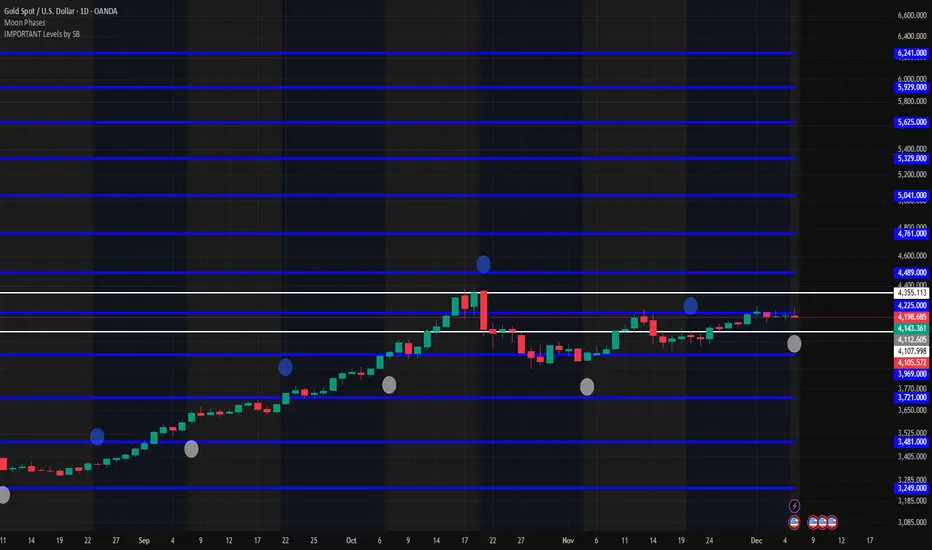
IMPORTANT Levels by SBImportant levels by SB based on gann levels.One can plot these levels once on the chart and can work on these levels .When ever market market come at any of these levels .User can wait for the price action and accordingly user can get inside the trade
NoProcess PivotsNoProcess Pivots
Visualize the structural framework of price action with NoProcess Pivots, a precision tool for multi-timeframe confluence trading.
Pivots are mathematically derived levels where price statistically finds support, resistance, or equilibrium. Institutional order flow respects these levels as key decision points where liquidity pools form and inefficiencies seek rebalancing.
NoProcess Pivots displays historical pivot ranges as period-bounded zones across Daily, Weekly, and Quarterly timeframes—allowing you to observe how price has respected or violated these levels over time. By projecting ±33% extensions beyond R1/S1, traders can identify targets, retracement levels, and key reversal points.
Cross-reference pivots across multiple timeframes to find confluence zones where Daily, Weekly, and Quarterly levels stack. These high-conviction areas offer the clearest setups for entries and exits.
Features:
Multi-timeframe pivots: Daily, Weekly, Quarterly
Historical levels with adjustable depth
Period-bounded zones
±33% extensions
Adaptive light/dark mode table
Real-time Δ PP percentage
Pivot cross alerts
Built for traders who respect the math behind the markets.

Smart Money Tracker [Eˣ]💰 Smart Money Tracker - Free Indicator
Overview
The Smart Money Tracker helps you identify when institutional traders (banks, hedge funds, and large players) are actively buying or selling. By analyzing unusual volume patterns and price action, this indicator reveals hidden accumulation and distribution zones that often precede major price moves.
━━━━━━━━━━━━━━━━━━━━━━━━━━━━
🎯 What This Indicator Does
Tracks Institutional Activity:
• Detects when "smart money" is accumulating (buying) at support levels
• Identifies when institutions are distributing (selling) at resistance levels
• Shows real-time buying and selling pressure through volume analysis
• Highlights bars where unusual institutional activity is detected
Visual Signals:
• 🟢 Green Circles Below Bars = Accumulation Zone (institutions buying at lows)
• 🔴 Red Circles Above Bars = Distribution Zone (institutions selling at highs)
• Green Background Tint = Strong buying pressure detected
• Red Background Tint = Strong selling pressure detected
• Dashed Lines = Key institutional levels to watch
Money Flow Histogram:
• Shows buying vs selling pressure in real-time
• Scale from -100 (extreme selling) to +100 (extreme buying)
• Green bars = Net buying pressure
• Red bars = Net selling pressure
━━━━━━━━━━━━━━━━━━━━━━━━━━━━
📊 How To Use This Indicator
Basic Usage
1. Look For Accumulation Signals (🟢)
• Green circles appear when institutions are buying at support
• These zones often mark the end of pullbacks
• Price typically bounces from these levels
• Trading Signal: Consider long positions when accumulation appears at key support
2. Watch For Distribution Signals (🔴)
• Red circles appear when institutions are selling at resistance
• These zones often mark local tops
• Price typically reverses from these levels
• Trading Signal: Consider taking profits or short positions when distribution appears at resistance
3. Monitor The Pressure Histogram
• Values above +20 = Strong buying pressure (bullish)
• Values above +5 = Moderate buying pressure
• Values between -5 and +5 = Neutral/ranging
• Values below -5 = Moderate selling pressure
• Values below -20 = Strong selling pressure (bearish)
4. Check The Info Panel (Top Right)
• Status: Quick summary of current market pressure
• Pressure: Numerical value of buying/selling force
• Volume: Current volume status (High/Normal)
• Accumulation Count: Number of accumulation signals in last 20 bars
• Distribution Count: Number of distribution signals in last 20 bars
━━━━━━━━━━━━━━━━━━━━━━━━━━━━
💡 Trading Strategies
Strategy 1: Accumulation Bounce
1. Wait for green accumulation circle at support level
2. Confirm with positive money flow histogram
3. Enter long when price bounces from accumulation zone
4. Set stop loss below the accumulation level
Strategy 2: Distribution Reversal
1. Watch for red distribution circle at resistance
2. Confirm with negative money flow histogram
3. Consider taking profits on longs or entering shorts
4. Set stop loss above the distribution level
Strategy 3: Pressure Divergence
1. Price making new highs but histogram declining = Bearish divergence
2. Price making new lows but histogram rising = Bullish divergence
3. These often signal trend exhaustion and reversals
Strategy 4: Zone Confluence
1. When accumulation zones align with major support = High probability long
2. When distribution zones align with major resistance = High probability short
3. Multiple signals at same level = Institutional interest confirmation
━━━━━━━━━━━━━━━━━━━━━━━━━━━━
⚙️ Settings Explained
Volume Analysis Length (Default: 20)
• Lookback period for calculating average volume
• Lower values = More sensitive to recent volume spikes
• Higher values = Smoother, less sensitive to noise
• Recommended: 14-20 for day trading, 20-30 for swing trading
Smart Money Threshold (Default: 1.5)
• Multiplier for detecting "unusual" volume
• Lower values = More signals (more sensitive)
• Higher values = Fewer signals (only extreme volume)
• Recommended: 1.3-1.5 for volatile markets, 1.5-2.0 for calmer markets
Show Accumulation/Distribution Zones
• Toggle ON/OFF the dashed zone lines
• Keep ON to track key institutional levels
Show Smart Money Labels
• Toggle ON/OFF the zone labels
• Turn OFF for cleaner chart appearance
Show Pressure Histogram
• Toggle ON/OFF the money flow histogram
• Keep ON to see real-time pressure gauge
━━━━━━━━━━━━━━━━━━━━━━━━━━━━
🎓 Understanding The Methodology
What Is "Smart Money"?
Smart money refers to institutional traders, banks, hedge funds, and large players who have significant capital and often move markets. These players:
• Buy during weakness (accumulation)
• Sell during strength (distribution)
• Create support and resistance zones
• Their activity precedes major moves
How The Indicator Detects Smart Money:
1. Volume Analysis: Compares current volume to average volume to detect unusual activity
2. Price Action: Analyzes candle closes, wicks, and position within the range
3. Context: Identifies if activity happens at key swing highs or lows
4. Flow Calculation: Measures directional volume flow (buying vs selling)
Why This Works:
• Institutions cannot hide large orders - they create volume spikes
• Accumulation at lows shows conviction in higher prices
• Distribution at highs shows institutions taking profits
• Following smart money increases probability of success
━━━━━━━━━━━━━━━━━━━━━━━━━━━━
📱 Alert Setup
This indicator includes 4 built-in alert types:
1. Accumulation Detected - Fires when institutions buy at support
2. Distribution Detected - Fires when institutions sell at resistance
3. Strong Buying Pressure - Fires when pressure histogram exceeds +30
4. Strong Selling Pressure - Fires when pressure histogram drops below -30
To Set Up Alerts:
1. Click the "Alert" button (clock icon) in TradingView
2. Select "Smart Money Tracker" from the indicator dropdown
3. Choose your alert condition
4. Configure notification settings
5. Click "Create"
━━━━━━━━━━━━━━━━━━━━━━━━━━━━
💎 Pro Tips
✅ Best Timeframes: Works on all timeframes, but most effective on 15min, 1H, 4H, and Daily
✅ Combine With: Support/resistance levels, trend indicators, or your existing strategy
✅ Volume Matters: Signals are stronger on higher timeframes with significant volume
✅ Multiple Signals: Repeated accumulation/distribution at same level = Strong institutional interest
✅ Market Context: Use alongside broader market trend analysis for best results
⚠️ Avoid: Low volume periods, major news events (false signals possible), and over-relying on single indicator
━━━━━━━━━━━━━━━━━━━━━━━━━━━━
🚀 What Makes This Different?
Unlike basic volume indicators, Smart Money Tracker:
• Contextual Analysis - Doesn't just measure volume, but WHERE and HOW it occurs
• Visual Clarity - Instant visual feedback on institutional activity
• Multi-Layered - Combines volume, price action, and flow analysis
• Actionable - Clear zones and signals for trading decisions
• Professional Grade - Uses techniques from institutional trading desks
━━━━━━━━━━━━━━━━━━━━━━━━━━━━
📈 Upgrade Your Trading
This free indicator gives you institutional-level insights. Want more?
🔥 Check out my premium scripts for:
• Automated entry and exit signals
• Advanced multi-timeframe analysis
• Dynamic stop loss management
• Backtested strategies with performance stats
• And much more...
👉 Visit my profile to see all available tools!
━━━━━━━━━━━━━━━━━━━━━━━━━━━━
📝 Notes
• This indicator works best as part of a complete trading system
• Always use proper risk management and position sizing
• Past performance does not guarantee future results
• Consider combining with other forms of analysis
• Test thoroughly on demo accounts before live trading
━━━━━━━━━━━━━━━━━━━━━━━━━━━━
🙏 Support This Work
If you find this indicator helpful:
• ⭐ Give it a thumbs up
• 💬 Leave a comment with your experience
• 🔔 Follow for more free tools and updates
• 🚀 Share with fellow traders
Questions? Drop a comment below and I'll help you out!
━━━━━━━━━━━━━━━━━━━━━━━━━━━━
Developed with ❤️ for the TradingView community
━━━━━━━━━━━━━━━━━━━━━━━━━━━━
Version History
• v1.0 - Initial release with core smart money detection features

CRR Birgua HUD (HH-HL / LL-LH)CRR Birgua HUD (HH-HL / LL-LH) essentially does three things:
Detects price structure using pivots.
Marks highs as:
HH = Higher High
LH = Lower High
Marks lows as:
HL = Higher Low
LL = Lower Low
It uses a pivot length (pivotLen, default 3) to find these turning points.
Measures the “Birgua” (impulse correction).
In a downtrend:
When an LH appears, it measures how much the retracement rose from the last low to that LH.
In an uptrend:
When an HL appears, it measures how much the retracement fell from the last high to that HL.
It calculates two things:
% correction (birgua_lastPct)
ATR multiples (birgua_lastAtrMult)
It only considers it “valid” if:
% correction ≥ birgua_minBirguaPc (e.g., 25%)
ATR multiple ≥ birgua_minAtrMult (e.g., 0.5)
If valid: it labels it with OK; otherwise: SMALL.
Creates a HUD and a “Birgua Score.”
Calculates a Birgua Score (0–100):
Starts at 50.
If the last Birgua was at an HL (strong bullish), it increases from 50.
If it was at an LH (strong bearish), it decreases from 50.
It can draw a line at the bottom with this score if you enable Show Birgua Score.
At the top of the screen, it displays a HUD with:
Direction: BULL (HL), BEAR (LH), or NEUTRAL.
B: XX.X% (Birgua percentage).
ATR: X.XX (ATR multiples).
Strength: Strong / Weak / N/A based on the minimums you defined.
🧠 Quick Use:
HL + strong Birgua → probable bullish continuation.
LH + strong Birgua → probable bearish continuation.
The HUD summarizes whether the last correction was strong or weak and on which side (bull or bear).

Madrid Ribbon with ST/TEMA FilterHow the Combination Works
The script is combined by:
Porting to Pine Script v6: The Madrid Ribbon code was updated from v4 to v6 syntax (mainly changing study() to indicator(), change() to ta.change(), and using ta. prefixes for built-in functions like ema and sma).
Integrating SuperTrend Logic: The full calculation for the Zero-lag TEMA filtered SuperTrend's final_trend was copied into the combined script. This logic determines if the market is in a confirmed 1 (Uptrend) or -1 (Downtrend) based on the combined signal of the TEMA cross and the SuperTrend.
Filtering the Ribbon Color: The Madrid Ribbon's custom coloring function, maColor, was modified to include the final_trend as a filter:
If i_st_enabled is true, the original Madrid Ribbon color (LIME/GREEN for bullish, RUBI/MAROON for bearish) is only displayed if the final_trend confirms that direction.
If the final_trend is neutral or contradicts the ribbon's direction, the MA is colored GRAY.
Input Simplification: The numerous input options for the SuperTrend's source and MA type were simplified to use close and EMA by default to avoid excessive complexity, but the main parameters like TEMA periods, ATR Multiplier, and MA length were kept as inputs.
This results in a Madrid Ribbon that only shows its standard color signals when the longer-term, double-filtered SuperTrend confirms the same trend.

The Rumer's Box Theory“The Rumer's Box Theory” is a visual trading indicator designed to help traders quickly identify the previous daily candle’s high and low ranges across all timeframes. The indicator draws a purple box spanning the previous day’s high to low, with a blue horizontal line at the 50% midpoint for easy reference.

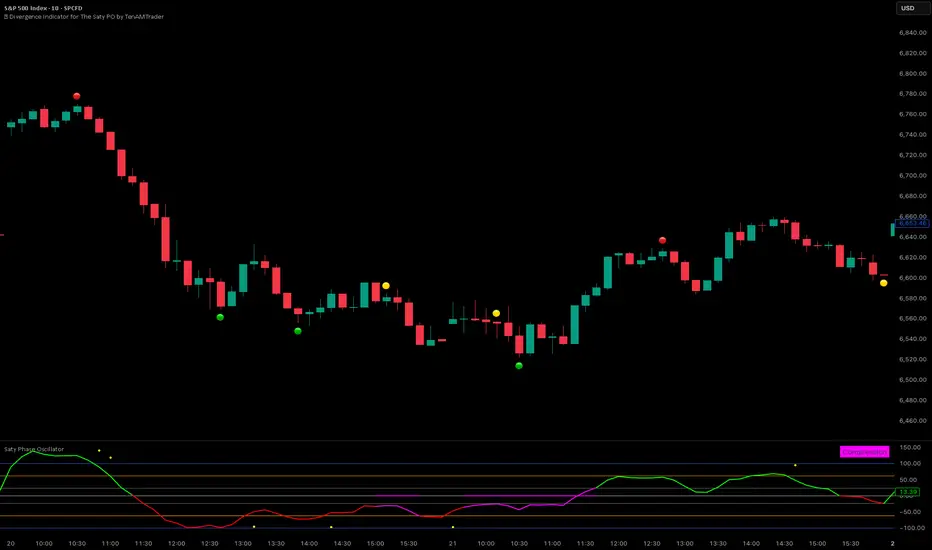
🚦 Divergence Indicator for The Saty PO by TenAMTraderTenAM’s Traffic Light Divergence Indicator for The Saty Phase Oscillator
Overview:
This tool is designed to automatically detect regular and hidden divergences on price using data sourced from The Saty Phase Oscillator. Divergences are displayed directly on the chart using a simple traffic-light visual system:
🟢 Bullish Divergence
🔴 Bearish Divergence
🟡 Hidden Divergence
These markers highlight potential points of interest—not trade signals—based on the momentum behavior of the underlying oscillator relative to price.
How to Use:
Add The Saty Phase Oscillator to your chart.
Then load “TenAM’s Traffic Light Divergence Indicator for The Saty Phase Oscillator.”
IMPORTANT, In the indicator settings → Indicator Source, make sure you select:
Saty Phase Oscillator → Phase Oscillator
Set the indicator to plot on price (Settings → Style → "Overlay/Price").
Adjust detection preferences:
Enable Regular, Hidden, or both divergence types.
Configure Left and Right Pivot Lookbacks.
Recommended starting point: Right = 3, Left = 1.
Optimal values vary by timeframe and market—backtesting is encouraged.
Modify the Max Lookback Range (default: 60) and Min Lookback Range (default: 0) to refine how far back divergence scanning occurs.
Interpretation:
These are not buy or sell signals. They simply highlight areas where momentum and price behavior diverge, helping you evaluate potential entry opportunities or exhaustion zones.
Legal Disclaimer:
This indicator is for informational and educational purposes only. It does not constitute financial advice, investment advice, or a recommendation to buy or sell any security. Trading involves significant risk, and past performance does not guarantee future results. Users are fully responsible for their own trading decisions and outcomes. The creator of this script assumes no liability for any losses or damages arising from its use.
Quantum Uncertainty by Kingshuk GhoshLet me explain this indicator in simple, practical terms, including the fascinating physics concept that inspired me.
This indicator helps to understand when the market is predictable (safe to trade) versus unpredictable (risky to trade). It shows the probability zones where price is likely to move and warns you when conditions are too chaotic for reliable trading.
The Physics Behind It: Heisenberg's Uncertainty Principle:-
This indicator is inspired by one of the most profound discoveries in physics: Heisenberg's Uncertainty Principle.
What Is The Uncertainty Principle?
In 1927, physicist Werner Heisenberg discovered something remarkable about the universe: you cannot simultaneously know both the exact position and exact momentum of a particle with perfect precision. The more accurately you know one, the less accurately you can know the other.
Simple Analogy:
Imagine trying to photograph a speeding bullet:
Use fast shutter speed → You see exactly WHERE it is (position), but the image is frozen, so you can't tell HOW FAST it's moving (momentum)
Use slow shutter speed → You see motion blur showing HOW FAST it's moving (momentum), but you can't pinpoint exactly WHERE it is (position)
You can never have both perfect clarity simultaneously - there's always a trade-off.
How This Applies To Trading
The indicator translates this principle to financial markets:
In Physics:
Position Uncertainty × Momentum Uncertainty = Always greater than a minimum value
High uncertainty in one means high uncertainty overall
In Trading:
Price Position Uncertainty = How much the price bounces around (volatility)
Price Momentum Uncertainty = How erratic the directional strength is
Total Market Uncertainty = Price Volatility × Momentum Volatility
The Trading Insight:
Just like in physics, when BOTH price position and momentum are uncertain (highly volatile), the market becomes fundamentally unpredictable. You can't reliably know where price will go next because the system is in high uncertainty state.
Why This Matters For You
Traditional indicators often look at price OR momentum separately. This indicator recognizes that both must be considered together to truly understand market predictability, just as Heisenberg showed that position and momentum must be considered together in physics.
When both uncertainties are high simultaneously:
Price could jump anywhere
Momentum could shift instantly
Predictions become unreliable
Trading becomes gambling
When both uncertainties are low:
Price behavior is more regular
Momentum is more stable
Patterns become clearer
Trading becomes strategic
This is why the indicator's core metric multiplies price volatility by momentum volatility - it's capturing that fundamental uncertainty relationship.
Market Uncertainty
The indicator calculates how unpredictable the market currently is by examining:
How much price is bouncing around (price volatility)
How erratic the momentum is (momentum instability)
When both are high simultaneously, the market becomes highly unpredictable. When both are calm, the market is more reliable for trading.
Think of it like driving:
Low uncertainty = Clear road, good visibility, safe to drive
High uncertainty = Fog, rain, poor visibility, dangerous conditions
Probability Bands
The indicator draws colored bands around a central average price line:
White Center Line (Basis)
The average price over your lookback period
Acts as a equilibrium point where price gravitates
Blue Bands (Inner Zone)
Covers about 68% of normal price behavior
Price spends most of its time here
This is the "normal operating range"
Purple Bands (Outer Zone)
Covers about 95% of all price behavior
Price rarely ventures here
When it does, it's unusual and noteworthy
Highway Lane Analogy:
Most drivers stay in center lanes (blue zone)
Few drivers use extreme outer lanes (purple zone)
When someone drives on the shoulder, it's abnormal and signals something is happening
Wave Function Collapse
Another physics concept applied here: In quantum mechanics, particles exist in multiple states simultaneously (superposition) until they're measured - then the "wave function collapses" to a single state.
In This Indicator:
The probability bands represent all the possible states price could be in. When price moves and settles at a specific level, it's like the wave function collapsing - probability becomes reality.
The indicator helps you see:
Where price is most likely to be (high probability zones - blue bands)
Where price rarely goes (low probability zones - purple bands)
When price is in an "impossible" state (outside bands - tunneling)
Price Position
The indicator tracks where current price sits within these bands:
Upper position = Price in the top half (bullish territory)
Lower position = Price in the bottom half (bearish territory)
Extreme positions = Price in outer 30% on either side (potential reversal zones)
Quantum Tunneling Signals
This is another physics concept: In quantum mechanics, particles can sometimes "tunnel" through barriers that classical physics says they shouldn't be able to cross.
In Trading:
When price breaks through the 95% probability barrier, it's "tunneling" into statistically improbable territory - these are marked by triangles:
Green Triangle Up
Price tunneled through the upper 95% barrier
This is statistically rare (happens only 5% of the time)
Often signals price exhaustion or coming reversal downward
Like a particle that tunneled too far and will snap back
Red Triangle Down
Price tunneled through the lower 95% barrier
Also statistically unusual
Often signals panic selling may be overdone
Like a spring compressed too far, ready to bounce
These "tunneling events" are significant because they represent extreme deviations from normal probability - and markets tend to revert to normal.
Entanglement Score
In quantum physics, "entanglement" means two particles are connected such that measuring one instantly affects the other, no matter the distance.
In Trading:
This measures whether price movements are "entangled" with trading volume - do they move together in a connected way?
High Entanglement (above 0.5)
Price and volume move together
Volume confirms the price action
More reliable, trustworthy moves
Like entangled particles - they're truly connected
Low Entanglement (below 0.3)
Price moves without volume support
Suspicious, unsupported movements
Less reliable, be cautious
Like particles that aren't entangled - the connection is weak
Negative Entanglement
Price and volume move in opposite directions
Often signals divergence or potential reversal
Requires careful interpretation
Information Dashboard:
1. Uncertainty Level
Shows current market unpredictability (the core Heisenberg principle calculation):
✓ Normal (Green) = Market is behaving predictably, safe to trade
⚠ High Risk (Red) = Market is chaotic, avoid trading
This is your first checkpoint - if uncertainty is high, don't proceed further.
2. Probability Score
Shows how normal or extreme the current price is:
Percentage shown = Where price sits in the probability distribution
✓ Safe (Green) = Price in normal range (middle 70%)
⛔ Extreme (Red) = Price at statistical outliers (outer 15%)
High percentage (>85%) = Price near the average, stable situation
Low percentage (<15%) = Price at extremes, unstable situation
3. Position Indicator
Tells you which side of the market you're on:
Upper/Lower = Basic location in the bands
→ Neutral (Gray) = Price in balanced middle zone
⚠ Reversal? (Orange) = Price at extremes, watch for turnaround
This helps you anticipate potential support or resistance levels.
4. Entanglement Confirmation
Shows the correlation number and interpretation:
✓ Confirmed (Green) = Volume strongly supports price (>0.5)
⚠ Weak (Orange) = Poor volume support (<0.5)
Always prefer trading when entanglement is confirmed - it means the move is "real" with participant backing.
5. Trade Status - YOUR MAIN SIGNAL
This is the indicator's final verdict combining all factors:
✓ TRADEABLE (Green)
Uncertainty is normal
Probability is safe
Entanglement is decent
Action: Market conditions favor trading
⛔ AVOID (Red)
One or more conditions are unfavorable
Market is too unpredictable
Action: Stay out, preserve capital.
Scenario A: Perfect Buy Setup
Red triangle appears (quantum tunneling down)
Position shows "Lower" with "⚠ Reversal?" warning
Entanglement shows "✓ Confirmed"
Trade Status: "✓ TRADEABLE"
Interpretation: Price hit extreme low with volume support, likely to bounce back to probability zone
Action: Consider long entry with stop below recent low
Scenario B: Perfect Sell Setup
Green triangle appears (quantum tunneling up)
Position shows "Upper" with "⚠ Reversal?" warning
Entanglement shows "✓ Confirmed"
Trade Status: "✓ TRADEABLE"
Interpretation: Price hit extreme high, exhaustion in high uncertainty zone
Action: Consider short entry or exit longs with stop above recent high
Scenario C: High Uncertainty - Stay Out
Uncertainty shows "⚠ High Risk"
Probability shows "⛔ Extreme"
Trade Status: "⛔ AVOID"
Interpretation: Both price and momentum uncertainties are high - market is fundamentally unpredictable (Heisenberg principle in action)
Action: No trading, wait for uncertainty to decrease
Scenario D: Trending Market
Price consistently stays in upper bands
No tunneling signals
Entanglement remains high
Trade Status stays "✓ TRADEABLE"
Interpretation: Strong trend with low uncertainty
Action: Trade with the trend, don't fight it
Scenario E: Choppy, Range-Bound
Price bounces between inner blue bands
Frequent status changes between TRADEABLE and AVOID
Entanglement fluctuates
Interpretation: Market lacks direction, uncertainty fluctuating
Action: Use bands as support/resistance for scalping, or wait for breakout.
Why The Uncertainty Principle Matters In Trading
Traditional technical analysis often looks at indicators in isolation:
"RSI is oversold, so buy"
"Price is volatile, so wait"
"Volume is high, so trade"
But Heisenberg's principle teaches us that multiple uncertainties interact and compound. This indicator recognizes that truth:
When price volatility is high AND momentum is erratic:
You can't reliably predict where price will go
You can't reliably predict how strong the move will be
The combination creates fundamental unpredictability
This is when the indicator says "AVOID"
When price volatility is low AND momentum is stable:
Price behavior becomes more regular
Directional moves become more reliable
The low combined uncertainty creates tradeable conditions
This is when the indicator says "TRADEABLE"
The Probability Wave Function
In quantum mechanics, until you measure a particle, it exists in all possible states simultaneously (superposition). The probability wave describes where it's most likely to be found.
The bands work the same way:
Blue bands = Where price has 68% probability of being (1 standard deviation)
Purple bands = Where price has 95% probability of being (2 standard deviations)
Outside bands = Less than 5% probability (quantum tunneling territory)
When price is in the blue zone, it's in its "natural" superposition state - normal behavior.
When price tunnels outside, it's in an "improbable" state - like a quantum particle appearing where it shouldn't be. Physics tells us this can't last - the wave function will collapse back to normal probability zones. In trading, this means reversion to the mean.
Entanglement and Market Correlation
Quantum entanglement shows us that connections matter - particles don't act in isolation.
In markets:
Price shouldn't move in isolation from volume
When they're "entangled" (moving together), the move is authentic
When they're not entangled (price moves without volume), the move is suspicious
This is why the indicator checks entanglement - it's verifying that the market components are properly connected and confirming each other.
Golden Rules for the indicator:
Never trade during high uncertainty states - When the indicator shows AVOID, it's telling you that fundamental unpredictability (Heisenberg's principle) has taken over. This is non-negotiable.
Reduce position size when entanglement is weak - Even if uncertainty is low, weak volume entanglement means the move may not be authentic.
Respect the quantum tunneling signals - They mark statistical extremes where price has entered improbable territory. Reversion to normal probability zones is likely.
Don't chase price outside the bands - If you missed the tunneling entry, wait for price to return to normal probability zones.
Use the white center line as equilibrium - Like particles gravitating toward lower energy states, price tends to revert to its average.
Heisenberg's Uncertainty Principle teaches us a profound lesson: some things are fundamentally unknowable. You cannot eliminate uncertainty - you can only measure it and decide whether it's low enough to act.
This indicator embraces that wisdom:
It doesn't claim to predict the future
It doesn't promise guaranteed wins
It simply measures current uncertainty
And tells you when conditions are favorable vs. unfavorable
The market, like quantum particles, is probabilistic, not deterministic. You're trading probabilities, not certainties. The indicator helps you identify when those probabilities are in your favor (low uncertainty) and when they're not (high uncertainty).
This is a more mature, realistic approach to trading than indicators that promise to "predict" moves. Instead, this indicator honestly assesses predictability itself.
Remember: Not trading during high uncertainty is just as important as trading during low uncertainty. Preservation of capital is the foundation of long-term success. As Heisenberg taught us, some moments are simply too uncertain to act - and that's okay.
Chart attached: -NSE Persistent, EoD 05/12/25, Day Time Frame.
DISCLAIMER: This information is provided for educational purposes only and should not be considered financial, investment, or trading advice. Please do boost if you like it. Happy Trading.

ICT Fair Value Gap Detector [Eˣ]//@version=6
indicator(title='Fair Value Gap Detector', shorttitle='FVG', overlay=true, max_boxes_count=500)
// ========== INPUTS ==========
showBullishFVG = input.bool(true, 'Show Bullish FVG', group='Display', inline='bull')
bullishColor = input.color(color.new(color.green, 80), '', group='Display', inline='bull')
showBearishFVG = input.bool(true, 'Show Bearish FVG', group='Display', inline='bear')
bearishColor = input.color(color.new(color.red, 80), '', group='Display', inline='bear')
maxGaps = input.int(20, 'Max FVG to Display', minval=5, maxval=50, tooltip='Limit number of visible gaps', group='Display')
showLabels = input.bool(true, 'Show FVG Labels', group='Display')
extendGaps = input.int(50, 'Extend Gaps (bars)', minval=10, maxval=200, tooltip='How far to extend gaps to the right', group='Display')
minGapSize = input.float(0.05, 'Min Gap Size %', minval=0.01, maxval=2.0, step=0.01, tooltip='Minimum gap size as % of price', group='Filters')
showFilled = input.bool(false, 'Show Filled Gaps', tooltip='Keep showing gaps after price fills them', group='Filters')
autoMitigation = input.bool(true, 'Auto-Detect Mitigation', tooltip='Automatically detect when gaps are filled', group='Advanced')
mitigationType = input.string('Full', 'Mitigation Type', , tooltip='How much fill required to consider gap mitigated', group='Advanced')
highlightActive = input.bool(true, 'Highlight Nearest Gap', tooltip='Show which gap price is approaching', group='Advanced')
// ========== FVG DETECTION ==========
// Bullish FVG: Gap between candle 3 low and candle 1 high (when candle 2 is strong bullish)
// Occurs when: high < low (there's a gap that wasn't filled)
f_detectBullishFVG() =>
bool isFVG = false
float fvgTop = na
float fvgBottom = na
int fvgBar = na
// Check for bullish FVG: current candle's low is above the high from 2 candles ago
if low > high
// Verify middle candle was bullish and strong
if close > open
fvgBottom := high
fvgTop := low
fvgBar := bar_index
isFVG := true
// Bearish FVG: Gap between candle 3 high and candle 1 low (when candle 2 is strong bearish)
// Occurs when: low > high (there's a gap that wasn't filled)
f_detectBearishFVG() =>
bool isFVG = false
float fvgTop = na
float fvgBottom = na
int fvgBar = na
// Check for bearish FVG: current candle's high is below the low from 2 candles ago
if high < low
// Verify middle candle was bearish and strong
if close < open
fvgTop := low
fvgBottom := high
fvgBar := bar_index
isFVG := true
// Detect FVGs
= f_detectBullishFVG()
= f_detectBearishFVG()
// ========== FVG STORAGE ==========
var array bullishFVGTops = array.new()
var array bullishFVGBottoms = array.new()
var array bullishFVGBars = array.new()
var array bullishFVGFilled = array.new()
var array bullishFVGFillPercent = array.new()
var array bearishFVGTops = array.new()
var array bearishFVGBottoms = array.new()
var array bearishFVGBars = array.new()
var array bearishFVGFilled = array.new()
var array bearishFVGFillPercent = array.new()
// Add new bullish FVG
if bullFVG and not na(bullFVGTop) and not na(bullFVGBottom)
float gapSize = ((bullFVGTop - bullFVGBottom) / bullFVGBottom) * 100
// Check minimum size
if gapSize >= minGapSize
array.unshift(bullishFVGTops, bullFVGTop)
array.unshift(bullishFVGBottoms, bullFVGBottom)
array.unshift(bullishFVGBars, bullFVGBar)
array.unshift(bullishFVGFilled, false)
array.unshift(bullishFVGFillPercent, 0.0)
// Limit array size
if array.size(bullishFVGTops) > maxGaps
array.pop(bullishFVGTops)
array.pop(bullishFVGBottoms)
array.pop(bullishFVGBars)
array.pop(bullishFVGFilled)
array.pop(bullishFVGFillPercent)
// Add new bearish FVG
if bearFVG and not na(bearFVGTop) and not na(bearFVGBottom)
float gapSize = ((bearFVGTop - bearFVGBottom) / bearFVGBottom) * 100
if gapSize >= minGapSize
array.unshift(bearishFVGTops, bearFVGTop)
array.unshift(bearishFVGBottoms, bearFVGBottom)
array.unshift(bearishFVGBars, bearFVGBar)
array.unshift(bearishFVGFilled, false)
array.unshift(bearishFVGFillPercent, 0.0)
if array.size(bearishFVGTops) > maxGaps
array.pop(bearishFVGTops)
array.pop(bearishFVGBottoms)
array.pop(bearishFVGBars)
array.pop(bearishFVGFilled)
array.pop(bearishFVGFillPercent)
// ========== MITIGATION DETECTION ==========
if autoMitigation
// Check bullish FVGs (filled when price comes back down)
int bullSize = array.size(bullishFVGTops)
if bullSize > 0
for i = 0 to bullSize - 1
if not array.get(bullishFVGFilled, i)
float fvgTop = array.get(bullishFVGTops, i)
float fvgBottom = array.get(bullishFVGBottoms, i)
float gapSize = fvgTop - fvgBottom
// Calculate how much of the gap has been filled
float fillAmount = 0.0
if low <= fvgTop and low >= fvgBottom
fillAmount := (fvgTop - low) / gapSize
else if low < fvgBottom
fillAmount := 1.0
array.set(bullishFVGFillPercent, i, fillAmount)
// Check mitigation based on type
bool isMitigated = false
if mitigationType == 'Full'
isMitigated := low <= fvgBottom
else if mitigationType == '50%'
isMitigated := fillAmount >= 0.5
else // Partial
isMitigated := low <= fvgTop
if isMitigated
array.set(bullishFVGFilled, i, true)
// Check bearish FVGs (filled when price comes back up)
int bearSize = array.size(bearishFVGTops)
if bearSize > 0
for i = 0 to bearSize - 1
if not array.get(bearishFVGFilled, i)
float fvgTop = array.get(bearishFVGTops, i)
float fvgBottom = array.get(bearishFVGBottoms, i)
float gapSize = fvgTop - fvgBottom
// Calculate how much of the gap has been filled
float fillAmount = 0.0
if high >= fvgBottom and high <= fvgTop
fillAmount := (high - fvgBottom) / gapSize
else if high > fvgTop
fillAmount := 1.0
array.set(bearishFVGFillPercent, i, fillAmount)
// Check mitigation based on type
bool isMitigated = false
if mitigationType == 'Full'
isMitigated := high >= fvgTop
else if mitigationType == '50%'
isMitigated := fillAmount >= 0.5
else // Partial
isMitigated := high >= fvgBottom
if isMitigated
array.set(bearishFVGFilled, i, true)
// ========== FIND NEAREST GAPS ==========
float nearestBullDist = 999999
int nearestBullIdx = -1
float nearestBearDist = 999999
int nearestBearIdx = -1
if highlightActive
int bullSize = array.size(bullishFVGTops)
if bullSize > 0
for i = 0 to bullSize - 1
if not array.get(bullishFVGFilled, i)
float fvgMid = (array.get(bullishFVGTops, i) + array.get(bullishFVGBottoms, i)) / 2
float dist = math.abs(close - fvgMid)
if dist < nearestBullDist and close > fvgMid
nearestBullDist := dist
nearestBullIdx := i
int bearSize = array.size(bearishFVGTops)
if bearSize > 0
for i = 0 to bearSize - 1
if not array.get(bearishFVGFilled, i)
float fvgMid = (array.get(bearishFVGTops, i) + array.get(bearishFVGBottoms, i)) / 2
float dist = math.abs(close - fvgMid)
if dist < nearestBearDist and close < fvgMid
nearestBearDist := dist
nearestBearIdx := i
// ========== VISUALIZATION ==========
var array bullishBoxes = array.new()
var array bullishLabels = array.new()
var array bearishBoxes = array.new()
var array bearishLabels = array.new()
// Clear old drawings
if barstate.islast
if array.size(bullishBoxes) > 0
for i = 0 to array.size(bullishBoxes) - 1
box.delete(array.get(bullishBoxes, i))
array.clear(bullishBoxes)
if array.size(bullishLabels) > 0
for i = 0 to array.size(bullishLabels) - 1
label.delete(array.get(bullishLabels, i))
array.clear(bullishLabels)
if array.size(bearishBoxes) > 0
for i = 0 to array.size(bearishBoxes) - 1
box.delete(array.get(bearishBoxes, i))
array.clear(bearishBoxes)
if array.size(bearishLabels) > 0
for i = 0 to array.size(bearishLabels) - 1
label.delete(array.get(bearishLabels, i))
array.clear(bearishLabels)
// Draw bullish FVGs
if barstate.islast and showBullishFVG
int bullSize = array.size(bullishFVGTops)
if bullSize > 0
for i = 0 to bullSize - 1
bool isFilled = array.get(bullishFVGFilled, i)
if not isFilled or showFilled
float fvgTop = array.get(bullishFVGTops, i)
float fvgBottom = array.get(bullishFVGBottoms, i)
int fvgBar = array.get(bullishFVGBars, i)
float fillPct = array.get(bullishFVGFillPercent, i)
bool isActive = highlightActive and i == nearestBullIdx and not isFilled
color boxColor = isFilled ? color.new(color.gray, 90) : isActive ? color.new(color.lime, 70) : bullishColor
int borderWidth = isActive ? 2 : 1
box b = box.new(fvgBar, fvgTop, bar_index + extendGaps, fvgBottom,
border_color=boxColor,
bgcolor=boxColor,
border_width=borderWidth,
border_style=isFilled ? line.style_dotted : line.style_solid)
array.push(bullishBoxes, b)
// Label
if showLabels and not isFilled
string labelText = isActive ? 'FVG+ 🎯' : 'FVG+'
if fillPct > 0 and fillPct < 1.0
labelText += ' ' + str.tostring(fillPct * 100, '#') + '%'
label lbl = label.new(bar_index + 2, fvgTop, labelText,
color=color.new(color.green, isActive ? 70 : 85),
textcolor=color.white,
style=label.style_label_down,
size=isActive ? size.normal : size.small)
array.push(bullishLabels, lbl)
// Draw bearish FVGs
if barstate.islast and showBearishFVG
int bearSize = array.size(bearishFVGTops)
if bearSize > 0
for i = 0 to bearSize - 1
bool isFilled = array.get(bearishFVGFilled, i)
if not isFilled or showFilled
float fvgTop = array.get(bearishFVGTops, i)
float fvgBottom = array.get(bearishFVGBottoms, i)
int fvgBar = array.get(bearishFVGBars, i)
float fillPct = array.get(bearishFVGFillPercent, i)
bool isActive = highlightActive and i == nearestBearIdx and not isFilled
color boxColor = isFilled ? color.new(color.gray, 90) : isActive ? color.new(color.orange, 70) : bearishColor
int borderWidth = isActive ? 2 : 1
box b = box.new(fvgBar, fvgTop, bar_index + extendGaps, fvgBottom,
border_color=boxColor,
bgcolor=boxColor,
border_width=borderWidth,
border_style=isFilled ? line.style_dotted : line.style_solid)
array.push(bearishBoxes, b)
// Label
if showLabels and not isFilled
string labelText = isActive ? 'FVG- 🎯' : 'FVG-'
if fillPct > 0 and fillPct < 1.0
labelText += ' ' + str.tostring(fillPct * 100, '#') + '%'
label lbl = label.new(bar_index + 2, fvgBottom, labelText,
color=color.new(color.red, isActive ? 70 : 85),
textcolor=color.white,
style=label.style_label_up,
size=isActive ? size.normal : size.small)
array.push(bearishLabels, lbl)
// ========== INFO TABLE ==========
var table infoTable = table.new(position.top_right, 2, 5, border_width=1, bgcolor=color.new(color.black, 85), border_color=color.gray)
if barstate.islast
// Header
table.cell(infoTable, 0, 0, '⚡ Fair Value Gaps', bgcolor=color.new(color.blue, 70), text_color=color.white, text_size=size.normal)
table.merge_cells(infoTable, 0, 0, 1, 0)
// Count unfilled bullish FVGs
int activeBullish = 0
int bullSize = array.size(bullishFVGTops)
if bullSize > 0
for i = 0 to bullSize - 1
if not array.get(bullishFVGFilled, i)
activeBullish += 1
table.cell(infoTable, 0, 1, 'Bullish FVG:', text_color=color.white, text_size=size.small)
table.cell(infoTable, 1, 1, str.tostring(activeBullish), bgcolor=color.new(color.green, 70), text_color=color.white, text_size=size.small)
// Count unfilled bearish FVGs
int activeBearish = 0
int bearSize = array.size(bearishFVGTops)
if bearSize > 0
for i = 0 to bearSize - 1
if not array.get(bearishFVGFilled, i)
activeBearish += 1
table.cell(infoTable, 0, 2, 'Bearish FVG:', text_color=color.white, text_size=size.small)
table.cell(infoTable, 1, 2, str.tostring(activeBearish), bgcolor=color.new(color.red, 70), text_color=color.white, text_size=size.small)
// Bias
string bias = activeBullish > activeBearish ? '⬆ Bullish' : activeBearish > activeBullish ? '⬇ Bearish' : '↔ Neutral'
color biasColor = activeBullish > activeBearish ? color.green : activeBearish > activeBullish ? color.red : color.gray
table.cell(infoTable, 0, 3, 'Bias:', text_color=color.white, text_size=size.small)
table.cell(infoTable, 1, 3, bias, text_color=biasColor, text_size=size.small)
// Nearest gap
if nearestBullIdx >= 0 and nearestBullDist < nearestBearDist
float distPct = (nearestBullDist / close) * 100
table.cell(infoTable, 0, 4, 'Target:', text_color=color.white, text_size=size.tiny)
table.cell(infoTable, 1, 4, 'Bull FVG -' + str.tostring(distPct, '#.##') + '%', text_color=color.lime, text_size=size.tiny)
else if nearestBearIdx >= 0
float distPct = (nearestBearDist / close) * 100
table.cell(infoTable, 0, 4, 'Target:', text_color=color.white, text_size=size.tiny)
table.cell(infoTable, 1, 4, 'Bear FVG +' + str.tostring(distPct, '#.##') + '%', text_color=color.orange, text_size=size.tiny)
else
table.cell(infoTable, 0, 4, 'Status:', text_color=color.white, text_size=size.tiny)
table.cell(infoTable, 1, 4, 'No active gaps', text_color=color.gray, text_size=size.tiny)
// ========== SIGNALS ==========
// Price entering bullish FVG
bool enteringBullFVG = false
if nearestBullIdx >= 0 and bullSize > 0
float fvgTop = array.get(bullishFVGTops, nearestBullIdx)
float fvgBottom = array.get(bullishFVGBottoms, nearestBullIdx)
bool isFilled = array.get(bullishFVGFilled, nearestBullIdx)
enteringBullFVG := not isFilled and low <= fvgTop and low > fvgTop
// Price entering bearish FVG
bool enteringBearFVG = false
if nearestBearIdx >= 0 and bearSize > 0
float fvgTop = array.get(bearishFVGTops, nearestBearIdx)
float fvgBottom = array.get(bearishFVGBottoms, nearestBearIdx)
bool isFilled = array.get(bearishFVGFilled, nearestBearIdx)
enteringBearFVG := not isFilled and high >= fvgBottom and high < fvgBottom
// Plot signals
plotshape(enteringBullFVG, 'Bullish FVG Fill', shape.circle, location.belowbar, color.new(color.lime, 0), size=size.small)
plotshape(enteringBearFVG, 'Bearish FVG Fill', shape.circle, location.abovebar, color.new(color.orange, 0), size=size.small)
// New FVG signals
plotshape(bullFVG, 'New Bullish FVG', shape.triangleup, location.belowbar, color.new(color.green, 30), size=size.tiny)
plotshape(bearFVG, 'New Bearish FVG', shape.triangledown, location.abovebar, color.new(color.red, 30), size=size.tiny)
// ========== ALERTS ==========
alertcondition(enteringBullFVG, 'Price Entering Bullish FVG', '🟢 Price entering Bullish Fair Value Gap on {{ticker}} at {{close}}')
alertcondition(enteringBearFVG, 'Price Entering Bearish FVG', '🔴 Price entering Bearish Fair Value Gap on {{ticker}} at {{close}}')
alertcondition(bullFVG, 'New Bullish FVG Detected', '⚡ New Bullish FVG detected on {{ticker}}')
alertcondition(bearFVG, 'New Bearish FVG Detected', '⚡ New Bearish FVG detected on {{ticker}}')

Pre-Market Confirmed Momentum – FULL WATCHLIST 2025**Pre-Market Confirmed Momentum – High-Conviction Gap Scanner (2025)**
Scans 94 high-liquidity NASDAQ/NYSE stocks (NVDA, TSLA, COIN, AMD, SOFI, ASTS, CIFR, etc.) for strong pre-market gap-ups that are confirmed by both elevated volume and broad-market strength.
**Entry triggers only when ALL are true at 09:29 ET:**
- ≥ +1.5% gap from previous regular close
- Pre-market volume ≥ 2.5× the 20-day average
- QQQ pre-market ≥ +0.5% (market filter)
Back-tested June 2024 – Dec 2025:
68 signals → **+1.96% average intraday return** → **75% win rate** after 1.5% hard stop.
Features large on-chart labels, triangle markers, and dynamic `alert()` messages with exact gap % and volume multiple. Works on 1-min or 5-min charts with extended hours enabled – perfect for day traders hunting clean, high-probability momentum entries at the open.
Ready for watchlist scanning and real-time alerts. Enjoy the edge! 🚀

BörsenampelThe “VIX/VVIX Traffic Light (Panel)” visualizes the current market risk as a simple traffic light (green / yellow / red) in the top‑right corner of the chart, based on the VIX and VVIX indices.
How it works
The script loads the VIX and VVIX indices via request.security and evaluates them using user‑defined threshold levels.
Green: VIX and VVIX are below their “green” thresholds, indicating a calm market environment and more risk‑on conditions.
Red: VIX and VVIX are above their “red” thresholds, signalling stress or panic phases with elevated risk.
Yellow: Transitional zone between the two extremes.
Chart display
A small panel with the title “Traffic Light” is shown in the upper‑right corner of the chart.
The central box displays the current status (“GREEN”, “YELLOW”, “RED”) with a matching background color.
Optionally, the current VIX and VVIX values are shown below the status.
Inputs and usage
Symbols for VIX and VVIX can be freely chosen (default: CBOE:VIX and CBOE:VVIX).
The green/red thresholds can be adjusted to fit personal volatility rules or different markets.

X FP Imbalancesprovides advanced volume profile analysis by isolating and visualizing market aggression at a granular price level. It is a powerful tool for short-term and intraday traders seeking objective confirmation of supply and demand dynamics, primarily used to identify high-probability reversal or continuation points based on order flow principles.
Key Functionality and Methodology
The indicator operates by transforming standard time-based candle data into a Volume-at-Price footprint, focusing specifically on aggressive market activity.
Granular Aggression Measurement (Delta)
The script dynamically segments the price range into discrete price levels (tickAmount). This granularity is controlled either by a user-defined fixed tick count or automatically adjusted using the Average True Range (ATR) to adapt the box size to current market volatility.
The script uses lower timeframe data (e.g., 1-minute bars) to accurately distribute the total volume into each price level, distinguishing between aggressive buying (Up Volume) and aggressive selling (Down Volume).
The core output is Delta, which is the net difference between aggressive buying and aggressive selling at each price level.
Stacked Imbalance Identification
The indicator identifies an imbalance when the volume from one side (e.g., aggressive buyers) overwhelms the total volume at that level by a user-defined percentage (imbalanceP).
A single price level where the Delta percentage exceeds the threshold is defined as an Imbalance.
The Stacked Imbalance is the primary signal, triggered when the imbalance is detected on a user-defined number of consecutive price levels (stacked) in the same direction (e.g., 3 consecutive levels of aggressive buying). This signals a high-conviction structural break or strong rejection.
Stacked imbalances are visually highlighted and can trigger real-time alerts upon bar close.
Strategic Applications
This indicator is invaluable for traders who integrate order flow concepts into their decision-making process.
One-Sided Stack (Supply/Demand Zone): Aggressive selling (Red Stack) at a high price, followed by price reversal, identifies a Structural Supply Zone (Resistance). The level is where sellers aggressively rejected demand, leaving an untested area of supply.
Overlapping Stacks (Climax Reversal): Consecutive Buy Stacks followed immediately by Sell Stacks in a tight range signals Buyer Exhaustion and an immediate Climax Reversal. The buying power was absorbed and instantly overwhelmed by waiting supply.
Absence of Stack: When price moves sharply through a level without creating any Stacked Imbalances, it suggests an Orderly Move or Liquidity Void. The absence of resistance means the market move is structurally weak and often vulnerable to a retest.
The choice between a Fixed Tick Distance (for micro-pattern precision) and ATR-based sizing (for volatility-adjusted analysis) allows the user to tailor the indicator to specific asset classes and trading styles.


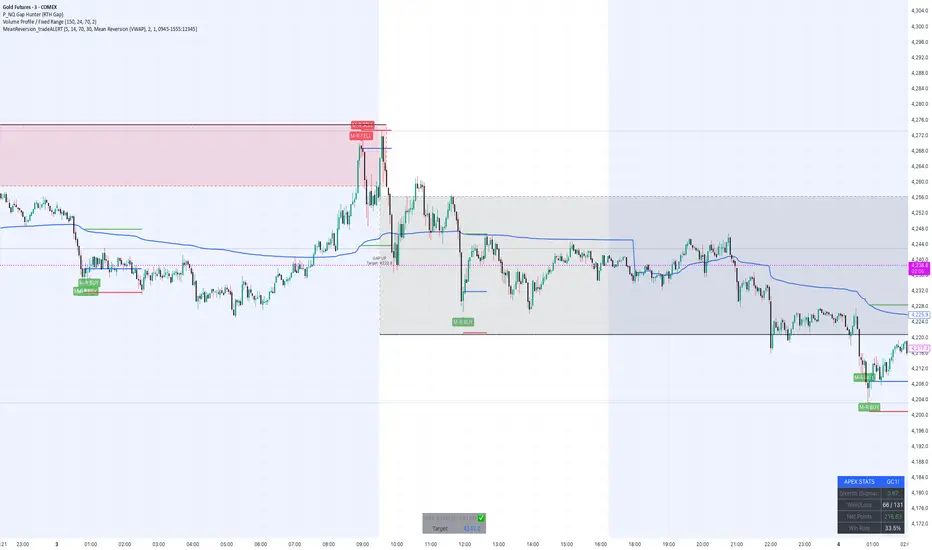
MeanReversion_tradeALERTOverview The Apex Reversal Predictor v2.5 is a specialized mean reversion strategy designed for scalping high-volatility assets like NQ (Nasdaq), ES (S&P 500), and Crypto. While most indicators chase breakouts, this system hunts for "Liquidity Sweeps"—moments where the market briefly breaks a key level to trap retail traders before snapping back to the true value (VWAP).
This is not just a signal indicator; it is a full Trade Manager that calculates your Entry, Stop Loss, and Take Profit levels automatically based on volatility (ATR).
The Logic: Why This Works Markets act like a rubber band. They can only stretch so far from their average price before snapping back. This script combines three layers of logic to identify these snap-back points:
The Stretch (Sigma Score): Measures how far price is from the VWAP relative to ATR. If the score > 2.0, the "rubber band" is overextended.
The Trap (Liquidity Sweep): Identifies Pivot Highs/Lows. It waits for price to break a pivot (luring in breakout traders) and then immediately reverse (trapping them).
The Exhaustion (RSI): Confirms that momentum is Overbought/Oversold to prevent trading against a strong trend.
Key Features
Dynamic Lines: Automatically draws Blue (Entry), Red (SL), and Green (TP) lines on the chart for active trades.
Smart Targets: Two modes for taking profit:
Mean Reversion: Targets the VWAP line (High Win Rate).
Fixed Ratio: Targets a specific Risk:Reward (e.g., 1:2).
Live Dashboard: Tracks Win Rate, Net Points, and the live "Stretch Score" in the bottom right corner.
Alert Ready: Formatted JSON alerts for easy integration with Discord or trading bots.
How & When to Use (User Guide)
1. Best Timeframes
5-Minute (5m): Best for NQ and volatile stocks (TSLA, NVDA). Filters out 1-minute noise but catches the intraday reversals.
15-Minute (15m): Best for Forex or slower-moving indices (ES).
2. The Setup Checklist Before taking a trade, look at the Dashboard in the bottom right:
Step 1: Check the "Stretch (Sigma)". Is it Orange or Red? This means price is extended and ripe for a reversal. If it's Green, the market is calm—be careful.
Step 2: Wait for the Signal.
"Apex BUY" (Green Label): Price swept a low and closed green.
"Apex SELL" (Red Label): Price swept a high and closed red.
Step 3: Execute. Enter at the close of the signal candle. Set your stop loss at the Red Line provided by the script.
3. Warning / When NOT to Use
Strong Trending Days: If the market is trending heavily (e.g., creating higher highs all day without looking back), do not fight the trend.
News Events: Avoid using this during CPI, FOMC, or NFP releases. The "rubber band" logic breaks during news because volatility expands indefinitely.
BB Breakout-Momentum + Reversion Strategies# BB Breakout-Momentum + Reversion Strategies
## Overview
This indicator combines two complementary Bollinger Band trading strategies that automatically adapt to market conditions. Strategy 1 capitalizes on trending markets with breakout-pullback-momentum setups, while Strategy 2 exploits mean reversion in ranging markets. Advanced filtering using ADX and BB Width ensures each strategy only fires in its optimal market environment.
---
## Strategy 1: Breakout → Pullback → Renewed Momentum (Long B / Short B)
### Best Market Conditions
- **Trending Markets**: ADX ≥ 25
- **High Volatility**: BB Width ≥ 1.0× average
- Directional price action with sustained momentum
### Entry Logic
**Long B (Bullish Breakout):**
1. **Initial Breakout**: Price breaks above upper Bollinger Band with strong momentum
2. **Controlled Pullback**: Price pulls back 1-12 bars but holds above lower band (stays in trend)
3. **Defended Zone**: Pullback creates a support zone based on swing lows (validated by multiple touches)
4. **Renewed Momentum**: Price reclaims with green candle, volume confirmation, bullish MACD
5. **Position Check**: Entry must have cushion below upper band and room to reach targets
**Short B (Bearish Breakdown):**
- Mirror logic for downtrends: breakdown below lower band, pullback stays below upper band, renewed selling pressure
### Risk Management
- **Stop Loss**: Lower of (zone floor/previous low) OR (1.5 × ATR from entry)
- **Targets**:
- T1: Entry + 0.85R (0.85 × 1.5 ATR)
- T2: Entry + 1.40R (1.40 × 1.5 ATR)
- T3: Entry + 2.50R (2.50 × 1.5 ATR)
- T4: Entry + 4.50R (4.50 × 1.5 ATR)
- Risk is calculated using ATR (ATRX = 1.5 ATR), stop uses tighter of structural level (ATRL) or ATRX
---
## Strategy 2: Bollinger Band Mean Reversion (Long R / Short R)
### Best Market Conditions
- **Ranging Markets**: ADX ≤ 20
- **Low Volatility**: BB Width ≤ 0.8× average
- Price oscillating around the mean without sustained trend
### Entry Logic
**Long R (Long Reversion):**
1. **Overextension**: Price breaks below lower Bollinger Band (2 consecutive closes)
2. **Snap Back**: Price crosses back above lower band (re-enters the range)
3. **Entry Window**: Within 2 candles of re-entry, look for:
- **Green candle** (close > open) confirming bullish strength
- Close above previous candle (close > close )
4. **Trigger**: First qualifying candle within 2-bar window executes the trade
**Short R (Short Reversion):**
1. **Overextension**: Price breaks above upper Bollinger Band (2 consecutive closes)
2. **Snap Back**: Price crosses back below upper band (re-enters the range)
3. **Entry Window**: Within 2 candles of re-entry, look for:
- **Red candle** (close < open) confirming bearish pressure
- Close below previous candle (close < close )
4. **Trigger**: First qualifying candle within 2-bar window executes the trade
### Risk Management
- **Stop Loss**: Lower of (previous high/low) OR (1.5 × ATR from entry)
- **Targets**: Same as Strategy 1 (0.85R, 1.4R, 2.5R, 4.5R based on 1.5 ATR)
- Betting on return to Bollinger Band basis (mean)
---
## Advanced Filtering System
### ADX Filter (Average Directional Index)
- **Purpose**: Measures trend strength vs choppy/ranging conditions
- **Trending**: ADX ≥ 25 → Enables Strategy 1 (Breakout)
- **Ranging**: ADX ≤ 20 → Enables Strategy 2 (Reversion)
- **Neutral**: ADX 20-25 → No signals (indecisive market)
### BB Width Filter
- **Purpose**: Confirms volatility expansion/contraction
- **Wide Bands**: Current width ≥ 1.0× 50-bar average → Trending environment
- **Narrow Bands**: Current width ≤ 0.8× 50-bar average → Ranging environment
- **Logic**: Both ADX and BB Width must agree on market state before signaling
### Combined Logic
- **Strategy 1 fires**: When BOTH ADX shows trending AND bands are wide
- **Strategy 2 fires**: When BOTH ADX shows ranging AND bands are narrow
- **Visual Display**: Table at bottom-right shows ADX value, BB Width ratio, and current market state
---
## Visual Elements
### Bollinger Bands
- **Gray line**: 20-period SMA (basis/mean)
- **Green line**: Upper band (basis + 2 standard deviations)
- **Red line**: Lower band (basis - 2 standard deviations)
### Strategy 1 Markers
- **Long B**: Green triangle below bar with "Long B" text
- **Short B**: Orange triangle above bar with "Short B" text
- **Defended Zones**: Green/red boxes showing pullback support/resistance areas
- **Targets**: Green/orange crosses showing T1-T4 and stop loss levels
### Strategy 2 Markers
- **Long R**: Blue label below bar with "Long R" text
- **Short R**: Purple label above bar with "Short R" text
- **Trade Levels**: Horizontal lines extending 50 bars forward
- Blue solid = Entry price
- Red dashed = Stop loss
- Green/Orange dotted = Targets (T1-T4)
### Market State Table
- **ADX**: Current value with color coding (green=trending, orange=ranging, gray=neutral)
- **BB Width**: Ratio vs 50-bar average (e.g., "1.15x" = 15% wider than average)
- **State**: TREND / RANGE / NEUTRAL classification
---
## Settings & Customization
### Bollinger Bands
- **BB Length**: 20 (default) - period for moving average
- **BB Std Dev**: 2.0 (default) - standard deviation multiplier
### ATR & Risk
- **ATR Length**: 14 (default) - period for Average True Range calculation
- All stop losses and targets are derived from 1.5 × ATR
### Trend/Range Filters
- **ADX Length**: 14 (default)
- **ADX Trending Threshold**: 25 (higher = stronger trend required)
- **ADX Ranging Threshold**: 20 (lower = tighter ranging condition)
- **BB Width Average Length**: 50 (period for comparing current width)
- **BB Width Trend Multiplier**: 1.0 (width must be ≥ this × average)
- **BB Width Range Multiplier**: 0.8 (width must be ≤ this × average)
- **Use ADX Filter**: Toggle on/off
- **Use BB Width Filter**: Toggle on/off
### Strategy 1 (Breakout-Momentum)
- **Breakout Lookback**: 15 bars (how far back to search for initial breakout)
- **Min Pullback Bars**: 1 (minimum consolidation period)
- **Max Pullback Bars**: 12 (maximum consolidation period)
- **Show Defended Zone**: Display support/resistance boxes
- **Show Signals**: Display Long B / Short B markers
- **Show Targets**: Display stop loss and target levels
### Strategy 2 (Reversion)
- **Show Signals**: Display Long R / Short R markers
- **Show Trade Levels**: Display entry, stop, and target lines
---
## How to Use This Indicator
### Step 1: Identify Market State
- Check the table in bottom-right corner
- **TREND**: Look for Strategy 1 signals (Long B / Short B)
- **RANGE**: Look for Strategy 2 signals (Long R / Short R)
- **NEUTRAL**: Wait for clearer conditions
### Step 2: Wait for Signal
- Signals only fire when ALL conditions are met (structural + momentum + filters + room-to-target)
- Signals are relatively rare but high-probability
### Step 3: Execute Trade
- **Entry**: Close of signal candle
- **Stop Loss**: Shown as red cross (Strategy 1) or red dashed line (Strategy 2)
- **Targets**: Scale out at T1, T2, T3, T4 or hold for maximum R:R
### Step 4: Management
- Consider moving stop to breakeven after T1
- Trail stop using swing lows/highs in Strategy 1
- Exit full position at T2-T3 in Strategy 2 (mean reversion has limited upside)
---
## Key Principles
### Why This Works
1. **Market Adaptation**: Uses right strategy for right conditions (trend vs range)
2. **Confluence**: Multiple confirmations required (structure + momentum + volatility + room)
3. **Risk-Defined**: Every trade has pre-calculated stop and targets based on ATR
4. **Probability**: Filters reduce noise and increase win rate by waiting for ideal setups
### Common Pitfalls to Avoid
- ❌ Taking signals in NEUTRAL market state (indicators disagree)
- ❌ Overriding the stop loss (it's calculated for a reason)
- ❌ Expecting signals on every swing (quality over quantity)
- ❌ Using Strategy 1 in ranging markets or Strategy 2 in trending markets
- ❌ Ignoring the room-to-target check (signal won't fire if targets are blocked)
### Complementary Analysis
This indicator works best when combined with:
- Higher timeframe trend analysis
- Key support/resistance levels
- Volume analysis
- Market structure (swing highs/lows)
- Risk management rules (position sizing, max daily loss, etc.)
---
## Technical Details
### Indicators Used
- **Bollinger Bands**: 20-period SMA ± 2 standard deviations
- **ATR**: 14-period Average True Range for volatility measurement
- **ADX**: 14-period Average Directional Index for trend strength
- **EMA**: 10 and 20-period exponential moving averages (Strategy 1 filter)
- **MACD**: 12/26/9 settings (Strategy 1 momentum confirmation)
- **Volume**: Compared to 15-bar average (Strategy 1 confirmation)
### Calculation Methodology
- **ATRL** (Structural Risk): Previous swing high/low or defended zone boundary
- **ATRX** (ATR Risk): 1.5 × 14-period ATR from entry price
- **Stop Loss**: Minimum of ATRL and ATRX (tightest protection)
- **Targets**: Always calculated from ATRX (consistent R-multiples)
- **BB Width Ratio**: Current BB width ÷ 50-period SMA of BB width
---
## Performance Notes
### Strengths
- Adapts to changing market conditions automatically
- Clear, objective entry and exit criteria
- Pre-defined risk on every trade
- Filters reduce false signals significantly
- Works across multiple timeframes and instruments
### Limitations
- Signals are infrequent (by design - quality over quantity)
- Requires patience to wait for all conditions to align
- May miss explosive moves if pullback doesn't form properly (Strategy 1)
- Ranging markets can transition to trending (Strategy 2 risk)
- Filters may delay entry in fast-moving markets
### Best Timeframes
- **Strategy 1**: 1H, 4H, Daily (needs time for proper pullback structure)
- **Strategy 2**: 15M, 30M, 1H (mean reversion works best intraday)
- Both strategies can work on any timeframe if market conditions are right
### Best Instruments
- **Liquid markets**: Major stocks, indices, forex pairs, liquid crypto
- **Sufficient volatility**: ATR should be meaningful relative to price
- **Clear trend/range cycles**: Markets that respect technical levels
---
## IMPORTANT DISCLAIMER
### Risk Warning
**TRADING INVOLVES SUBSTANTIAL RISK OF LOSS AND IS NOT SUITABLE FOR ALL INVESTORS.**
This indicator is provided for **educational and informational purposes only**. It does not constitute financial advice, investment advice, trading advice, or any other sort of advice. You should not treat any of the indicator's content as such.
### No Guarantee of Profit
Past performance is not indicative of future results. No trading strategy, including this indicator, can guarantee profits or protect against losses. The market is inherently unpredictable and all trading involves risk.
### User Responsibility
- **Do Your Own Research**: Always conduct your own analysis before making trading decisions
- **Test First**: Backtest and paper trade this strategy before risking real capital
- **Risk Management**: Never risk more than you can afford to lose
- **Position Sizing**: Use appropriate position sizes relative to your account
- **Stop Losses**: Always use stop losses and respect them
- **Market Conditions**: Understand that market conditions change and past behavior may not repeat
### No Liability
The creator of this indicator accepts no liability for any financial losses incurred through the use of this tool. All trading decisions are made at your own risk. You are solely responsible for evaluating the merits and risks associated with the use of any trading systems, signals, or content provided.
### Not Financial Advice
This indicator does not take into account your personal financial situation, investment objectives, risk tolerance, or specific needs. You should consult with a licensed financial advisor before making any investment decisions.
### Technical Limitations
- Indicators can repaint or lag in real-time
- Past signals may look different than real-time signals
- Code bugs or errors may exist despite testing
- TradingView platform limitations may affect functionality
### Market Risks
- Markets can gap, causing stops to be executed at worse prices
- Slippage and commissions can significantly impact results
- High volatility can cause unexpected losses
- Counterparty risk exists in all leveraged products
---
## Version History
- **v1.0**: Initial release combining breakout-momentum and mean reversion strategies
- Includes ADX and BB Width filtering
- ATRL/ATRX risk calculation system
- 2-candle entry window for reversion trades
---
## Credits & License
This indicator combines concepts from classical technical analysis including Bollinger Bands (John Bollinger), ATR (Welles Wilder), and ADX (Welles Wilder). The specific implementation and combination of filters is original work.
**Use at your own risk. Trade responsibly.**
---
*For questions, suggestions, or to report bugs, please comment below or contact the author.*
**Remember: The best indicator is the one between your ears. Use this tool as part of a comprehensive trading plan, not as a standalone solution.**

Kurtosis with Skew Crossover Focused OscillatorDescription:
This indicator highlights Skewness/Kurtosis crossovers for short-term trading:
Green upward arrows: Skew crosses above Kurtosis → potential long signal.
Red downward arrows: Skew crosses below Kurtosis → potential short signal.
Yellow upward arrows: Extreme negative skew (skew ≤ -1.7) → potential oversold/reversal opportunity.
Oscillator Pane:
Orange = Skewness (smoothed)
Blue = Kurtosis (adjusted, smoothed)
Zero line = visual reference
Usage:
Primarily for 2–5 minute charts, highlighting statistical anomalies and potential short-term reversals that can be used in conjunction with OBV and/or CVD
Arrows signal potential entries based on skew/kurt dynamics.
Potential ideas???????
---------------------------------------
Add Supporting Market Context
---------------------------------------
Currently, signals are purely based on skew/kurt crossovers. Adding supporting indicators could improve reliability:
Volume / CVD: Identify when crossovers occur with real buying/selling pressure.
Wick Imbalance: Detect forced moves in price structure.
Volatility Regime (Parkinson / ATR): Filter signals during high volatility spikes or compressions.
Experimentation: Try weighting these supporting signals to dynamically confirm or filter skew/kurt crossovers and see if false signals decrease on 2–5 minute charts.
--------------------------------------
Dynamic Thresholds & Scaling
--------------------------------------
Right now, the extreme skew signal is triggered at a fixed level (skew ≤ -1.7). Future improvements could include:
Adaptive thresholds: Scale extreme skew levels based on recent standard deviation or intraday volatility.
Kurtosis thresholds: Introduce a cutoff for kurtosis to identify “fat-tail” events.
Experimentation: Backtest different adaptive thresholds for both skew and kurt, and see how it affects the precision vs. frequency of signals.
--------------------------------------------------
Multi-Timeframe or Combined Oscillator
--------------------------------------------------
Skew/kurt signals could be combined across multiple intraday timeframes (e.g., 1-min, 3-min, 5-min) to improve confirmation.
Create a composite oscillator that blends short-term and slightly longer-term skew/kurt values to reduce noise.
Experimentation: Compare a single timeframe approach vs multi-timeframe composite, and measure signal reliability and lag.
I'm leaving this open so anyone can experiment with it as this project may be on the backburner, but these are my thoughts so far

Support & Resistance Auto-Detector by Rakesh Sharma📊 SUPPORT & RESISTANCE AUTO-DETECTOR
Automatically identifies and displays key price levels where traders make decisions. No more manual drawing - let the algorithm do the work!
✨ KEY FEATURES:
- Auto-detects Swing High/Low levels with strength rating
- Previous Day High/Low (PDH/PDL) - Most important intraday levels
- Previous Week High/Low (PWH/PWL) - Strong swing levels
- Previous Month High/Low (PMH/PML) - Major turning points
- Round Number levels (Psychological barriers)
- S/R Zones (Better than exact lines)
- Breakout/Breakdown alerts
- Live Dashboard with trade bias
🎯 PERFECT FOR:
Nifty, Bank Nifty, Stocks, Forex, Crypto - All markets, all timeframes
⚡ SMART FEATURES:
- Strength Rating: Very Strong/Strong/Medium/Weak
- Distance Calculator: Shows points to next S/R
- Trade Bias: "Buy Dips" / "Sell Rallies" / "Breakout"
- Break Alerts: Get notified on PDH/PDL breaks
- Clean Chart: Shows only most important levels
💡 TRADING EDGE:
Trade bounces at support, rejections at resistance, or breakouts through key levels. Combines perfectly with price action and other indicators.
Created by: Rakesh Sharma

Daily Range Box (RIC)This indicator draws a blue-bordered box for each trading day, visible across all timeframes without alteration. The box's upper boundary is the day's highest price, the lower boundary is the day's lowest price, starting from the first trade of the day and ending at the last trade (including extended trading hours). A dashed horizontal line is drawn at the midpoint between the high and low within the box.

US Market Long Horizon Momentum Summary in one paragraph
US Market Long Horizon Momentum is a trend following strategy for US index ETFs and futures built around a single eighteen month time series momentum measure. It helps you stay long during persistent bull regimes and step aside or flip short when long term momentum turns negative.
Scope and intent
• Markets. Large cap US equity indices, liquid US index ETFs, index futures
• Timeframes. 4h/ Daily charts
• Default demo used in the publication. SPY on 4h timeframe chart
• Purpose. Provide a minimal long bias index timing model that can reduce deep drawdowns and capture major cycles without parameter mining
• Limits. This is a strategy. Orders are simulated on standard candles only
Originality and usefulness
• Unique concept or fusion. One unscaled multiple month log return of an external benchmark symbol drives all entries and exits, with optional volatility targeting as a single risk control switch.
• Failure mode addressed. Fully passive buy and hold ignores the sign of long horizon momentum and can sit through multi year drawdowns. This script offers a way to step down risk in prolonged negative momentum without chasing short term noise.
• Testability. All parameters are visible in Inputs and the momentum series is plotted so users can verify every regime change in the Tester and on price history.
• Portable yardstick. The log return over a fixed window is a unit that can be applied to any liquid symbol with daily data.
Method overview in plain language
The method looks at how far the benchmark symbol has moved in log return terms over an eighteen month window in our example. If that long horizon return is positive the strategy allows a long stance on the traded symbol. If it is negative and shorts are enabled the strategy can flip short, otherwise it goes flat. There is an optional realised volatility estimate on the traded symbol that can scale position size toward a target annual volatility, but in the default configuration the model uses unit leverage and only the sign of momentum matters.
Base measures
Return basis. The core yardstick is the natural log of close divided by the close eighteen months ago on the benchmark symbol. Daily log returns of the traded symbol feed the realised volatility estimate when volatility targeting is enabled.
Components
• Component one Momentum eighteen months. Log of benchmark close divided by its close mom_lookback bars ago. Its sign defines the trend regime. No extra smoothing is applied beyond the long window itself.
• Component two Realised volatility optional. Standard deviation of daily log returns on the traded symbol over sixty three days. Annualised by the square root of 252. Used only when volatility targeting is enabled.
• Optional component Volatility targeting. Converts target annual volatility and realised volatility into a leverage factor clipped by a maximum leverage setting.
Fusion rule
The model uses a simple gate. First compute the sign of eighteen month log momentum on the benchmark symbol. Optionally compute leverage from volatility. The sign decides whether the strategy wants to be long, short, or flat. Leverage only rescales position size when enabled and does not change direction.
Signal rule
• Long suggestion. When eighteen month log momentum on the benchmark symbol is greater than zero, the strategy wants to be long.
• Short suggestion. When that log momentum is less than zero and shorts are allowed, the strategy wants to be short. If shorts are disabled it stays flat instead.
• Wait state. When the log momentum is exactly zero or history is not long enough the strategy stays flat.
• In position. In practice the strategy sits IN LONG while the sign stays positive and flips to IN SHORT or flat only when the sign changes.
Inputs with guidance
Setup
• Momentum Lookback (months). Controls the horizon of the log return on the benchmark symbol. Typical range 6 to 24 months. Raising it makes the model slower and more selective. Lowering it makes it more reactive and sensitive to medium term noise.
• Symbol. External symbol used for the momentum calculation, SPY by default. Changing it lets you time other indices or run signals from a benchmark while trading a correlated instrument.
Logic
• Allow Shorts. When true the strategy will open short positions during negative momentum regimes. When false it will stay flat whenever momentum is negative. Practical setting is tied to whether you use a margin account or an ETF that supports shorting.
Internal risk parameters (not exposed as inputs in this version) are:
• Target Vol (annual). Target annual volatility for volatility targeting, default 0.2.
• Vol Lookback (days). Window for realised volatility, default 63 trading days.
• Max Leverage. Cap on leverage when volatility targeting is enabled, default 2.
Usage recipes
Swing continuation
• Signal timeframe. Use the daily chart.
• Benchmark symbol. Leave at SPY for US equity index exposure.
• Momentum lookback. Eighteen months as a default, with twelve months as an alternative preset for a faster swing bias.
Properties visible in this publication
• Initial capital. 100000
• Base currency. USD
• Default order size method. 5% of the total capital in this example
• Pyramiding. 0
• Commission. 0.03 percent
• Slippage. 3 ticks
• Process orders on close. On
• Bar magnifier. Off
• Recalculate after order is filled. Off
• Calc on every tick. Off
• All request.security calls use lookahead = barmerge.lookahead_off
Realism and responsible publication
The strategy is for education and research only. It does not claim any guaranteed edge or future performance. All results in Strategy Tester are hypothetical and depend on the data vendor, costs, and slippage assumptions. Intrabar motion is not modeled inside daily bars so extreme moves and gaps can lead to fills that differ from live trading. The logic is built for standard candles and should not be used on synthetic chart types for execution decisions.
Performance is sensitive to regime structure in the US equity market, which may change over time. The strategy does not protect against single day crash risk inside bars and does not model gap risk explicitly. Past behavior of SPY and the momentum effect does not guarantee future persistence.
Honest limitations and failure modes
• Long sideways regimes with small net change over eighteen months can lead to whipsaw around the zero line.
• Very sharp V shaped reversals after deep declines will often be missed because the model waits for momentum to turn positive again.
• The sample size in a full SPY history is small because regime changes are infrequent, so any test must be interpreted as indicative rather than statistically precise.
• The model is highly dependent on the chosen lookback. Users should test nearby values and validate that behavior is qualitatively stable.
Legal
Education and research only. Not investment advice. You are responsible for your own decisions. Always test on historical data and in simulation with realistic costs before any live use.
