BTC Dynamic Volatility Trend Backtested from 2017 to present, this strategy has delivered a staggering 7100%+ cumulative return. It doesn't just track the market; it dominates it. By capturing major trends and strictly limiting drawdowns, it has significantly outperformed the standard 'Buy & Hold' BTC strategy, proving its ability to generate massive alpha across multiple bull and bear cycles.
自 2017 年至今,本策略实现了惊人的 7100%+ 累计收益率。它不仅仅是跟随市场,更是超越了市场。通过精准捕捉主升浪并严格控制回撤,该策略在穿越多轮牛熊周期后,大幅度跑赢了比特币‘买入持有’(Buy & Hold)的基准收益,展现了极致的阿尔法(Alpha)捕捉能力。"
Introduction :Simplicity is the ultimate sophistication. This strategy is designed specifically for Bitcoin (BTC), capturing its unique characteristics: high volatility, frequent fakeouts, and massive trend persistence. It abandons complex indicators in favor of a robust logic: "Follow the Trend, Filter the Noise, Let Profits Run."
Core Logic
Trend Filter (Fibonacci EMA 144): We use the 144-period Exponential Moving Average as the baseline. Longs are only taken above this line, and shorts only below. This keeps you on the right side of the major trend.
Volatility Breakout (Donchian Channel 20): Entries are triggered only when price breaks the 20-day high (for longs) or low (for shorts). This confirms momentum and avoids trading in chop.
Dynamic Risk Management (ATR Chandelier Exit):
Instead of fixed % stops, we use Average True Range (ATR) to calculate stop losses.
The Ratchet Mechanism: The stop loss moves up with the price but never moves down (for longs). This locks in profits automatically as the trend develops and exits immediately when volatility turns against you.
Why Use This Strategy?
Zero Repainting: All signals are confirmed.
No Curve Fitting: Uses classic parameters (144, 20) that have worked for decades.
Mental Peace: The strategy handles the exit. You don't need to guess where to sell. It holds through minor corrections and exits only when the trend truly reverses.
Settings
Leverage %: Adjust your position size based on equity (default 100% = 1x).
Timeframe: Recommended for 4H charts.
中文版 (Chinese Version)
简介 :大道至简。本策略专为 比特币 (BTC) 设计,针对其高波动、假突破多但趋势爆发力强的特点,摒弃了复杂的过度拟合指标,回归交易本质:“顺大势,滤噪音,截断亏损,让利润奔跑”。
核心逻辑
趋势过滤器 (斐波那契 EMA 144): 使用 144 周期指数移动平均线作为多空分水岭。价格在均线之上只做多,之下只做空。这能有效过滤掉大部分震荡市的噪音。
波动率突破 (唐奇安通道 20): 只有当价格突破过去 20 根 K 线的最高价(做多)或最低价(做空)时才进场。这确保了我们只在趋势确立的瞬间入场。
动态风控 (ATR 吊灯止损):
拒绝固定点数止损,使用 ATR(平均真实波幅)根据市场热度动态计算安全距离。
棘轮机制: 止损线会跟随价格上涨而上移,但绝不会下移(做多时)。这实现了自动化的“利润锁定”,既能扛住正常的波动回调,又能在大势反转时果断离场。
策略优势
绝不重绘: 所有信号均为收盘确认或实时触价。
拒绝拟合: 使用经过数十年市场验证的经典参数组合。
心态管理: 策略全自动管理出场。你不需要纠结何时止盈,它会帮你吃到完整的鱼身,直到趋势结束。
使用建议
资金管理: 可通过参数调整仓位占比(默认 100% = 1倍杠杆)。
推荐周期: 建议在4小时 图表上运行效果最佳。
Indicadores y estrategias
TomTrades Candle Behavior & Timing + TP + Alertsgreen mean sell red mean buy if prices breaks above green its a buy same for red if price stay below red its a sell white line is hourly trend line
T-DOW-FLOW: Final Edition
T-DOW-FLOW: Market Structure & Smart Pivot Zones
This indicator is a comprehensive technical analysis tool designed to visualize "Market Structure" based on Dow Theory and precise Supply/Demand Zones. It helps traders identify the true market trend and high-probability reaction levels by analyzing raw price action (ZigZag Pivots) rather than lagging indicators.
The script integrates three core systems:
ZigZag Trend Cloud: Visualizes the market bias (Uptrend/Downtrend).
Smart Pivot Zones (Type 1): Highlights the specific "Wick-to-Body" area of recent pivots.
Auto Density Channels (Type 2): Detects historical support/resistance clusters.
1. ZigZag Trend Identification
Logic: The script utilizes ta.highestbars and ta.lowestbars to detect Swing Highs and Swing Lows.
Trend Cloud:
If the structure creates a Higher High, the background cloud turns Green (Uptrend).
If the structure creates a Lower Low, the background cloud turns Red (Downtrend).
This provides an instant visual filter for "Trend Flow," encouraging traders to trade only in the direction of the dominant market structure.
2. SR Type 1: Smart Pivot Zones (Wick-to-Body)
Unlike standard indicators that draw thin lines at the absolute High/Low, this script focuses on the "Imbalance Zone".
It calculates the price range between the Pivot's Wick and the Pivot's Body (Open/Close) and fills this area with a colored zone.
Why? The area between the wick and body often represents the precise zone where institutional orders were filled, acting as a more reliable support/resistance level than a single price point.
3. SR Type 2: Auto Density Channels
This module scans a significant amount of historical data (default: 300 bars) to find clusters of pivot points.
Areas where multiple pivots align within a specific width are drawn as Channels. These represent strong, long-term psychological levels.
Trend Filter: Check the Trend Cloud color.
Green: Look for Long opportunities.
Red: Look for Short opportunities.
Entry Trigger: Wait for the price to retrace into a Smart Pivot Zone (Type 1) or an Auto Channel (Type 2).
Look for price rejection (wicks) at these zones in the direction of the Trend Cloud.
Structure Confirmation: Use the ZigZag lines and labels (HH, HL, etc.) to confirm that the market structure is still intact before entering.
ZigZag Settings: Adjust the sensitivity of the trend detection.
SR Type 1: Toggle the "Wick-to-Body" fill and choose between Wicks or Bodies as the primary source.
SR Type 2: Adjust the historical loopback period and channel width sensitivity.
This script is for educational and technical analysis purposes only. Past performance does not guarantee future results.
(以下、日本語説明 / Japanese Description)
このインジケーターは、「ダウ理論」に基づくトレンド判定と、精密な「需給ゾーン(Supply/Demand)」を可視化するための市場構造分析ツールです。 遅行指標を使わず、純粋なプライスアクション(ZigZagピボット)に基づいて、機関投資家の意識する価格帯を特定します。
1. ZigZagトレンドクラウド
ロジック: 一定期間の高値・安値を検出し、ダウ理論に基づいてトレンドを判定します。
視覚化: 高値切り上げ(上昇トレンド)なら「緑」、安値切り下げ(下落トレンド)なら「赤」の背景色を表示します。これにより、トレードすべき方向(順張り)を一目で判断できます。
2. SR Type 1: スマートピボットゾーン (Wick-to-Body)
単なる水平線ではなく、ローソク足の**「ヒゲ先」から「実体」までの価格差**をゾーンとして塗りつぶして表示します。
理由: ヒゲと実体の間の領域は、大口の注文が執行された(需給の不均衡が発生した)重要なエリアであることが多く、ピンポイントのラインよりも信頼性の高い反発ゾーンとして機能します。
3. SR Type 2: オート・デンシティ・チャネル
過去の長期間(デフォルト300本)のデータをスキャンし、ピボットが密集している価格帯を自動で「チャネル」として描画します。長期的に意識される強力なレジサポ帯です。
環境認識: 背景のトレンドクラウドの色に従い、目線を固定します。
エントリー: 価格がSRゾーン(Type 1)やチャネル(Type 2)に引きつけて、反発する動きを確認してエントリーします。
構造確認: ZigZagラインとラベル(HH/HLなど)を見て、トレンドが崩れていないことを確認します。
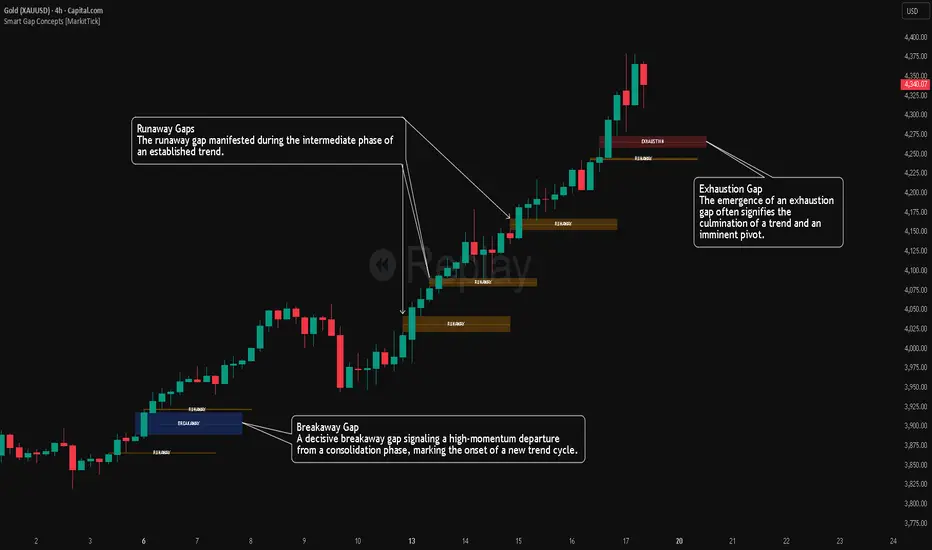
FVG Maxing - Fair Value Gaps, Equilibrium, and Candle Patterns
What this script does
This open-source indicator highlights 3-candle fair value gaps (FVGs) on the active chart timeframe, draws their midpoint ("equilibrium") line, tracks when each gap is mitigated, and optionally marks simple candle patterns (engulfing and doji) for confluence. It is intended as an educational tool to study how price interacts with imbalances.
3-candle bullish and bearish FVG zones drawn as forward-extending boxes.
Equilibrium line at 50% of each gap.
Different styling for mitigated vs unmitigated gaps.
Compact statistics panel showing how many gaps are currently active and filled.
Optional overlays for bullish/bearish engulfing patterns and doji candles.
1. FVG logic (3-candle gaps)
The script focuses on a strict 3-candle definition of a fair value gap:
Three consecutive candles with the same body direction.
The wick of candle 3 is separated from the wick of candle 1 (no overlap).
A bullish gap is created when price moves up fast enough to leave a gap between candle 1 and 3. A bearish gap is the mirror case to the downside.
In Pine, the core detection looks like this:
// Three candles with the same body direction
bull_seq = close > open and close > open and close > open
bear_seq = close < open and close < open and close < open
// Wick gap between candle 1 and candle 3
bull_gap = bull_seq and low > high
bear_gap = bear_seq and high < low
// Final FVG flags
is_bull_fvg = bull_gap
is_bear_fvg = bear_gap
For each detected FVG:
Bullish FVG range: from high up to low (gap below current price).
Bearish FVG range: from low down to high (gap above current price).
Each zone is stored in a custom FVGData structure so it can be updated when price later trades back inside it.
2. Equilibrium line (0.5 of the gap)
Every FVG box gets an optional equilibrium line plotted at the midpoint between its top and bottom:
eq_level = (top + bottom) / 2.0
right_index = extend_boxes ? bar_index + extend_length_bars : bar_index
bx = box.new(bar_index - 2, top, right_index, bottom)
eq_ln = line.new(bar_index - 2, eq_level, right_index, eq_level)
line.set_style(eq_ln, line.style_dashed)
line.set_color(eq_ln, eq_color)
You can use this line as a neutral “fair value” reference inside the zone, or as a simple way to think in terms of premium/discount within each gap.
3. Mitigation rules and styling
Each FVG stays active until price trades back into the gap:
Bullish FVG is considered mitigated when the low touches or moves below the top of the gap.
Bearish FVG is considered mitigated when the high touches or moves above the bottom of the gap.
When that happens, the script:
Marks the internal FVGData entry as mitigated.
Softens the box fill and border colors.
Optionally updates the label text from "BULL EQ / BEAR EQ" to "BULL FILLED / BEAR FILLED".
Can hide mitigated zones almost completely if you only want to see unfilled imbalances.
This allows you to distinguish between current areas of interest and zones that have already been traded through.
4. Candle pattern overlays (engulfing and doji)
For additional confluence, the script can mark simple candle patterns on top of the FVG view:
Bullish engulfing — current candle body fully wraps the previous bearish body and is larger in size.
Bearish engulfing — current candle body fully wraps the previous bullish body and is larger in size.
Doji — candles where the real body is small relative to the full range (high–low).
The detection is based on basic body and range geometry:
curr_body = math.abs(close - open)
prev_body = math.abs(close - open )
curr_range = high - low
body_ratio = curr_range > 0 ? curr_body / curr_range : 1.0
bull_engulfing = close > open and close < open and open <= close and close >= open and curr_body > prev_body
bear_engulfing = close < open and close > open and open >= close and close <= open and curr_body > prev_body
is_doji = curr_range > 0 and body_ratio <= doji_body_ratio
On the chart, they appear as:
Small triangle markers below bullish engulfing candles.
Small triangle markers above bearish engulfing candles.
Small circles above doji candles.
All three overlays are optional and can be turned on or off and recolored in the CANDLE PATTERNS group of inputs.
5. Inputs overview
The script organizes settings into clear groups:
DISPLAY SETTINGS : Show bullish/bearish FVGs, show/hide mitigated zones, box extension length, box border width, and maximum number of boxes.
EQUILIBRIUM : Toggle equilibrium lines, color, and line width.
LABELS : Enable labels, choose whether to label unmitigated and/or mitigated zones, and select label size.
BULLISH COLORS / BEARISH COLORS : Separate fill and border colors for bullish and bearish gaps.
MITIGATED STYLE : Opacity used when a gap is marked as mitigated.
STATISTICS : Toggle the on-chart FVG statistics panel.
CANDLE PATTERNS : Show engulfing patterns, show dojis, colors, and the body-to-range threshold that defines a doji.
6. Statistics panel
An optional table in the corner of the chart summarizes the current state of all tracked gaps:
Total number of FVGs still being tracked.
Number of bullish vs bearish FVGs.
Number of unfilled vs mitigated FVGs.
Simple fill rate: percentage of tracked FVGs that have been marked as mitigated.
This can help you study how a particular market tends to treat gaps over time.
7. How you might use it (examples)
These are usage ideas only, not recommendations:
Study how often your symbol mitigates gaps and where inside the zone price tends to react.
Use higher-timeframe context and then refine entries near the equilibrium line on your trading timeframe.
Combine FVG zones with basic candle patterns (engulfing/doji) as an extra visual anchor, if that fits your process.
Hope you enjoy, give your feedback in the comments!
- officialjackofalltrades
MeanReversion_tradeALERTOverview The Apex Reversal Predictor v2.5 is a specialized mean reversion strategy designed for scalping high-volatility assets like NQ (Nasdaq), ES (S&P 500), and Crypto. While most indicators chase breakouts, this system hunts for "Liquidity Sweeps"—moments where the market briefly breaks a key level to trap retail traders before snapping back to the true value (VWAP).
This is not just a signal indicator; it is a full Trade Manager that calculates your Entry, Stop Loss, and Take Profit levels automatically based on volatility (ATR).
The Logic: Why This Works Markets act like a rubber band. They can only stretch so far from their average price before snapping back. This script combines three layers of logic to identify these snap-back points:
The Stretch (Sigma Score): Measures how far price is from the VWAP relative to ATR. If the score > 2.0, the "rubber band" is overextended.
The Trap (Liquidity Sweep): Identifies Pivot Highs/Lows. It waits for price to break a pivot (luring in breakout traders) and then immediately reverse (trapping them).
The Exhaustion (RSI): Confirms that momentum is Overbought/Oversold to prevent trading against a strong trend.
Key Features
Dynamic Lines: Automatically draws Blue (Entry), Red (SL), and Green (TP) lines on the chart for active trades.
Smart Targets: Two modes for taking profit:
Mean Reversion: Targets the VWAP line (High Win Rate).
Fixed Ratio: Targets a specific Risk:Reward (e.g., 1:2).
Live Dashboard: Tracks Win Rate, Net Points, and the live "Stretch Score" in the bottom right corner.
Alert Ready: Formatted JSON alerts for easy integration with Discord or trading bots.
How & When to Use (User Guide)
1. Best Timeframes
5-Minute (5m): Best for NQ and volatile stocks (TSLA, NVDA). Filters out 1-minute noise but catches the intraday reversals.
15-Minute (15m): Best for Forex or slower-moving indices (ES).
2. The Setup Checklist Before taking a trade, look at the Dashboard in the bottom right:
Step 1: Check the "Stretch (Sigma)". Is it Orange or Red? This means price is extended and ripe for a reversal. If it's Green, the market is calm—be careful.
Step 2: Wait for the Signal.
"Apex BUY" (Green Label): Price swept a low and closed green.
"Apex SELL" (Red Label): Price swept a high and closed red.
Step 3: Execute. Enter at the close of the signal candle. Set your stop loss at the Red Line provided by the script.
3. Warning / When NOT to Use
Strong Trending Days: If the market is trending heavily (e.g., creating higher highs all day without looking back), do not fight the trend.
News Events: Avoid using this during CPI, FOMC, or NFP releases. The "rubber band" logic breaks during news because volatility expands indefinitely.
EMA Market Structure [BOSWaves]// This Pine Script™ code is subject to the terms of the Mozilla Public License 2.0 at mozilla.org
// Join our channel for more free tools: t.me
// This Pine Script® code is subject to the terms of the Mozilla Public License 2.0 at mozilla.org
// © BOSWaves
//@version=6
indicator("EMA Market Structure ", overlay=true, max_lines_count=500, max_labels_count=500, max_boxes_count=500)
// ============================================================================
// Inputs
// ============================================================================
// Ema settings
emaLength = input.int(50, "EMA Length", minval=1, tooltip="Period for the Exponential Moving Average calculation")
emaSource = input.source(close, "EMA Source", tooltip="Price source for EMA calculation (close, open, high, low, etc.)")
colorSmooth = input.int(3, "Color Smoothing", minval=1, group="EMA Style", tooltip="Smoothing period for the EMA color gradient transition")
showEmaGlow = input.bool(true, "EMA Glow Effect", group="EMA Style", tooltip="Display glowing halo effect around the EMA line for enhanced visibility")
// Structure settings
swingLength = input.int(5, "Swing Detection Length", minval=2, group="Structure", tooltip="Number of bars to the left and right to identify swing highs and lows")
swingCooloff = input.int(10, "Swing Marker Cooloff (Bars)", minval=1, group="Structure", tooltip="Minimum number of bars between consecutive swing point markers to reduce visual clutter")
showSwingLines = input.bool(true, "Show Structure Lines", group="Structure", tooltip="Display lines connecting swing highs and swing lows")
showSwingZones = input.bool(true, "Show Structure Zones", group="Structure", tooltip="Display shaded zones between consecutive swing points")
showBOS = input.bool(true, "Show Break of Structure", group="Structure", tooltip="Display BOS labels and stop loss levels when price breaks structure")
bosCooloff = input.int(15, "BOS Cooloff (Bars)", minval=5, maxval=50, group="Structure", tooltip="Minimum number of bars required between consecutive BOS signals to avoid signal spam")
slExtension = input.int(20, "SL Line Extension (Bars)", minval=5, maxval=100, group="Structure", tooltip="Number of bars to extend the stop loss line into the future for visibility")
slBuffer = input.float(0.1, "SL Buffer %", minval=0, maxval=2, step=0.05, group="Structure", tooltip="Additional buffer percentage to add to stop loss level for safety margin")
// Background settings
showBG = input.bool(true, "Show Trend Background", group="EMA Style", tooltip="Display background color based on EMA trend direction")
bgBullColor = input.color(color.new(#00ff88, 96), "Bullish BG", group="EMA Style", tooltip="Background color when EMA is in bullish trend")
bgBearColor = input.color(color.new(#ff3366, 96), "Bearish BG", group="EMA Style", tooltip="Background color when EMA is in bearish trend")
// ============================================================================
// Ema trend filter with gradient color
// ============================================================================
ema = ta.ema(emaSource, emaLength)
// Calculate EMA acceleration for gradient color
emaChange = ema - ema
emaAccel = ta.ema(emaChange, colorSmooth)
// Manual tanh function for normalization
tanh(x) =>
ex = math.exp(2 * x)
(ex - 1) / (ex + 1)
accelNorm = tanh(emaAccel / (ta.atr(14) * 0.01))
// Map normalized accel to hue (60 = green, 120 = yellow/red)
hueRaw = 60 + accelNorm * 60
hue = na(hueRaw ) ? hueRaw : (hueRaw + hueRaw ) / 2
sat = 1.0
val = 1.0
// HSV to RGB conversion
hsv_to_rgb(h, s, v) =>
c = v * s
x = c * (1 - math.abs((h / 60) % 2 - 1))
m = v - c
r = 0.0
g = 0.0
b = 0.0
if (h < 60)
r := c
g := x
b := 0
else if (h < 120)
r := x
g := c
b := 0
else if (h < 180)
r := 0
g := c
b := x
else if (h < 240)
r := 0
g := x
b := c
else if (h < 300)
r := x
g := 0
b := c
else
r := c
g := 0
b := x
color.rgb(int((r + m) * 255), int((g + m) * 255), int((b + m) * 255))
emaColor = hsv_to_rgb(hue, sat, val)
emaTrend = ema > ema ? 1 : ema < ema ? -1 : 0
// EMA with enhanced glow effect using fills
glowOffset = ta.atr(14) * 0.25
emaGlow8 = plot(showEmaGlow ? ema + glowOffset * 8 : na, "EMA Glow 8", color.new(emaColor, 100), 1, display=display.none)
emaGlow7 = plot(showEmaGlow ? ema + glowOffset * 7 : na, "EMA Glow 7", color.new(emaColor, 100), 1, display=display.none)
emaGlow6 = plot(showEmaGlow ? ema + glowOffset * 6 : na, "EMA Glow 6", color.new(emaColor, 100), 1, display=display.none)
emaGlow5 = plot(showEmaGlow ? ema + glowOffset * 5 : na, "EMA Glow 5", color.new(emaColor, 100), 1, display=display.none)
emaGlow4 = plot(showEmaGlow ? ema + glowOffset * 4 : na, "EMA Glow 4", color.new(emaColor, 100), 1, display=display.none)
emaGlow3 = plot(showEmaGlow ? ema + glowOffset * 3 : na, "EMA Glow 3", color.new(emaColor, 100), 1, display=display.none)
emaGlow2 = plot(showEmaGlow ? ema + glowOffset * 2 : na, "EMA Glow 2", color.new(emaColor, 100), 1, display=display.none)
emaGlow1 = plot(showEmaGlow ? ema + glowOffset * 1 : na, "EMA Glow 1", color.new(emaColor, 100), 1, display=display.none)
emaCore = plot(ema, "EMA Core", emaColor, 3)
emaGlow1b = plot(showEmaGlow ? ema - glowOffset * 1 : na, "EMA Glow 1b", color.new(emaColor, 100), 1, display=display.none)
emaGlow2b = plot(showEmaGlow ? ema - glowOffset * 2 : na, "EMA Glow 2b", color.new(emaColor, 100), 1, display=display.none)
emaGlow3b = plot(showEmaGlow ? ema - glowOffset * 3 : na, "EMA Glow 3b", color.new(emaColor, 100), 1, display=display.none)
emaGlow4b = plot(showEmaGlow ? ema - glowOffset * 4 : na, "EMA Glow 4b", color.new(emaColor, 100), 1, display=display.none)
emaGlow5b = plot(showEmaGlow ? ema - glowOffset * 5 : na, "EMA Glow 5b", color.new(emaColor, 100), 1, display=display.none)
emaGlow6b = plot(showEmaGlow ? ema - glowOffset * 6 : na, "EMA Glow 6b", color.new(emaColor, 100), 1, display=display.none)
emaGlow7b = plot(showEmaGlow ? ema - glowOffset * 7 : na, "EMA Glow 7b", color.new(emaColor, 100), 1, display=display.none)
emaGlow8b = plot(showEmaGlow ? ema - glowOffset * 8 : na, "EMA Glow 8b", color.new(emaColor, 100), 1, display=display.none)
// Create glow layers with fills (from outermost to innermost)
fill(emaGlow8, emaGlow7, showEmaGlow ? color.new(emaColor, 97) : na)
fill(emaGlow7, emaGlow6, showEmaGlow ? color.new(emaColor, 95) : na)
fill(emaGlow6, emaGlow5, showEmaGlow ? color.new(emaColor, 93) : na)
fill(emaGlow5, emaGlow4, showEmaGlow ? color.new(emaColor, 90) : na)
fill(emaGlow4, emaGlow3, showEmaGlow ? color.new(emaColor, 87) : na)
fill(emaGlow3, emaGlow2, showEmaGlow ? color.new(emaColor, 83) : na)
fill(emaGlow2, emaGlow1, showEmaGlow ? color.new(emaColor, 78) : na)
fill(emaGlow1, emaCore, showEmaGlow ? color.new(emaColor, 70) : na)
fill(emaCore, emaGlow1b, showEmaGlow ? color.new(emaColor, 70) : na)
fill(emaGlow1b, emaGlow2b, showEmaGlow ? color.new(emaColor, 78) : na)
fill(emaGlow2b, emaGlow3b, showEmaGlow ? color.new(emaColor, 83) : na)
fill(emaGlow3b, emaGlow4b, showEmaGlow ? color.new(emaColor, 87) : na)
fill(emaGlow4b, emaGlow5b, showEmaGlow ? color.new(emaColor, 90) : na)
fill(emaGlow5b, emaGlow6b, showEmaGlow ? color.new(emaColor, 93) : na)
fill(emaGlow6b, emaGlow7b, showEmaGlow ? color.new(emaColor, 95) : na)
fill(emaGlow7b, emaGlow8b, showEmaGlow ? color.new(emaColor, 97) : na)
// ============================================================================
// Swing high/low detection
// ============================================================================
// Swing High/Low Detection
swingHigh = ta.pivothigh(high, swingLength, swingLength)
swingLow = ta.pivotlow(low, swingLength, swingLength)
// Cooloff tracking
var int lastSwingHighPlot = na
var int lastSwingLowPlot = na
// Check if cooloff period has passed
canPlotHigh = na(lastSwingHighPlot) or (bar_index - lastSwingHighPlot) >= swingCooloff
canPlotLow = na(lastSwingLowPlot) or (bar_index - lastSwingLowPlot) >= swingCooloff
// Store swing points
var float lastSwingHigh = na
var int lastSwingHighBar = na
var float lastSwingLow = na
var int lastSwingLowBar = na
// Track previous swing for BOS detection
var float prevSwingHigh = na
var float prevSwingLow = na
// Update swing highs with cooloff
if not na(swingHigh) and canPlotHigh
prevSwingHigh := lastSwingHigh
lastSwingHigh := swingHigh
lastSwingHighBar := bar_index - swingLength
lastSwingHighPlot := bar_index
// Update swing lows with cooloff
if not na(swingLow) and canPlotLow
prevSwingLow := lastSwingLow
lastSwingLow := swingLow
lastSwingLowBar := bar_index - swingLength
lastSwingLowPlot := bar_index
// ============================================================================
// Structure lines & zones
// ============================================================================
var line swingHighLine = na
var line swingLowLine = na
var box swingHighZone = na
var box swingLowZone = na
if showSwingLines
// Draw line connecting swing highs with zones
if not na(swingHigh) and canPlotHigh and not na(prevSwingHigh)
if not na(lastSwingHighBar)
line.delete(swingHighLine)
swingHighLine := line.new(lastSwingHighBar, lastSwingHigh, bar_index - swingLength, swingHigh, color=color.new(#ff3366, 0), width=2, style=line.style_solid)
// Create resistance zone
if showSwingZones
box.delete(swingHighZone)
zoneTop = math.max(lastSwingHigh, swingHigh)
zoneBottom = math.min(lastSwingHigh, swingHigh)
swingHighZone := box.new(lastSwingHighBar, zoneTop, bar_index - swingLength, zoneBottom, border_color=color.new(#ff3366, 80), bgcolor=color.new(#ff3366, 92))
// Draw line connecting swing lows with zones
if not na(swingLow) and canPlotLow and not na(prevSwingLow)
if not na(lastSwingLowBar)
line.delete(swingLowLine)
swingLowLine := line.new(lastSwingLowBar, lastSwingLow, bar_index - swingLength, swingLow, color=color.new(#00ff88, 0), width=2, style=line.style_solid)
// Create support zone
if showSwingZones
box.delete(swingLowZone)
zoneTop = math.max(lastSwingLow, swingLow)
zoneBottom = math.min(lastSwingLow, swingLow)
swingLowZone := box.new(lastSwingLowBar, zoneTop, bar_index - swingLength, zoneBottom, border_color=color.new(#00ff88, 80), bgcolor=color.new(#00ff88, 92))
// ============================================================================
// Break of structure (bos)
// ============================================================================
// Track last BOS bar for cooloff
var int lastBullishBOS = na
var int lastBearishBOS = na
// Check if cooloff period has passed
canPlotBullishBOS = na(lastBullishBOS) or (bar_index - lastBullishBOS) >= bosCooloff
canPlotBearishBOS = na(lastBearishBOS) or (bar_index - lastBearishBOS) >= bosCooloff
// Bullish BOS: Price breaks above previous swing high while EMA is bullish
bullishBOS = showBOS and canPlotBullishBOS and emaTrend == 1 and not na(prevSwingHigh) and close > prevSwingHigh and close <= prevSwingHigh
// Bearish BOS: Price breaks below previous swing low while EMA is bearish
bearishBOS = showBOS and canPlotBearishBOS and emaTrend == -1 and not na(prevSwingLow) and close < prevSwingLow and close >= prevSwingLow
// Update last BOS bars
if bullishBOS
lastBullishBOS := bar_index
if bearishBOS
lastBearishBOS := bar_index
// Plot BOS with enhanced visuals and SL at the candle wick
if bullishBOS
// Calculate SL at the low of the current candle (bottom of wick) with buffer
slLevel = low * (1 - slBuffer/100)
// BOS Label with shadow effect
label.new(bar_index, low, "BOS", style=label.style_label_up, color=color.new(#00ff88, 0), textcolor=color.black, size=size.normal, tooltip="Bullish Break of Structure SL: " + str.tostring(slLevel))
// Main SL line at candle low
line.new(bar_index, slLevel, bar_index + slExtension, slLevel, color=color.new(#00ff88, 0), width=2, style=line.style_dashed, extend=extend.none)
// SL zone box for visual emphasis
box.new(bar_index, slLevel + (slLevel * 0.002), bar_index + slExtension, slLevel - (slLevel * 0.002), border_color=color.new(#00ff88, 60), bgcolor=color.new(#00ff88, 85))
// S/R label
label.new(bar_index + slExtension, slLevel, "S/R", style=label.style_label_left, color=color.new(#00ff88, 0), textcolor=color.black, size=size.tiny)
if bearishBOS
// Calculate SL at the high of the current candle (top of wick) with buffer
slLevel = high * (1 + slBuffer/100)
// BOS Label with shadow effect
label.new(bar_index, high, "BOS", style=label.style_label_down, color=color.new(#ff3366, 0), textcolor=color.white, size=size.normal, tooltip="Bearish Break of Structure SL: " + str.tostring(slLevel))
// Main SL line at candle high
line.new(bar_index, slLevel, bar_index + slExtension, slLevel, color=color.new(#ff3366, 0), width=2, style=line.style_dashed, extend=extend.none)
// SL zone box for visual emphasis
box.new(bar_index, slLevel + (slLevel * 0.002), bar_index + slExtension, slLevel - (slLevel * 0.002), border_color=color.new(#ff3366, 60), bgcolor=color.new(#ff3366, 85))
// S/R label
label.new(bar_index + slExtension, slLevel, "S/R", style=label.style_label_left, color=color.new(#ff3366, 0), textcolor=color.white, size=size.tiny)
// ============================================================================
// Dynamic background zones
// ============================================================================
bgcolor(showBG and emaTrend == 1 ? bgBullColor : showBG and emaTrend == -1 ? bgBearColor : na)
// ============================================================================
// Alerts
// ============================================================================
alertcondition(bullishBOS, "Bullish BOS", "Bullish Break of Structure detected!")
alertcondition(bearishBOS, "Bearish BOS", "Bearish Break of Structure detected!")
alertcondition(emaTrend == 1 and emaTrend != 1, "EMA Bullish", "EMA turned bullish")
alertcondition(emaTrend == -1 and emaTrend != -1, "EMA Bearish", "EMA turned bearish")
// ╔════════════════════════════════╗
// ║ Download at ║
// ╚════════════════════════════════╝
// ███████╗██╗███╗ ███╗██████╗ ██╗ ███████╗
// ██╔════╝██║████╗ ████║██╔══██╗██║ ██╔════╝
// ███████╗██║██╔████╔██║██████╔╝██║ █████╗
// ╚════██║██║██║╚██╔╝██║██╔═══╝ ██║ ██╔══╝
// ███████║██║██║ ╚═╝ ██║██║ ███████╗███████╗
// ╚══════╝╚═╝╚═╝ ╚═╝╚═╝ ╚══════╝╚══════╝
// ███████╗ ██████╗ ██████╗ ███████╗██╗ ██╗
// ██╔════╝██╔═══██╗██╔══██╗██╔════╝╚██╗██╔╝
// █████╗ ██║ ██║██████╔╝█████╗ ╚███╔╝
// ██╔══╝ ██║ ██║██╔══██╗██╔══╝ ██╔██╗
// ██║ ╚██████╔╝██║ ██║███████╗██╔╝ ██╗
// ╚═╝ ╚═════╝ ╚═╝ ╚═╝╚══════╝╚═╝ ╚═╝
// ████████╗ ██████╗ ██████╗ ██╗ ███████╗
// ╚══██╔══╝██╔═══██╗██╔═══██╗██║ ██╔════╝
// ██║ ██║ ██║██║ ██║██║ ███████╗
// ██║ ██║ ██║██║ ██║██║ ╚════██║
// ██║ ╚██████╔╝╚██████╔╝███████╗███████║
// ╚═╝ ╚═════╝ ╚═════╝ ╚══════╝╚══════╝
// ==========================================================================================
SMC + OB + FVG + Reversal + UT Bot + Hull Suite – by Fatich.id🎯 7 INTEGRATED SYSTEMS:
✓ Mxwll Suite (SMC + Auto Fibs + CHoCH/BOS)
✓ UT Bot (Trend Signals + Label Management)
✓ Hull Suite (Momentum Analysis)
✓ LuxAlgo FVG (Fair Value Gaps)
✓ LuxAlgo Order Blocks (Volume Pivots) ⭐ NEW
✓ Three Bar Reversal (Pattern Recognition)
✓ Reversal Signals (Momentum Count Style)
⚡ KEY FEATURES:
• Smart Money Structure (CHoCH/BOS/I-CHoCH/I-BoS)
• Auto Fibonacci (10 customizable levels)
• Order Block Detection (Auto mitigation)
• Fair Value Gap Tracking
• Session Highlights (NY/London/Asia)
• Volume Activity Dashboard
• Multi-Timeframe Support
• Clean Label Management
🎨 PERFECT FOR:
• Smart Money Concept Traders
• Order Flow & Liquidity Analysis
• Support/Resistance Trading
• Trend Following & Reversals
• Multi-Timeframe Analysis
💡 RECOMMENDED SETTINGS:
Clean Charts: OB Count 3, UT Signals 3, FVG 5
Detailed Analysis: OB Count 5-10, All Signals
Scalping: Low sensitivity, Hull 20-30
Swing Trading: High sensitivity, Hull 55-100
VIX/VXV Ratio (TitsNany)This script plots the VXV/VIX ratio, which compares medium-term volatility (90-day fear) to short-term volatility (30-day fear). When the ratio rises above key levels like 1.16 or 1.24, it signals that traders expect future stress, often preceding market pullbacks. When the ratio falls toward or below 1.0, short-term fear is spiking, which typically occurs during active selloffs or volatility events. In short, elevated readings warn of potential market drops ahead, while sharp declines in the ratio reflect panic already hitting the market.
VWAP Multi-Timeframe Pro [Eˣ]🎯 VWAP MULTI-TIMEFRAME PRO - The Institution's Favorite Indicator on Steroids
The Volume Weighted Average Price (VWAP) is the most widely used indicator by institutional traders, market makers, and professional desks worldwide. While most traders only monitor the Daily VWAP, professionals track multiple timeframes simultaneously to identify high-probability support/resistance zones. This indicator brings institutional-grade multi-timeframe VWAP analysis to your chart.
═══════════════════════════════════════
⚡ WHAT MAKES THIS SPECIAL
═══════════════════════════════════════
• 5 SIMULTANEOUS TIMEFRAMES: Daily, Weekly, Monthly, Quarterly, and Yearly VWAPs all visible at once
• STANDARD DEVIATION BANDS: Statistical overbought/oversold zones (similar to Bollinger Bands for VWAP)
• REAL-TIME POSITION ANALYSIS: Live table showing price position relative to each VWAP with percentage distance
• SMART CROSS DETECTION: Automatic visual markers when price crosses key VWAP levels
• OVERALL BIAS INDICATOR: Instant bullish/neutral/bearish reading based on VWAP alignment
• FULLY CUSTOMIZABLE: Colors, widths, bands, labels - tailor everything to your style
• COMPREHENSIVE ALERTS: Get notified for crosses, band touches, and key level interactions
═══════════════════════════════════════
📚 UNDERSTANDING VWAP
═══════════════════════════════════════
What is VWAP?
VWAP calculates the average price weighted by volume. Unlike simple moving averages, VWAP gives more weight to price levels where significant volume occurred. This makes it the "true average price" that institutions use to evaluate whether they're getting good fills.
Why Institutions Love VWAP:
- Algorithmic traders use VWAP as a benchmark for execution quality
- Market makers use VWAP to determine fair value
- Large funds use VWAP to minimize market impact when entering/exiting positions
- Banks and brokers measure trading performance against VWAP
The Multi-Timeframe Edge:
When multiple timeframe VWAPs align or converge, they create powerful support/resistance zones where institutions are likely to defend positions or enter new ones.
═══════════════════════════════════════
📊 HOW TO READ THE INDICATOR
═══════════════════════════════════════
VWAP LINES:
- BLUE = Daily VWAP (resets each day)
- PURPLE = Weekly VWAP (resets each week)
- ORANGE = Monthly VWAP (resets each month)
- RED = Quarterly VWAP (resets each quarter) - optional
- MAROON = Yearly VWAP (resets each year) - optional
PRICE POSITION:
- Price ABOVE VWAP = Bullish territory, buyers in control
- Price BELOW VWAP = Bearish territory, sellers in control
- Price AT VWAP = Equilibrium, decision point
STANDARD DEVIATION BANDS:
- Upper Band = Potential resistance, overbought zone
- Lower Band = Potential support, oversold zone
- 1st Band (solid dots) = 1 standard deviation (68% of price action)
- 2nd Band (crosses) = 2 standard deviations (95% of price action)
CROSS MARKERS:
- Triangles = Daily VWAP crosses
- Diamonds = Weekly VWAP crosses
- Squares = Monthly VWAP crosses
POSITION TABLE:
Shows real-time data for each active VWAP:
- Value = Current VWAP price level
- Position = Whether price is above (▲) or below (▼) with percentage distance
- Bias = Overall market sentiment based on VWAP alignment
═══════════════════════════════════════
💡 TRADING STRATEGIES
═══════════════════════════════════════
STRATEGY 1: MEAN REVERSION (Best for ranging markets)
1. Wait for price to reach upper or lower standard deviation bands
2. Look for reversal signals (candlestick patterns, divergence, etc.)
3. Enter trade expecting price to return to VWAP
4. Target = Opposite band or VWAP itself
5. Stop = Beyond the band or previous swing high/low
Example: Price reaches lower daily band + bullish engulfing → Buy, target daily VWAP
STRATEGY 2: TREND FOLLOWING (Best for trending markets)
1. Identify trend direction using higher timeframe VWAPs
2. Only take trades in direction of higher TF VWAPs
3. Enter on pullbacks to lower TF VWAP
4. Use VWAP as dynamic trailing stop
Example: Price above Weekly + Monthly VWAP (bullish) → Wait for pullback to Daily VWAP → Buy with stop below Daily VWAP
STRATEGY 3: CONFLUENCE ZONES (High probability setups)
1. Look for areas where multiple VWAPs converge (within 0.5-1%)
2. These create strong support/resistance zones
3. Trade bounces off confluence zones or breakouts through them
4. More VWAPs converging = stronger level
Example: Daily, Weekly, and Monthly VWAP all at $100 → Very strong support/resistance
STRATEGY 4: VWAP CROSSES (Momentum shifts)
1. Watch for price crossing multiple VWAPs simultaneously
2. Cross above multiple VWAPs = Bullish momentum shift
3. Cross below multiple VWAPs = Bearish momentum shift
4. Confirm with volume spike for stronger signal
Example: Price crosses above Daily + Weekly VWAP on high volume → Strong buy signal
STRATEGY 5: INSTITUTIONAL POSITIONING (For swing/position traders)
1. Focus on Weekly and Monthly VWAPs
2. These are where large institutions defend positions
3. Look for price action respect at these levels
4. Failed breaks often lead to explosive moves in opposite direction
Example: Price tests Monthly VWAP 3 times and bounces → Strong buy zone
═══════════════════════════════════════
⚙️ SETTINGS GUIDE
═══════════════════════════════════════
TIMEFRAMES SECTION:
- Toggle each timeframe on/off based on your trading style
- Customize colors to match your chart theme
- Adjust line widths for better visibility (1-5)
BANDS SECTION:
- Show Standard Deviation Bands: Enable/disable bands
- Band Multiplier: Default 1.0 (1 std dev). Increase to 1.5 or 2.0 for wider bands in volatile markets
- Band Transparency: Adjust visibility (higher = more transparent)
- Show 2nd Band Level: Enable 2 standard deviation bands for extreme zones
- 2nd Band Multiplier: Default 2.0 (2 std dev)
DISPLAY SECTION:
- Show VWAP Labels: Display D/W/M/Q/Y labels on right side of chart
- Mark VWAP Crosses: Show visual markers when price crosses VWAPs
- Show Price Position Table: Display real-time position analysis table
═══════════════════════════════════════
🎨 RECOMMENDED SETTINGS BY TRADING STYLE
═══════════════════════════════════════
DAY TRADERS / SCALPERS:
- Enable: Daily + Weekly VWAP
- Band Multiplier: 1.0
- Chart Timeframe: 1min, 5min, 15min
- Focus: Quick mean reversion plays off Daily VWAP and bands
SWING TRADERS:
- Enable: Daily + Weekly + Monthly VWAP
- Band Multiplier: 1.0 - 1.5
- Chart Timeframe: 1H, 4H, Daily
- Focus: Trade in direction of Weekly/Monthly, enter at Daily VWAP
POSITION TRADERS / INVESTORS:
- Enable: Weekly + Monthly + Quarterly VWAP
- Band Multiplier: 1.5 - 2.0
- Chart Timeframe: Daily, Weekly
- Focus: Major support/resistance at Monthly/Quarterly levels
═══════════════════════════════════════
🔔 ALERT SETUP GUIDE
═══════════════════════════════════════
This indicator includes 8 alert conditions:
VWAP CROSS ALERTS:
1. Price Crossed Above Daily VWAP - Potential bullish momentum
2. Price Crossed Below Daily VWAP - Potential bearish momentum
3. Price Crossed Above Weekly VWAP - Stronger bullish signal
4. Price Crossed Below Weekly VWAP - Stronger bearish signal
5. Price Crossed Above Monthly VWAP - Major trend shift signal
6. Price Crossed Below Monthly VWAP - Major trend shift signal
BAND ALERTS:
7. Price Reached Upper Band - Potential overbought, watch for reversal
8. Price Reached Lower Band - Potential oversold, watch for reversal
How to Set Alerts:
1. Click the "Alert" button (clock icon) at top of chart
2. Select "VWAP Multi-Timeframe Pro" from Condition dropdown
3. Choose your desired alert condition
4. Set alert name and notification preferences
5. Click "Create"
Pro Tip: Set multiple alerts for different conditions to catch all opportunities. For example, set alerts for both Daily and Weekly crosses to catch both short-term and intermediate-term setups.
═══════════════════════════════════════
💎 ADVANCED TIPS & TRICKS
═══════════════════════════════════════
1. THE VWAP MAGNET EFFECT
Price tends to gravitate back toward VWAP, especially during the first hour of trading. Use this for quick scalps: when price deviates significantly from Daily VWAP in the morning, it often returns by mid-session.
2. OPENING RANGE + VWAP
Combine VWAP with opening range high/low. When price breaks opening range while above VWAP = strong bullish setup. Breaking opening range while below VWAP = strong bearish setup.
3. VWAP RECLAIM/LOSS
- "Reclaiming VWAP" (price moves back above after being below) = bullish signal
- "Losing VWAP" (price moves back below after being above) = bearish signal
These often mark intraday trend changes.
4. MULTI-TIMEFRAME ALIGNMENT
When Daily, Weekly, AND Monthly VWAPs all point in same direction (all above or all below price), it indicates very strong trend. Trade WITH this alignment, not against it.
5. VWAP ANCHORING
Note where each VWAP resets:
- Daily = Midnight
- Weekly = Monday open
- Monthly = 1st of month
- Quarterly = Jan 1, Apr 1, Jul 1, Oct 1
- Yearly = January 1st
The first few days after a reset can show directional bias for the entire period.
6. VOLUME CONFIRMATION
VWAP crosses are more reliable when accompanied by above-average volume. A cross on low volume may be a false signal.
7. BAND WALK
In strong trends, price can "walk the bands" - staying near upper band in uptrends or lower band in downtrends. Don't blindly fade these; wait for actual reversal signals.
8. CONFLUENCE WITH OTHER INDICATORS
Combine VWAP with:
- Support/Resistance levels
- Fibonacci retracements
- Moving averages
- Volume profile levels
When VWAP aligns with other technical levels, the zone becomes even more significant.
═══════════════════════════════════════
⚠️ IMPORTANT NOTES & LIMITATIONS
═══════════════════════════════════════
VWAP RESETS:
VWAP is a cumulative calculation that resets at the start of each new period. This is standard VWAP behavior, not a bug. When you see a VWAP "jump" at midnight (Daily) or Monday open (Weekly), this is normal.
EXTENDED HOURS:
If your chart includes extended hours data, VWAP will include that data. For stocks, you may want to use regular hours only for cleaner VWAP levels.
LOW VOLUME PERIODS:
During very low volume periods (pre-market, holidays), VWAP may be less reliable as it can be easily skewed by a few large trades.
CRYPTO MARKETS:
Since crypto trades 24/7, Daily VWAP resets at midnight UTC (or your chart's timezone). Weekly VWAP resets Monday 00:00 UTC.
NOT A STANDALONE SYSTEM:
While VWAP is powerful, it should be part of a complete trading system including risk management, proper position sizing, and confirmation from other technical factors.
═══════════════════════════════════════
📈 MARKET-SPECIFIC USAGE
═══════════════════════════════════════
STOCKS / EQUITIES:
VWAP is most powerful in liquid stocks. Focus on Daily and Weekly VWAP. Institutional traders heavily use VWAP for large orders. Best during regular market hours.
CRYPTO:
Works excellent in major pairs (BTC, ETH) due to 24/7 volume. Use Daily for intraday, Weekly for swing trades. Be aware of timezone for VWAP reset.
FOREX:
Less commonly used but still effective in major pairs during liquid sessions (London/NY overlap). Focus on Daily and Weekly timeframes.
FUTURES / INDICES:
Highly effective in ES, NQ, and other liquid futures. Institutions use VWAP extensively. All timeframes relevant depending on trading style.
═══════════════════════════════════════
🎓 LEARNING RESOURCES
═══════════════════════════════════════
To deepen your understanding of VWAP:
- Study how market makers use VWAP for order execution
- Research "VWAP algorithms" used by institutional traders
- Practice identifying VWAP respect vs. rejection on historical charts
- Paper trade VWAP strategies before using real capital
- Observe how VWAP behaves in different market conditions (trending vs. ranging)
═══════════════════════════════════════
✨ FINAL THOUGHTS
═══════════════════════════════════════
VWAP Multi-Timeframe Pro brings institutional-grade analysis to retail traders. By monitoring multiple timeframes simultaneously, you can see the same levels that big money is watching and make more informed trading decisions.
Remember: VWAP is a tool, not a crystal ball. Use it as part of a comprehensive trading plan with proper risk management. The best traders use VWAP to understand WHERE institutions are positioned and HOW price is behaving relative to fair value.
This is a free, professional-grade indicator with no ads, no upsells, and no gimmicks. If you find it valuable, please give it a like and follow for more quality indicators and trading tools.
Happy trading, and may your VWAPs always be in your favor! 🎯
---
Disclaimer: This indicator is for educational purposes. Past performance does not guarantee future results. Always practice proper risk management and never risk more than you can afford to lose.
EMA 14/50 Crossover Strategy + Candle Source OptionsSimple fast and slow ema crossover strategy. you can select input sources for ema. also feel free to use it with other strategies
ICT Order Block Identifier [Eˣ]📦 Order Block Identifier - Free Indicator
Overview
The Order Block Identifier automatically detects and displays institutional order blocks on your charts - the exact zones where banks, hedge funds, and market makers place their orders. Based on ICT (Inner Circle Trader) concepts, this indicator helps you trade alongside smart money by identifying where institutions are likely to defend their positions and where price often finds support or resistance.
━━━━━━━━━━━━━━━━━━━━━━━━━━━━
🎯 What This Indicator Does
Detects Order Blocks:
• 🟢 Bullish Order Blocks (OB+) - Last bearish candle before strong bullish move
• 🔴 Bearish Order Blocks (OB-) - Last bullish candle before strong bearish move
• Automatically identifies institutional buying/selling zones
• Tracks up to 30 order blocks simultaneously
• Works on all timeframes and instruments
Smart Features:
• Auto-Timeframe Adjustment - Optimizes detection for 1min to Weekly charts
• Active Block Highlighting - Shows which OB price is approaching (🎯)
• Mitigation Tracking - Knows when blocks are "used" and no longer valid
• ATR-Based Detection - Adapts to each instrument's volatility
• Strength Filtering - Choose Low/Medium/High to control sensitivity
Visual Display:
• Clean boxes extending from order block to current price
• Color-coded: Green (bullish), Red (bearish), Gray (mitigated)
• OB+ / OB- labels for quick identification
• Active blocks highlighted with 🎯 emoji
• Distance indicator showing how far price is from nearest OB
Statistics Panel:
• Count of active bullish and bearish order blocks
• Market bias based on OB balance
• Distance to nearest order block
• Real-time status updates
━━━━━━━━━━━━━━━━━━━━━━━━━━━━
📚 Understanding Order Blocks
What Are Order Blocks?
Order blocks are the "footprints" left behind by institutional traders (banks, hedge funds, market makers) when they enter large positions. Because institutions can't fill massive orders at once without moving the market, they:
1. Place orders gradually over time
2. Leave zones where their buy/sell orders are concentrated
3. Defend these zones when price returns
4. Create reliable support and resistance levels
The ICT Concept:
Developed by Michael Huddleston (Inner Circle Trader), order block theory states that:
• The last opposite-colored candle before a strong move contains institutional orders
• Price often returns to test these zones before continuing
• These zones act as strong support (bullish OB) or resistance (bearish OB)
• Smart money defends their positions at these levels
Why Order Blocks Work:
• Unfilled Orders: Institutions may still have pending orders in the block
• Position Defense: They protect their entries by adding to positions
• Stop Placement: Retail stops cluster near these zones (liquidity for institutions)
• Market Structure: Price respects these levels due to order flow dynamics
━━━━━━━━━━━━━━━━━━━━━━━━━━━━
🟢 Bullish Order Blocks Explained
How They Form:
1. Price is consolidating or declining
2. Institutions begin accumulating (buying)
3. A strong bullish move erupts
4. The last bearish candle before this move = Bullish Order Block
5. This candle represents where institutions were buying aggressively
Why The Last Bearish Candle?
• Institutions absorbed all selling pressure at this level
• Their buy orders filled as price was declining
• When price returns, they defend this zone with more buying
• It becomes a demand zone / support level
Trading Bullish Order Blocks:
Setup:
• Wait for price to retrace back to bullish OB (green box)
• Look for rejection/reversal pattern (pin bar, engulfing, etc.)
• Enter long when price bounces from the OB zone
• Stop loss: Below the order block
• Target: Recent high or opposite order block
Best Scenarios:
• OB aligns with other support (trendline, fibonacci, round number)
• First touch of OB (unmitigated) has highest probability
• Occurs during high-volume sessions (London/NY)
• Trend is bullish on higher timeframe
Example Trade:
• Bullish OB forms at $50,000 (last red candle before rally)
• Price rallies to $52,000 then retraces
• Price drops back to $50,100 (touching OB)
• Bullish pin bar forms on the OB
• Enter long at $50,200, stop at $49,800
• Target: $52,000+ (previous high)
━━━━━━━━━━━━━━━━━━━━━━━━━━━━
🔴 Bearish Order Blocks Explained
How They Form:
1. Price is consolidating or rising
2. Institutions begin distributing (selling)
3. A strong bearish move erupts
4. The last bullish candle before this move = Bearish Order Block
5. This candle represents where institutions were selling aggressively
Why The Last Bullish Candle?
• Institutions absorbed all buying pressure at this level
• Their sell orders filled as price was rising
• When price returns, they defend this zone with more selling
• It becomes a supply zone / resistance level
Trading Bearish Order Blocks:
Setup:
• Wait for price to retrace back to bearish OB (red box)
• Look for rejection/reversal pattern (shooting star, bearish engulfing)
• Enter short when price rejects from the OB zone
• Stop loss: Above the order block
• Target: Recent low or opposite order block
Best Scenarios:
• OB aligns with other resistance (trendline, fibonacci, round number)
• First touch of OB (unmitigated) has highest probability
• Occurs during high-volume sessions (London/NY)
• Trend is bearish on higher timeframe
Example Trade:
• Bearish OB forms at $48,000 (last green candle before drop)
• Price drops to $46,000 then retraces
• Price rallies back to $47,900 (touching OB)
• Bearish engulfing forms at the OB
• Enter short at $47,800, stop at $48,200
• Target: $46,000- (previous low)
━━━━━━━━━━━━━━━━━━━━━━━━━━━━
📊 How To Use This Indicator
Strategy 1: Order Block Retest (Classic)
Best For: Swing trading, capturing reversals
Timeframes: 15min, 1H, 4H, Daily
Win Rate: 60-70% (first touch)
Entry Rules:
1. Identify unmitigated order block (bright color, not gray)
2. Wait for price to return to the OB zone
3. Look for price action confirmation:
• Bullish OB: Pin bar, bullish engulfing, hammer
• Bearish OB: Shooting star, bearish engulfing, doji
4. Enter in the direction of the OB
5. Stop loss: Beyond the opposite side of OB (20-30 pips)
6. Target: 2-3R or opposite OB
Example:
• Bullish OB at $100-$102
• Price drops to $101.50 (enters OB)
• Bullish pin bar forms with low at $100.80
• Enter long at $102 (OB high), stop at $99.50
• Risk: $2.50, Target: $107.50 (3R)
Strategy 2: Break & Retest
Best For: Trend trading, breakout confirmation
Timeframes: 5min, 15min, 1H
Win Rate: 65-75%
Entry Rules:
1. Price breaks through an order block
2. Wait for pullback to the broken OB
3. The OB now acts as support (if broken up) or resistance (if broken down)
4. Enter when price respects the flipped OB
5. Stop: Inside the OB zone
6. Target: Next OB or structure level
Why It Works: Broken OBs flip polarity - support becomes resistance and vice versa
Strategy 3: Multi-Timeframe Confirmation
Best For: High-probability setups
Timeframes: Combine 1H + 4H or 15min + 1H
Win Rate: 70-80%
Entry Rules:
1. Identify order block on higher timeframe (4H or Daily)
2. Switch to lower timeframe (1H or 15min)
3. Wait for lower TF order block to form within higher TF OB
4. Trade the lower TF OB in direction of higher TF OB
5. Stop: Below lower TF OB
6. Target: Edge of higher TF OB or beyond
Why It Works: Alignment across timeframes = institutional consensus
Strategy 4: Order Block to Order Block
Best For: Range trading, swing entries
Timeframes: 1H, 4H
Win Rate: 55-65%
Entry Rules:
1. Identify both bullish OB below and bearish OB above
2. Price is ranging between these OBs
3. Enter long at bullish OB, target bearish OB
4. Enter short at bearish OB, target bullish OB
5. Stop: Beyond the trading OB
6. Exit at opposite OB
Why It Works: Price moves from one institutional zone to another
Strategy 5: Mitigation Fade
Best For: Aggressive scalping
Timeframes: 5min, 15min
Win Rate: 50-60% (higher risk)
Entry Rules:
1. Price approaches an order block
2. Instead of bouncing, price breaks through (mitigates it)
3. Enter immediately in direction of breakout
4. Stop: Back inside the mitigated OB
5. Quick target: 1-1.5R
Why It Works: When OB fails, it often leads to strong continuation
━━━━━━━━━━━━━━━━━━━━━━━━━━━━
⚙️ Settings Explained
Core Settings
Auto-Adjust for Timeframe (Default: ON)
• Automatically optimizes detection for current chart timeframe
• 1min: 3 bars lookback
• 5min: 4 bars lookback
• 15min: 5 bars lookback
• 1H: 6 bars lookback
• 4H: 8 bars lookback
• Daily+: 10-12 bars lookback
• Recommended: Keep ON for best results
Manual Detection Length (Default: 5)
• Only used when Auto-Adjust is OFF
• Number of bars to look back for the "last opposite candle"
• Lower (2-4): More sensitive, more blocks, more noise
• Higher (6-10): Less sensitive, fewer blocks, higher quality
• Recommended: Use Auto-Adjust instead
Display Settings
Show Bullish/Bearish Order Blocks
• Toggle each type on/off independently
• Customize colors for each OB type
• Tip: Match colors to your chart theme
Max Order Blocks to Display (Default: 10)
• Limits how many OBs are shown at once
• Lower (5-8): Cleaner chart, only recent blocks
• Higher (15-30): More historical context
• Recommended: 8-12 for most trading
Show Order Block Labels (Default: ON)
• Displays "OB+" and "OB-" text on blocks
• Shows 🎯 on active (nearest) block
• Turn OFF for minimal chart appearance
• Recommended: Keep ON for clarity
Extend Blocks (bars) (Default: 50)
• How far to extend OB boxes to the right
• Lower (20-30): Shorter boxes, less clutter
• Higher (100+): Longer boxes, easier to see
• Blocks auto-extend until mitigated or limit reached
• Recommended: 40-60 bars
Filters
Block Strength Filter (Default: Medium)
• Controls how strong a move must be to create an OB
• Low: 0.5x ATR move required - Many blocks, more noise
• Medium: 1x ATR move required - Balanced quality/quantity
• High: 1.5x ATR move required - Only strongest institutional moves
• Recommended for beginners: High
• Recommended for experienced: Medium
• Recommended for scalpers: Low
Min Block Size % (Default: 0.1)
• Minimum size of OB as percentage of price
• Filters out tiny, insignificant blocks
• Crypto: 0.1-0.3%
• Forex: 0.05-0.15%
• Stocks: 0.1-0.5%
• Adjust based on instrument volatility
Advanced Settings
Show Mitigated Blocks (Default: OFF)
• When ON: Shows gray boxes for "used" order blocks
• When OFF: Blocks disappear after mitigation
• Use ON: For learning and analysis
• Use OFF: For clean, active trading
Highlight Active Block (Default: ON)
• Highlights the nearest order block to current price
• Active block shown with 🎯 emoji and brighter color
• Helps focus on most relevant trading opportunity
• Recommended: Keep ON
━━━━━━━━━━━━━━━━━━━━━━━━━━━━
📱 Info Panel Guide
Bullish OB Count
• Number of active (unmitigated) bullish order blocks
• Higher number = More support zones below price
• Multiple bullish OBs = Strong demand structure
Bearish OB Count
• Number of active (unmitigated) bearish order blocks
• Higher number = More resistance zones above price
• Multiple bearish OBs = Strong supply structure
Bias Indicator
• ⬆ Bullish: More bullish OBs than bearish (demand > supply)
• ⬇ Bearish: More bearish OBs than bullish (supply > demand)
• ↔ Neutral: Equal OBs on both sides
• Trade in direction of bias for higher probability
Near Indicator
• Shows which OB price is closest to
• Displays distance as percentage
• Example: "Bull OB 0.85%" = Bullish OB is 0.85% below current price
• Watch for "Near" alerts to time entries
━━━━━━━━━━━━━━━━━━━━━━━━━━━━
📱 Alert Setup
This indicator includes 4 alert types:
1. Price Entering Bullish OB
• Fires when price touches a bullish order block
• Action: Watch for bounce/reversal pattern
• High-probability long setup developing
2. Price Entering Bearish OB
• Fires when price touches a bearish order block
• Action: Watch for rejection/reversal pattern
• High-probability short setup developing
3. New Bullish OB Detected
• Fires when a new bullish order block forms
• Action: Mark the zone for future retest
• New demand zone identified
4. New Bearish OB Detected
• Fires when a new bearish order block forms
• Action: Mark the zone for future retest
• New supply zone identified
To Set Up Alerts:
1. Click "Alert" button (clock icon)
2. Select "Order Block Identifier"
3. Choose your alert condition
4. Configure notification method
5. Click "Create"
Pro Tip: Set "Price Entering" alerts to catch trading opportunities in real-time
━━━━━━━━━━━━━━━━━━━━━━━━━━━━
💎 Pro Tips & Best Practices
✅ DO:
• First touch is best - Unmitigated OBs have highest win rate (60-70%)
• Wait for confirmation - Don't buy/sell just because price touched OB
• Use multiple timeframes - Higher TF OBs are stronger than lower TF
• Combine with structure - OB + trendline/support = high probability
• Trade with the bias - More bullish OBs = favor longs
• Respect mitigation - Once OB is mitigated, it's less reliable
• Use proper stop loss - Always place stops beyond the OB zone
• Consider session timing - OBs work best during London/NY sessions
⚠️ DON'T:
• Don't blindly buy/sell at OBs - Wait for confirmation
• Don't ignore mitigation - Gray blocks are much weaker
• Don't trade every OB - Quality over quantity
• Don't fight strong trends - OBs can be run through in strong momentum
• Don't use alone - Combine with price action, support/resistance
• Don't expect 100% win rate - Even best OBs fail sometimes (30-40% of time)
• Don't overtrade - Wait for A+ setups with confluence
🎯 Best Timeframes By Trading Style:
• Scalpers: 1min, 5min (quick OB touches)
• Day Traders: 5min, 15min, 1H (balanced view)
• Swing Traders: 1H, 4H, Daily (major institutional zones)
• Position Traders: 4H, Daily, Weekly (strongest OBs)
🔥 Best Instruments:
• Excellent: Forex major pairs (EUR/USD, GBP/USD), BTC, ETH, ES, NQ
• Good: Gold, Oil, Major indices, Large-cap stocks
• Moderate: Altcoins, small-cap stocks (more noise)
• Avoid: Very low liquidity instruments (OBs less reliable)
⏰ Best Times To Trade OBs:
• London Session (03:00-12:00 EST): Highest OB respect rate
• NY Session (08:00-17:00 EST): Strong OB reactions
• London-NY Overlap (08:00-12:00 EST): Best probability
• Asian Session: Lower probability, wait for London
━━━━━━━━━━━━━━━━━━━━━━━━━━━━
🎓 Advanced Order Block Concepts
Order Block Flips (Polarity Change)
When price breaks through an OB and closes beyond it:
• Bullish OB that's broken becomes bearish (support becomes resistance)
• Bearish OB that's broken becomes bullish (resistance becomes support)
• Trading: Watch for retest of broken OB from opposite side
Order Block Refinement
When multiple OBs form at similar level:
• Later OB "refines" or "replaces" the earlier one
• Use the most recent OB as the active zone
• Older OBs become less relevant
Order Block Clusters
Multiple OBs stacked close together:
• Creates a "super zone" of institutional interest
• Higher probability of reversal
• Wider zone for entries (more room for confirmation)
Fair Value Gaps + Order Blocks
When OB aligns with Fair Value Gap:
• Extremely high probability setup
• Price is drawn to fill the gap AND test the OB
• Double confluence = institutional magnet
Order Block Mitigation Types
• Full Mitigation: Price fully enters and closes inside OB
• Partial Mitigation: Price wicks into OB but closes outside
• False Mitigation: Quick touch then immediate rejection
• Partial/false mitigation = OB still somewhat valid
━━━━━━━━━━━━━━━━━━━━━━━━━━━━
📈 Common Order Block Patterns
Pattern 1: The Perfect Retest
• OB forms during strong move
• Price continues 100-200+ pips
• Price retraces back to OB
• Clean bounce with confirmation candle
• Highest probability pattern
Pattern 2: The Double Tap
• Price tests OB, bounces weakly
• Price tests same OB again
• Second test produces stronger reaction
• Second touch often better entry
Pattern 3: The Fake-Out
• Price breaks through OB
• Immediately reverses back
• "Stop hunt" or liquidity grab
• Enter after price reclaims OB
Pattern 4: The Ladder
• Multiple OBs stacked like stairs
• Price steps from one OB to next
• Each OB provides support/resistance
• Trade OB-to-OB movements
Pattern 5: The Failed OB
• Price crashes through OB without pause
• OB completely invalidated
• Often signals strong momentum
• Don't fight it, trade the breakout
━━━━━━━━━━━━━━━━━━━━━━━━━━━━
🚀 What Makes This Different?
Unlike basic support/resistance indicators, Order Block Identifier:
• ICT Methodology - Based on proven institutional concepts
• Auto-Timeframe Optimization - Works perfectly on all timeframes
• ATR-Based Detection - Adapts to each instrument's volatility
• Mitigation Tracking - Knows when blocks are no longer valid
• Active Block Highlighting - Shows most relevant opportunity
• Smart Filtering - Only shows high-quality institutional zones
• Visual Clarity - Clean, professional appearance
• Real-Time Updates - Blocks update as price action develops
Based On Professional Concepts:
• ICT Smart Money Concepts (SMC)
• Institutional order flow analysis
• Market maker behavior patterns
• Supply and demand zone theory
━━━━━━━━━━━━━━━━━━━━━━━━━━━━
📈 Upgrade Your Trading Arsenal
This free indicator gives you institutional-level order block analysis. Want more?
🔥 Check out my premium scripts for:
• Automated entries at order blocks with confirmation
• Fair Value Gap detection combined with OBs
• Multi-timeframe order block strategies
• Breaker blocks and advanced ICT concepts
• Complete smart money trading systems
• And much more...
👉 Visit my profile to trade like institutions!
━━━━━━━━━━━━━━━━━━━━━━━━━━━━
📝 Important Notes
• Order blocks are high-probability zones, not guarantees
• Always use confirmation (price action patterns)
• First touch of OB is most reliable (60-70% win rate)
• Mitigated blocks are much weaker (30-40% win rate)
• Works best during high-volume sessions
• Combine with proper risk management (1-2% risk per trade)
• Not all OBs are created equal - look for confluence
• Practice on demo before trading live
• Past performance doesn't guarantee future results
Learning Curve:
• Week 1-2: Learn to identify OBs and wait for retests
• Week 3-4: Practice entry confirmation and risk management
• Month 2-3: Combine with other analysis (MTF, structure, FVGs)
• Month 3+: Develop personal OB trading system
Disclaimer: For educational purposes only. Order block trading requires practice and proper risk management. Always do your own research.
━━━━━━━━━━━━━━━━━━━━━━━━━━━━
🙏 Support This Work
If this indicator helps you trade with institutions:
• ⭐ Give it a thumbs up
• 💬 Share your best order block trades in comments
• 🔔 Follow for more free ICT/SMC tools
• 🚀 Share with traders learning smart money concepts
Questions about order blocks? Drop a comment and I'll explain!
━━━━━━━━━━━━━━━━━━━━━━━━━━━━
Developed with ❤️ for traders who want to see what institutions see
━━━━━━━━━━━━━━━━━━━━━━━━━━━━
Version History
• v1.0 - Initial release with auto-timeframe detection and ATR-based strength filtering
Session Highlighter Pro [Eˣ]🌍 Session Highlighter Pro - Free Indicator
Overview
Session Highlighter Pro brings institutional-level session analysis to your charts. This indicator automatically highlights the Asian, London, and New York trading sessions, marks high-volatility "Kill Zones", identifies profitable session overlaps, and tracks key session levels - all essential for timing your trades and understanding when the smart money is active.
━━━━━━━━━━━━━━━━━━━━━━━━━━━━
🎯 What This Indicator Does
Highlights Trading Sessions:
• 🟡 Asian Session (19:00-04:00 EST) - Lower volatility, range-bound
• 🔵 London Session (03:00-12:00 EST) - High volatility, trend moves
• 🟢 New York Session (08:00-17:00 EST) - Highest volume, major moves
• All times automatically adjust for EST/EDT (daylight saving)
Marks Kill Zones:
• 🔥 London Kill Zone (02:00-05:00 EST) - London market makers most active
• 🔥 NY Kill Zone (08:30-11:00 EST) - NY institutional activity peaks
• Highest probability setups occur during these windows
• Peak liquidity and volatility periods
Identifies Session Overlaps:
• ⚡ London-NY Overlap (08:00-12:00 EST) - Maximum volume period
• 💜 Asian-London Overlap (03:00-04:00 EST) - Early volatility spike
• Most explosive moves happen during overlaps
• Best time for breakout and momentum trading
Tracks Session Levels:
• Session High/Low lines (support and resistance)
• Session Open lines (key reference levels)
• Real-time range calculations
• Customizable line styles and colors
Smart Features:
• Statistics panel showing current session and ranges
• Fully customizable colors and display options
• Works on all timeframes (best on 5min to 1H)
• Built-in alerts for session starts and kill zones
• Clean, professional visualization
━━━━━━━━━━━━━━━━━━━━━━━━━━━━
📊 Understanding Trading Sessions
Why Sessions Matter
Different trading sessions have dramatically different characteristics:
• Volume: Sessions determine who's in the market (retail vs institutional)
• Volatility: Major sessions bring major moves
• Liquidity: Better fills and tighter spreads during active sessions
• Trends: Real trends start during London/NY, not Asian
• Reversals: Often happen at session opens/closes
Professional traders time their entries based on sessions - now you can too.
━━━━━━━━━━━━━━━━━━━━━━━━━━━━
🟡 Asian Session (19:00-04:00 EST)
Characteristics:
• Lowest volume of the three major sessions
• Range-bound, choppy price action
• Less institutional activity
• Tokyo, Hong Kong, Singapore markets open
• Good for range trading, poor for breakouts
Best For:
• Range trading strategies
• Scalping in established ranges
• Identifying support/resistance for London open
• Pairs: AUD/JPY, NZD/JPY, AUD/USD
Trading Tips:
• Avoid breakout trades - often false breakouts
• Trade between session high/low
• Watch for range compression before London
• Expect reversal at support/resistance
What To Avoid:
• Chasing breakouts (usually fail)
• Large position sizes (low liquidity)
• News trading (limited market participation)
━━━━━━━━━━━━━━━━━━━━━━━━━━━━
🔵 London Session (03:00-12:00 EST)
Characteristics:
• High volatility and volume
• Strongest trends develop here
• Major institutional activity
• European markets + early London traders
• Real breakouts happen during this session
Best For:
• Trend trading strategies
• Breakout trading (especially at open)
• Major currency pairs (EUR/USD, GBP/USD, EUR/GBP)
• Gold and oil trading
Trading Tips:
• Watch for breakout of Asian range at London open
• First hour (03:00-04:00 EST) often sets daily tone
• London Kill Zone (02:00-05:00) has highest win rate
• Session high/low often hold as support/resistance
Key Moments:
• 03:00 EST: London open - major volatility spike
• 02:00-05:00 EST: London Kill Zone - institutional orders
• 08:00 EST: London-NY overlap begins - explosive moves
━━━━━━━━━━━━━━━━━━━━━━━━━━━━
🟢 New York Session (08:00-17:00 EST)
Characteristics:
• Highest volume globally (when overlapping with London)
• US market open brings major moves
• Economic news releases (08:30 EST typically)
• Strong directional moves
• US institutional money flows
Best For:
• Trend continuation trades
• News trading (NFP, CPI, FOMC, etc.)
• US indices (ES, NQ, YM)
• Major pairs involving USD
Trading Tips:
• 08:30 EST = Most economic releases (high volatility)
• NY Kill Zone (08:30-11:00) = Highest probability window
• First 2 hours most volatile (08:00-10:00)
• After 12:00 (London close) volume drops significantly
Key Moments:
• 08:00 EST: NY open + London overlap begins
• 08:30 EST: Economic data releases
• 08:30-11:00 EST: NY Kill Zone - institutional activity
• 12:00 EST: London close - volume drops
• 16:00 EST: Stock market close - volatility spike
━━━━━━━━━━━━━━━━━━━━━━━━━━━━
🔥 Kill Zones Explained
What Are Kill Zones?
Kill Zones are specific time windows within sessions where institutional traders (banks, hedge funds, market makers) are most active. These periods consistently show:
• Highest win-rate setups
• Largest moves relative to risk
• Best liquidity for entries/exits
• Most reliable technical patterns
Popularized by ICT (Inner Circle Trader), these zones represent when smart money acts.
London Kill Zone (02:00-05:00 EST)
Why It Works:
• London banks and institutions place orders
• Pre-London positioning before official open
• Often runs stops before reversing
• Sets up the trend for London session
How To Trade:
1. Watch for sweep of Asian highs/lows
2. Look for reversal back into range
3. Enter in direction of reversal
4. Target: Opposite side of range or session high/low
Best Pairs: EUR/USD, GBP/USD, EUR/GBP, Gold
NY Kill Zone (08:30-11:00 EST)
Why It Works:
• Overlaps with London session (maximum volume)
• Economic data releases at 08:30
• US institutions enter positions
• Highest liquidity period globally
How To Trade:
1. Wait for news spike at 08:30 (if applicable)
2. Identify sweep and reversal patterns
3. Enter with momentum after confirmation
4. Target: Session high/low or previous day levels
Best Instruments: Indices (ES, NQ), USD pairs, Gold
━━━━━━━━━━━━━━━━━━━━━━━━━━━━
⚡ Session Overlaps
London-NY Overlap (08:00-12:00 EST)
The Golden Window:
• Highest trading volume of entire 24-hour cycle
• Both European and US traders active
• Maximum liquidity = tightest spreads
• Biggest moves of the day often occur here
• Best time for all trading styles
Trading Strategies:
• Breakout trading (high follow-through probability)
• Momentum trading (strong trends develop)
• News trading (major releases during this time)
• Scalping (high volatility + tight spreads)
What To Watch:
• Direction established in first hour often continues
• 08:30 economic data can reverse or accelerate trends
• After London close (12:00), expect consolidation
Asian-London Overlap (03:00-04:00 EST)
The Early Bird Window:
• Short overlap period
• Early volatility as Asian session ends
• London traders positioning before official open
• Often see reversal of Asian range
Trading Strategies:
• Fade Asian extremes (sell highs, buy lows)
• Play breakout of Asian range
• Quick scalps during volatility spike
• Position for London session trend
━━━━━━━━━━━━━━━━━━━━━━━━━━━━
📊 How To Use This Indicator
Strategy 1: Session Breakout Trading
Best For: Trend trading, catching major moves
Timeframes: 5min, 15min, 1H
Setup:
1. Note Asian session high/low (yellow lines)
2. Wait for London open (03:00 EST)
3. If price breaks Asian high/low with strong candle, enter breakout
4. Stop loss: Opposite side of Asian range
5. Target: 1.5-2x Asian range or session high/low
Why It Works: London volume breaks Asian consolidation
Strategy 2: Kill Zone Reversals
Best For: High win-rate setups
Timeframes: 5min, 15min
Setup:
1. Wait for Kill Zone to begin (red background)
2. Watch for stop hunt (sweep of recent high/low)
3. Look for rejection/reversal pattern
4. Enter when price reverses back into range
5. Stop: Beyond the swept level
6. Target: Opposite kill zone extreme
Why It Works: Institutions sweep stops then reverse
Strategy 3: Overlap Momentum
Best For: Riding strong trends
Timeframes: 15min, 1H
Setup:
1. Wait for London-NY overlap (08:00 EST, orange background)
2. Identify trend direction in first 30 minutes
3. Enter pullbacks in trend direction
4. Stop: Below recent swing low/high
5. Target: Session high/low or previous day levels
6. Hold until overlap ends (12:00 EST)
Why It Works: Maximum volume drives sustained moves
Strategy 4: Asian Range Trading
Best For: Low-risk scalping
Timeframes: 5min, 15min
Setup:
1. During Asian session (yellow background)
2. Let range establish (first 2-3 hours)
3. Buy at session low, sell at session high
4. Tight stops outside range
5. Exit before London open (03:00 EST)
Why It Works: Asian session typically ranges
Strategy 5: Session Level Trading
Best For: Support/resistance trading
Timeframes: All
Setup:
1. Previous session highs/lows become S/R levels
2. Watch for price reaction at these levels
3. Enter bounces (support) or rejections (resistance)
4. Use session open lines as confirmation
5. Stop: Slightly beyond session level
Why It Works: Traders watch session levels globally
━━━━━━━━━━━━━━━━━━━━━━━━━━━━
⚙️ Settings Explained
Sessions
Show Asian/London/NY Session
• Toggle each session on/off
• Customize background colors for each
• Adjust transparency to your preference
• Tip: Disable sessions you don't trade
Highlight Session Overlaps
• Shows when sessions overlap (different color)
• Critical for identifying high-volume periods
• Recommended: Keep ON
Overlap Color
• Customize the overlap background color
• Default: Orange (stands out from session colors)
Levels
Show Session High/Low Lines
• Displays horizontal lines at session extremes
• Acts as intraday support/resistance
• Choose line style: Solid, Dashed, or Dotted
• Recommended: Keep ON for level trading
Show Session Open Lines
• Displays line at session opening price
• Key reference level for traders
• Choose line style (default: Dashed)
• Useful for mean reversion strategies
Kill Zones
Show Kill Zones
• Master toggle for kill zone highlighting
• Turn OFF if you don't use kill zone strategies
London Kill Zone (02:00-05:00 EST)
• Toggle London KZ on/off
• Most important for forex traders
NY Kill Zone (08:30-11:00 EST)
• Toggle NY KZ on/off
• Most important for indices/stock traders
KZ Color
• Customize kill zone background color
• Default: Red (indicates high importance)
Display
Show Session Statistics
• Toggle the info panel (top-left)
• Displays current session and ranges
• Keep ON for session awareness
Show Session Labels
• Toggle session name labels on chart
• Shows session name + current range %
• Turn OFF for cleaner appearance
━━━━━━━━━━━━━━━━━━━━━━━━━━━━
📱 Statistics Panel Guide
Current Session
• Shows which session is currently active
• Color-coded for quick identification
• Displays "KILL ZONE 🔥" when applicable
• Shows "OVERLAP" during London-NY overlap
Session Table
Session Column:
• Lists all three major sessions
• Color-coded icons for quick reference
Time Column:
• Shows session hours in EST
• All times automatically adjust for daylight saving
Range Column:
• Current session range as percentage
• Updates in real-time during active session
• Shows "-" when session hasn't started
• Higher range = More volatility
Using The Stats:
• Compare daily ranges to historical average
• Larger ranges = More opportunity
• Small ranges in Kill Zones = Potential breakout coming
• Track which sessions are most profitable for your style
━━━━━━━━━━━━━━━━━━━━━━━━━━━━
📱 Alert Setup
This indicator includes 6 alert types:
1. Asian Session Open
• Fires when Asian session starts (19:00 EST)
• Useful for range traders
2. London Session Open
• Fires when London session starts (03:00 EST)
• Critical alert for breakout traders
3. NY Session Open
• Fires when NY session starts (08:00 EST)
• Important for US market traders
4. London Kill Zone Start
• Fires at 02:00 EST
• High-probability trading window begins
5. NY Kill Zone Start
• Fires at 08:30 EST
• Prime time for indices and USD pairs
6. London-NY Overlap Start
• Fires at 08:00 EST
• Maximum volume period begins
To Set Up Alerts:
1. Click "Alert" button (clock icon)
2. Select "Session Highlighter Pro"
3. Choose your alert type
4. Configure notification method
5. Click "Create"
Pro Tip: Set alerts for kill zones and overlaps - these are your highest probability trading windows
━━━━━━━━━━━━━━━━━━━━━━━━━━━━
💎 Pro Tips & Best Practices
✅ DO:
• Trade during your session - Match your schedule to high-volume sessions
• Focus on Kill Zones - Highest win-rate setups occur here
• Use session levels as S/R - Previous session highs/lows are watched globally
• Wait for overlaps - Best moves happen during London-NY overlap
• Fade Asian extremes - Asian highs/lows often reversed by London
• Watch the first hour - Sets tone for the entire session
• Track session ranges - Know if volatility is high or low
• Respect session transitions - Major reversals happen at opens/closes
⚠️ DON'T:
• Don't fight the session - Don't expect trends during Asian session
• Don't ignore overlaps - Missing London-NY overlap = Missing best moves
• Don't trade all sessions - Focus on one or two that fit your schedule
• Don't chase late session - After London close (12:00 EST), volume drops
• Don't ignore time - Same setup has different probability in different sessions
• Don't trade low-volume gaps - Between NY close and Asian open, stay flat
🎯 Session Selection By Trading Style:
• Scalpers: London-NY overlap (08:00-12:00 EST)
• Day Traders: London + NY sessions (03:00-17:00 EST)
• Swing Traders: Focus on London/NY opens for entries
• Range Traders: Asian session (19:00-04:00 EST)
• Breakout Traders: London open + Kill Zones
• News Traders: NY Kill Zone (08:30-11:00 EST)
🔥 Best Instruments By Session:
• Asian: AUD/JPY, NZD/JPY, AUD/USD, Nikkei
• London: EUR/USD, GBP/USD, EUR/GBP, Gold, FTSE, DAX
• New York: All USD pairs, ES, NQ, YM, Gold, Oil
• Overlap: Everything (maximum liquidity)
━━━━━━━━━━━━━━━━━━━━━━━━━━━━
🚀 What Makes This Different?
Unlike basic session indicators, Session Highlighter Pro includes:
• Kill Zones - ICT-style high-probability windows marked
• Session Overlaps - Automatically identifies peak volume periods
• Real-Time Statistics - Track session ranges and volatility
• Dynamic Levels - Session highs/lows update in real-time
• Full Customization - Colors, styles, toggle everything
• Clean Display - Professional look, not cluttered
• Smart Alerts - Never miss a session or kill zone
• EST Timezone - Standard format all pro traders use
Based On Professional Concepts:
• ICT Kill Zone methodology
• Institutional order flow timing
• Global market structure understanding
• Session-based trading psychology
━━━━━━━━━━━━━━━━━━━━━━━━━━━━
📈 Common Session Patterns
Pattern 1: Asian Range, London Breakout
• Asian session creates tight range
• London open breaks range with volume
• Trade breakout in direction of London move
Pattern 2: London Reversal At NY Open
• London trends one direction all session
• NY open (08:00) reverses the London trend
• Often happens at London highs/lows
Pattern 3: Kill Zone Sweep & Reverse
• Kill zone begins
• Price sweeps recent high/low (stop hunt)
• Immediately reverses in opposite direction
• Most reliable pattern in trading
Pattern 4: Overlap Continuation
• London establishes trend direction
• NY open (08:00) confirms and accelerates
• Trend continues through entire overlap
Pattern 5: Late Session Consolidation
• After London close (12:00 EST)
• Volume drops, price ranges
• Wait for next session instead of trading
━━━━━━━━━━━━━━━━━━━━━━━━━━━━
📈 Upgrade Your Trading Toolkit
This free indicator gives you professional session analysis. Want more?
🔥 Check out my premium scripts for:
• Automated entry signals timed to sessions
• Advanced multi-timeframe session analysis
• Kill zone-specific trading strategies
• Backtested session-based systems
• Complete trading solutions
• And much more...
👉 Visit my profile for institutional-grade tools!
━━━━━━━━━━━━━━━━━━━━━━━━━━━━
📝 Important Notes
• All times displayed in EST (Eastern Standard Time)
• Automatically adjusts for daylight saving time
• Works on all timeframes (best on 5min-1H)
• Designed for Forex, Indices, and Commodities
• Session times are approximate - liquidity varies
• Use with proper risk management
• Not all session patterns play out perfectly
• Market conditions vary - adapt accordingly
Timezone Note: This indicator uses EST/EDT. If you're in a different timezone, calculate the offset. For example, London traders should add 5 hours to all times displayed.
Disclaimer: For educational purposes. Trading involves risk. Session-based trading requires practice and proper risk management.
━━━━━━━━━━━━━━━━━━━━━━━━━━━━
🙏 Support This Work
If this indicator helps you time your trades better:
• ⭐ Give it a thumbs up
• 💬 Share your best session-based trades in comments
• 🔔 Follow for more free professional tools
• 🚀 Share with traders who need better timing
Questions about trading sessions? Drop a comment and I'll help!
━━━━━━━━━━━━━━━━━━━━━━━━━━━━
Developed with ❤️ for traders who understand that WHEN you trade matters as much as WHAT you trade
━━━━━━━━━━━━━━━━━━━━━━━━━━━━
Version History
• v1.0 - Initial release with sessions, kill zones, overlaps, and real-time statistics
VectorCoresAI SMA + Bollinger Fusion v1VectorCoresAI — SMA + Bollinger Fusion (Free)
A clean, modern visual tool combining four key SMAs with an adaptive Bollinger structure.
This script merges two of the most widely used charting concepts into one simple, readable view:
Included
✔ SMA 21
✔ SMA 50
✔ SMA 100
✔ SMA 200
✔ Bollinger Bands with adjustable length + multiplier
✔ Adaptive “Fusion Squeeze” shading to highlight compression phases
✔ Optional visibility toggles for each SMA
✔ Lightweight, non-intrusive overlay
What this indicator is designed for
This tool helps traders quickly understand:
Trend alignment using the 21/50/100/200 SMAs
Volatility conditions around the Bollinger midline
Price compression and expansion
Early awareness of breakout environments
Clean visual structure without clutter
Everything is intentionally simple and transparent.
No predictions, no signals, no trading advice — just clean chart structure.
Why this version is unique
Instead of using standard Bollinger visuals, this Fusion edition uses subtle adaptive shading to show when the bands contract.
This makes compression zones instantly visible without overwhelming the chart.
The SMAs are fixed to widely-used trend levels, giving consistent readings across all markets and timeframes.
Who this is for
Newer traders who want a clear introduction to SMAs + Bollinger Bands
Experienced traders who want a lightweight visual tool
Anyone building structure-based strategies
Users of the VectorCoresAI suite who want a simple companion tool
Notes
This indicator is part of the VectorCoresAI Free Tools collection.
All logic is open-source and educational only.
More tools coming soon.
Status + BollingersThis combined indicator provides a concise view of the market's current state, volatility, and momentum using key technical metrics displayed on a central dashboard and overlaid on the price chart.
The Bollinger Bands consist of a 20-period Simple Moving Average (SMA) as the middle line, bounded by an upper and lower band (typically $2.0$ Standard Deviations).
Function: Measures volatility.
CRSI (RSI) Red ($>70$), Lime ($<30$) - Indicates Overbought (Red) or Oversold (Lime) pressure, signaling possible reversals.
ADX Orange ($>30$), Gray ($<20$) - Measures Trend Strength, regardless of direction. Orange means strong trend (ideal for trend following); Gray means weak/ranging market.
Volume Status "Bang" (Red) Safe (Green) - Compares current volume to the average. "Patladı" indicates a significant volume spike (momentum confirmation), suggesting institutional activity or a decisive move.
Multi-Timeframe Fair Value Gap by Vigna📊 Multi-Timeframe Fair Value Gap (FVG) Indicator
This indicator displays Fair Value Gaps (FVGs) from multiple timeframes simultaneously on your chart. FVGs are price gaps that occur when the market moves quickly and skips certain price levels. These gaps tend to be "filled" later and often serve as important support and resistance zones.
🎯 What are Fair Value Gaps?
A Fair Value Gap occurs when:
Bullish FVG: The current low is higher than the high from 2 candles ago (gap upward)
Bearish FVG: The current high is lower than the low from 2 candles ago (gap downward)
⏱️ Supported Timeframes:
1 Hour (1H)
2 Hours (2H)
3 Hours (3H)
4 Hours (4H)
1 Day (1D)
1 Week (1W)
🎨 Features:
✅ All timeframes visible simultaneously
✅ Each timeframe has its own color (bullish & bearish)
✅ Labels show the timeframe of each gap
✅ Automatic deletion when gap is filled
✅ Optional: MidPoint Fill (gap marked as filled at 50%)
✅ Extend right: Gaps extend to the right until filled
✅ All colors fully customizable
⚙️ Settings:
Timeframes: Enable/disable individual timeframes as needed
MidPoint Fill: Mark gap as filled when 50% is reached
Delete On Fill: Automatically remove filled gaps from chart
Label Timeframes: Show labels with timeframe names
Colors: Customize all colors to your preferences
💡 Application:
FVGs often serve as magnetic attraction points for price
Higher timeframe FVGs (4H, 1D, 1W) are typically more significant
Use FVGs as potential entry/exit zones
Combine with other indicators for better confirmation
📈 Recommended Use:
Works best on timeframes from 15min to 1H
Ideal for Forex, Crypto, and Stocks
Especially useful for Swing Trading and Day Trading
🔧 Technical Details:
Uses optimized request.security() calls (12 total, under the 40 limit)
Employs tuple syntax for efficient data fetching
Real-time gap detection and filling mechanism
Memory-efficient array management with var keyword
KC/BB Squeeze Scanner (10/20>50 EMA, $10–$500, Vol > 1M)High volume, up trending, and compression occurring.
Volatility Aurora [The_lurker]█░░░░░░░░░░░░░░░░░░░ VOLATILITY AURORA ░░░░░░░░░░░░░░░░░░░░█
█░░░░░░░░░░░░░░░ Where Market Energy Meets Visual Poetry ░░░░░░░░░░░░░░░░█
📖 INTRODUCTION
━━━━━━━━━━━━━━━━━━━━━━━━━━━━━━━━━━━━━━━━━━━
The Aurora Borealis occurs when charged particles from the sun collide with gases in Earth's atmosphere, creating mesmerizing waves of colorful light.
𝗩𝗼𝗹𝗮𝘁𝗶𝗹𝗶𝘁𝘆 𝗔𝘂𝗿𝗼𝗿𝗮 applies this elegant concept to financial markets:
⚡ Price Momentum = Charged Particles
🌌 ATR Layers = Atmospheric Layers
🎨 Color Intensity = Energy Magnitude
📐 Layer Expansion = Volatility State
When momentum "collides" with volatility layers, the Aurora illuminates potential market regime changes — often before they fully manifest in price action.
🔬 THE SCIENCE BEHIND IT
━━━━━━━━━━━━━━━━━━━━━━━━━━━━━━━━━━━━━━━━━━━━━━━━━━━━━━━━━━━━━━━━━━━━━━━━━━━━━
Unlike traditional volatility indicators that provide a single value, Volatility Aurora creates a 𝗺𝘂𝗹𝘁𝗶-𝗱𝗶𝗺𝗲𝗻𝘀𝗶𝗼𝗻𝗮𝗹 𝘃𝗼𝗹𝗮𝘁𝗶𝗹𝗶𝘁𝘆 𝗳𝗶𝗲𝗹𝗱 using five distinct ATR layers based on Fibonacci periods:
│ Layer │ Period │ Atmospheric │ Function │
├──────────────────────┼─────────────────┼─────────────────┤
│ Layer 1 │ 5 │ Ionosphere │ Captures immediate vol shifts
│ Layer 2 │ 13 │ Mesosphere │ Medium-term vol response
│ Layer 3 │ 34 │ Stratosphere │ Intermediate vol structure
│ Layer 4 │ 55 │ Troposphere │ Foundational vol baseline
│ Layer 5 │ 89 │ Surface │ Structural, long-term vol
⚡ CORE CONCEPTS
━━━━━━━━━━━━━━━━━━━━━━━━━━━━━━━━━━━━━━━━━━━
𝟭. 𝗟𝗮𝘆𝗲𝗿 𝗘𝘅𝗽𝗮𝗻𝘀𝗶𝗼𝗻 & 𝗖𝗼𝗻𝘁𝗿𝗮𝗰𝘁𝗶𝗼𝗻
Each layer dynamically expands or contracts based on its normalized ATR value:
• 𝗘𝘅𝗽𝗮𝗻𝗱𝗶𝗻𝗴 𝗟𝗮𝘆𝗲𝗿𝘀 → Increasing volatility regime
• 𝗖𝗼𝗻𝘁𝗿𝗮𝗰𝘁𝗶𝗻𝗴 𝗟𝗮𝘆𝗲𝗿𝘀 → Decreasing volatility / Consolidation
• 𝗕𝗿𝗲𝗮𝘁𝗵𝗶𝗻𝗴 𝗘𝗳𝗳𝗲𝗰𝘁 → Natural market rhythm visualization
𝟮. 𝗛𝗮𝗿𝗺𝗼𝗻𝘆 𝗦𝗰𝗼𝗿𝗲
Measures alignment between all five layers:
• 𝗛𝗶𝗴𝗵 𝗛𝗮𝗿𝗺𝗼𝗻𝘆 (>70%) → All timeframes agree → Strong, reliable trends
• 𝗟𝗼𝘄 𝗛𝗮𝗿𝗺𝗼𝗻𝘆 (<30%) → Timeframe divergence → Choppy conditions
𝟯. 𝗘𝗻𝗲𝗿𝗴𝘆 𝗜𝗻𝘁𝗲𝗻𝘀𝗶𝘁𝘆
Quantifies how strongly momentum is "hitting" the volatility layers:
• 𝗛𝗶𝗴𝗵 𝗜𝗻𝘁𝗲𝗻𝘀𝗶𝘁𝘆 → Strong directional conviction
• 𝗟𝗼𝘄 𝗜𝗻𝘁𝗲𝗻𝘀𝗶𝘁𝘆 → Weak momentum, potential reversal
𝟰. 𝗥𝗲𝗴𝗶𝗺𝗲 𝗖𝗹𝗮𝘀𝘀𝗶𝗳𝗶𝗰𝗮𝘁𝗶𝗼𝗻
Based on aggregate layer states:
🟢 𝗖𝗔𝗟𝗠 → Low volatility across all layers
🟡 𝗡𝗢𝗥𝗠𝗔𝗟 → Balanced market conditions
🟠 𝗩𝗢𝗟𝗔𝗧𝗜𝗟𝗘 → Elevated activity
🔴 𝗘𝗫𝗧𝗥𝗘𝗠𝗘 → Maximum volatility state
🎨 VISUAL COMPONENTS
━━━━━━━━━━━━━━━━━━━━━━━━━━━━━━━━━━━━━━━━━━━
🌈 𝗔𝘂𝗿𝗼𝗿𝗮 𝗟𝗮𝘆𝗲𝗿𝘀 (𝗚𝗿𝗮𝗱𝗶𝗲𝗻𝘁 𝗕𝗮𝗻𝗱𝘀)
• Five pairs of symmetrical bands around the price core
• Color gradient from core (bright) to outer (dim)
• Expansion reflects current volatility state
💠 𝗖𝗼𝗿𝗲 𝗟𝗶𝗻𝗲
• Central EMA-based trend line
• Color changes with momentum direction:
🟢 Cyan/Teal = Bullish
🔴 Pink/Magenta = Bearish
🟣 Purple = Neutral
💫 𝗘𝗻𝗲𝗿𝗴𝘆 𝗣𝘂𝗹𝘀𝗲 𝗟𝗶𝗻𝗲𝘀
• Diagonal flow lines showing momentum trajectory
• Thicker lines = Higher energy
• Direction indicates momentum flow
🎵 𝗛𝗮𝗿𝗺𝗼𝗻𝘆 𝗪𝗮𝘃𝗲𝘀
• Vertical dotted lines appear when harmony exceeds 70%
• Signals timeframe alignment — high-probability zones
📊 HOW TO USE
━━━━━━━━━━━━━━━━━━━━━━━━━━━━━━━━━━━━━━━━━━━
📈 𝗧𝗿𝗲𝗻𝗱 𝗙𝗼𝗹𝗹𝗼𝘄𝗶𝗻𝗴
• Enter when Aurora expands in your direction
• Core line color confirms bias
• High harmony = Higher confidence
💥 𝗩𝗼𝗹𝗮𝘁𝗶𝗹𝗶𝘁𝘆 𝗕𝗿𝗲𝗮𝗸𝗼𝘂𝘁𝘀
• Watch for regime shift from CALM to VOLATILE
• Expanding layers signal incoming movement
• Intensity spike confirms breakout strength
↩️ 𝗠𝗲𝗮𝗻 𝗥𝗲𝘃𝗲𝗿𝘀𝗶𝗼𝗻
• EXTREME regime often precedes reversals
• Contracting layers after expansion = Potential pullback
• Low harmony during trends = Weakening momentum
🛡️ 𝗥𝗶𝘀𝗸 𝗠𝗮𝗻𝗮𝗴𝗲𝗺𝗲𝗻𝘁
• Use outer layers as dynamic support/resistance
• Wider Aurora = Wider stops required
• Contracting Aurora = Tighter risk parameters
⚙️ SETTINGS GUIDE
━━━━━━━━━━━━━━━━━━━━━━━━━━━━━━━━━━━━━━━━━━━
🌌 𝗔𝘂𝗿𝗼𝗿𝗮 𝗖𝗼𝗿𝗲
│ Setting │Default │ Description
│ Layer 1-5 │ Fib │ ATR periods (5,13,34,55,89)
│ Expansion Factor │ 2.5 │ Controls layer width multiplier
│ Smoothing │ 5 │ EMA smoothing for visual clarity
⚡ 𝗘𝗻𝗲𝗿𝗴𝘆 𝗙𝗶𝗲𝗹𝗱
│ Setting │ Default │ Description
│ Momentum Length │ 14 │ Period for momentum calculation
│ Energy Lookback │ 21 │ Normalization window
│ Energy Multiplier │ 1.5 │ Amplifies energy display
🎨 𝗩𝗶𝘀𝘂𝗮𝗹
│ Setting │ Default │ Description
│ Language │ EN │ Interface language (EN/AR)
│ Show Aurora │ ✓ │ Toggle layer visibility
│ Show Core Line │ ✓ │ Toggle center line
│ Show Energy Pulse │ ✓ │ Toggle flow lines
│ Show Harmony Waves │ ✓ │ Toggle alignment indicators
🔔 ALERTS
━━━━━━━━━━━━━━━━━━━━━━━━━━━━━━━━━━━━━━━━━━━
⚡ 𝗥𝗲𝗴𝗶𝗺𝗲 𝗦𝗵𝗶𝗳𝘁 — Volatility regime changed
🎵 𝗛𝗶𝗴𝗵 𝗛𝗮𝗿𝗺𝗼𝗻𝘆 — All layers aligned (>85%)
↕️ 𝗗𝗶𝗿𝗲𝗰𝘁𝗶𝗼𝗻 𝗖𝗵𝗮𝗻𝗴𝗲 — Momentum direction reversed
🔥 𝗜𝗻𝘁𝗲𝗻𝘀𝗶𝘁𝘆 𝗦𝗽𝗶𝗸𝗲 — Energy exceeded 80% threshold
💡 TIPS FOR BEST RESULTS
━━━━━━━━━━━━━━━━━━━━━━━━━━━━━━━━━━━━━━━━━━━
1️⃣ 𝗛𝗶𝗴𝗵𝗲𝗿 𝗧𝗶𝗺𝗲𝗳𝗿𝗮𝗺𝗲𝘀 — Aurora works best on 1H+ charts
2️⃣ 𝗖𝗼𝗺𝗯𝗶𝗻𝗲 𝘄𝗶𝘁𝗵 𝗣𝗔 — Use Aurora as context, not signals
3️⃣ 𝗪𝗮𝘁𝗰𝗵 𝗛𝗮𝗿𝗺𝗼𝗻𝘆 — High harmony setups win more
4️⃣ 𝗥𝗲𝘀𝗽𝗲𝗰𝘁 𝗥𝗲𝗴𝗶𝗺𝗲 — Don't fight EXTREME volatility
5️⃣ 𝗟𝗮𝘆𝗲𝗿 𝗖𝗼𝗻𝗳𝗹𝘂𝗲𝗻𝗰𝗲 — Multi-layer bounces = Strong S/R
⚠️ DISCLAIMER
━━━━━━━━━━━━━━━━━━━━━━━━━━━━━━━━━━━━━━━━━━━
This indicator is for educational purposes only. Past performance does not
guarantee future results. Always use proper risk management and conduct your
own analysis before making trading decisions.
█████████████████████████████████████████████████████████████
█░░░░░░░░░░░░░░░░░░░░░ شفق التقلب ░░░░░░░░░░░░░░░░░░░░░░█
█░░░░░░░░░░░░░░░ حيث تلتقي طاقة السوق بالشعور البصري ░░░░░░░░░░░░░░░░█
📖 المقدمة
━━━━━━━━━━━━━━━━━━━━━━━━━━━━━━━━━━━━━━━━━━━
يحدث الشفق القطبي عندما تصطدم الجسيمات المشحونة القادمة من الشمس بالغازات في الغلاف الجوي للأرض، مما يخلق موجات ساحرة من الضوء الملون.
يطبق نفس المفهوم الأنيق على الأسواق المالية
⚡ زخم السعر = الجسيمات المشحونة
🌌 طبقات ATR = طبقات الغلاف الجوي
🎨 شدة اللون = حجم الطاقة
📐 توسع الطبقات = حالة التقلب
عندما "يصطدم" الزخم بطبقات التقلب، يُضيء الشفق التغيرات المحتملة في نظام السوق — غالباً قبل أن تتجلى بالكامل في حركة السعر.
🔬 العلم وراء المؤشر
━━━━━━━━━━━━━━━━━━━━━━━━━━━━━━━━━━━━━━━━━━━
على عكس مؤشرات التقلب التقليدية التي تقدم قيمة واحدة، يُنشئ شفق التقلب 𝗽𝗮𝗾𝗹 𝘁𝗮𝗾𝗮𝗹𝗹𝘂𝗯 𝗺𝘂𝘁𝗮'𝗮𝗱𝗱𝗶𝗱 𝗮𝗹-𝗮𝗯'𝗮𝗱 باستخدام خمس طبقات ATR مميزة مبنية على أرقام فيبوناتشي:
│ الطبقة │ الفترة │ المعادل الجوي │ الوظيفة
│ الطبقة١ │ 5 │ الأيونوسفير │ تلتقط تحولات التقلب الفورية
│ الطبقة٢ │ 13 │ الميزوسفير │ استجابة التقلب متوسطة المدى
│ الطبقة٣ │ 34 │ الستراتوسفير │ هيكل التقلب المتوسط
│ الطبقة٤ │ 55 │ التروبوسفير │ خط الأساس للتقلب
│ الطبقة٥ │ 89 │ السطح │ التقلب الهيكلي طويل المدى
⚡ المفاهيم الأساسية
━━━━━━━━━━━━━━━━━━━━━━━━━━━━━━━━━━━━━━━━━━━
𝟭. توسع وانكماش الطبقات
تتوسع أو تنكمش كل طبقة ديناميكياً بناءً على قيمة ATR المعيارية:
• طبقات متوسعة ← نظام تقلب متزايد
• طبقات منكمشة ← تقلب متناقص / تجميع
• تأثير التنفس ← تصور إيقاع السوق الطبيعي
𝟮. درجة التناغم
تقيس التوافق بين جميع الطبقات الخمس:
• تناغم عالي (>٧٠٪) ← جميع الأطر متفقة ← اتجاهات قوية
• تناغم منخفض (<٣٠٪) ← تباين الأطر ← ظروف متقطعة
𝟯. شدة الطاقة
تحدد مدى قوة "اصطدام" الزخم بطبقات التقلب:
• شدة عالية ← قناعة اتجاهية قوية
• شدة منخفضة ← زخم ضعيف، احتمال انعكاس
𝟰. تصنيف النظام
بناءً على حالات الطبقات المجمعة:
🟢 هادئ ← تقلب منخفض عبر جميع الطبقات
🟡 طبيعي ← ظروف سوق متوازنة
🟠 متقلب ← نشاط مرتفع
🔴 متطرف ← حالة التقلب القصوى
🎨 المكونات البصرية
━━━━━━━━━━━━━━━━━━━━━━━━━━━━━━━━━━━━━━━━━━━
🌈 طبقات الشفق (النطاقات المتدرجة)
• خمسة أزواج من النطاقات المتماثلة حول نواة السعر
• تدرج لوني من النواة (ساطع) إلى الخارج (خافت)
• التوسع يعكس حالة التقلب الحالية
💠 خط النواة
• خط اتجاه مركزي قائم على EMA
• يتغير اللون مع اتجاه الزخم:
🟢 سماوي = صاعد
🔴 وردي = هابط
🟣 بنفسجي = محايد
💫 خطوط نبض الطاقة
• خطوط تدفق مائلة تُظهر مسار الزخم
• خطوط أسمك = طاقة أعلى
• الاتجاه يشير إلى تدفق الزخم
🎵 موجات التناغم
• خطوط عمودية منقطة تظهر عندما يتجاوز التناغم ٧٠٪
• تشير إلى توافق الأطر الزمنية — مناطق احتمالية عالية
📊 كيفية الاستخدام
━━━━━━━━━━━━━━━━━━━━━━━━━━━━━━━━━━━━━━━━━━━
📈 تتبع الاتجاه
• ادخل عندما يتوسع الشفق في اتجاهك
• لون خط النواة يؤكد التحيز
• تناغم عالي = ثقة أعلى
💥 اختراقات التقلب
• راقب تحول النظام من هادئ إلى متقلب
• الطبقات المتوسعة تشير إلى حركة قادمة
• ارتفاع الشدة يؤكد قوة الاختراق
↩️ الارتداد للمتوسط
• النظام المتطرف غالباً يسبق الانعكاسات
• طبقات منكمشة بعد التوسع = احتمال تراجع
• تناغم منخفض أثناء الاتجاهات = زخم ضعيف
🛡️ إدارة المخاطر
• استخدم الطبقات الخارجية كدعم/مقاومة ديناميكية
• شفق أوسع = وقف خسارة أوسع مطلوب
• شفق منكمش = معايير مخاطر أضيق
⚙️ دليل الإعدادات
━━━━━━━━━━━━━━━━━━━━━━━━━━━━━━━━━━━━━━━━━━━
🌌 نواة الشفق
│ الإعداد │الافتراضي│ الوصف
│ الطبقات ١-٥ │ Fib │ فترات ATR (5,13,34,55,89)
│ معامل التوسع │ 2.5 │ يتحكم في مضاعف عرض الطبقات
│ التنعيم │ 5 │ تنعيم EMA للوضوح البصري
⚡ مجال الطاقة
│ الإعداد │الافتراضي│ الوصف
│ فترة الزخم │ 14 │ فترة حساب الزخم
│ فترة الطاقة │ 21 │ نافذة التطبيع
│ مضاعف الطاقة │ 1.5 │ يضخم عرض الطاقة
🎨 العرض البصري
│ الإعداد │الافتراضي│ الوصف
│ اللغة │ EN │ لغة الواجهة (EN/AR)
│ إظهار الشفق │ ✓ │ تبديل ظهور الطبقات
│ خط النواة │ ✓ │ تبديل الخط المركزي
│ نبض الطاقة │ ✓ │ تبديل خطوط التدفق
│ موجات التناغم │ ✓ │ تبديل مؤشرات التوافق
🔔 التنبيهات
━━━━━━━━━━━━━━━━━━━━━━━━━━━━━━━━━━━━━━━━━━━
⚡ تحول النظام — تغير نظام التقلب
🎵 تناغم عالي — جميع الطبقات متوافقة (>٨٥٪)
↕️ تغير الاتجاه — انعكس اتجاه الزخم
🔥 ارتفاع الشدة — تجاوزت الطاقة عتبة ٨٠٪
💡 نصائح للحصول على أفضل النتائج
━━━━━━━━━━━━━━━━━━━━━━━━━━━━━━━━━━━━━━━━━━━
1️⃣ الأطر الزمنية الأعلى — الشفق يعمل بشكل أفضل على ساعة فأكثر
2️⃣ ادمج مع حركة السعر — استخدم الشفق كسياق وليس إشارات
3️⃣ راقب التناغم — إعدادات التناغم العالي تربح أكثر
4️⃣ احترم النظام — لا تحارب التقلب المتطرف
5️⃣ تقاطع الطبقات — ارتداد من طبقات متعددة = دعم/مقاومة قوية
⚠️ إخلاء المسؤولية
━━━━━━━━━━━━━━━━━━━━━━━━━━━━━━━━━━━━━━━━━━━
هذا المؤشر للأغراض التعليمية فقط. الأداء السابق لا يضمن النتائج المستقبلية.
استخدم دائماً إدارة مخاطر مناسبة وقم بتحليلك الخاص قبل اتخاذ قرارات التداول.
█████████████████████████████████████████████████████████████
CCI by DioAdded background color to entry points of the channel for easy observation to levels I am looking at.