OPEN-SOURCE SCRIPT
Actualizado Bar Magnifier
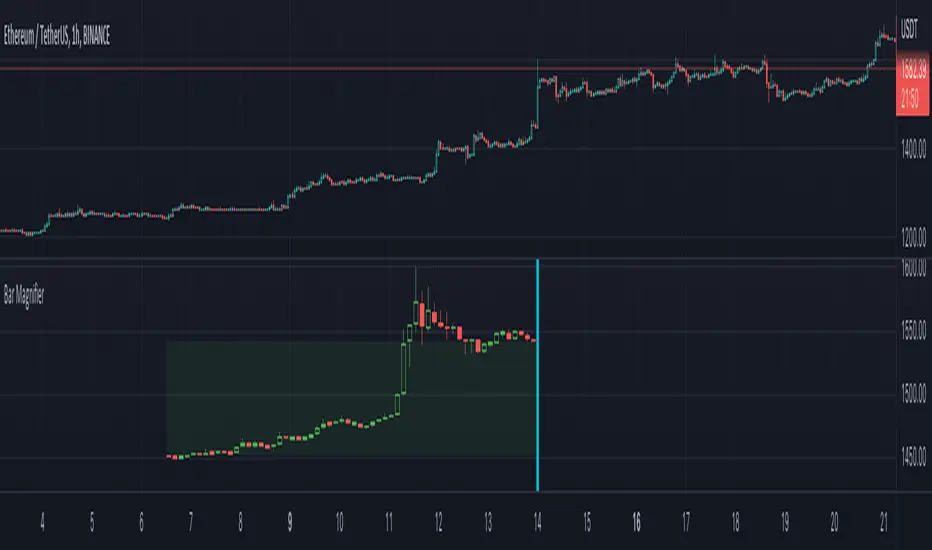
Many times while developing algos based on patterns and reversals, I come across issues which needs lower timeframe inspection. Loading multiple charts and comparing equivalent lower timeframe is slightly cumbersome at times. Hence, I thought of building this simple tool - which will instantly provide me lower timeframe candles for given candle. Since the candle selection happen via confirmed time input, we can use this as slider to move from one candle to other for inspection.
🎲 Usage
🎯Loading the script
https://www.tradingview.com/x/yt97ps9N/
🎯Components
Once loaded, you can see the marker which tells which bar is magnified. And you can also see all the lower timeframe candles before that point. Please note that due to pine restrictions, we can only show last 250 lower timeframe bars. You can change the lower timeframe via settings to cover if the chart timeframe is very high.
https://www.tradingview.com/x/tnvzOW6w/
🎯Moving to different bars
Click on the middle of the marker, you will see slider which you can slide to move from one bar to other.
https://www.tradingview.com/x/lWTSiqGg/
Example, after sliding, you will see the lower timeframe data of new candle.
https://www.tradingview.com/x/XLVSGcwt/
🎯Settings
Settings has only two inputs.
🎲 Usage
🎯Loading the script
- When you load the script, a prompt appears which asks you to select a time by clicking on the chart.
- Select the bar you want to magnify and study
https://www.tradingview.com/x/yt97ps9N/
🎯Components
Once loaded, you can see the marker which tells which bar is magnified. And you can also see all the lower timeframe candles before that point. Please note that due to pine restrictions, we can only show last 250 lower timeframe bars. You can change the lower timeframe via settings to cover if the chart timeframe is very high.
https://www.tradingview.com/x/tnvzOW6w/
🎯Moving to different bars
Click on the middle of the marker, you will see slider which you can slide to move from one bar to other.
https://www.tradingview.com/x/lWTSiqGg/
Example, after sliding, you will see the lower timeframe data of new candle.
https://www.tradingview.com/x/XLVSGcwt/
🎯Settings
Settings has only two inputs.
- Bar time - selects the bar which needs to be inspected.
- Lower timeframe - Default is 1 min. And select a timeframe according to your chart timeframe. Less than 1 min is not supported by security.lower_tf function. Hence, will not work.
https://www.tradingview.com/x/hYCN06cB/
Notas de prensa
Added HTF envelopeScript de código abierto
Fiel al espíritu de TradingView, el creador de este script lo ha convertido en código abierto, para que los traders puedan revisar y verificar su funcionalidad. ¡Enhorabuena al autor! Aunque puede utilizarlo de forma gratuita, recuerde que la republicación del código está sujeta a nuestras Normas internas.

Trial - trendoscope.io/trial
Subscribe - trendoscope.io/pricing
Blog - docs.trendoscope.io
Subscribe - trendoscope.io/pricing
Blog - docs.trendoscope.io
Exención de responsabilidad
La información y las publicaciones no constituyen, ni deben considerarse como asesoramiento o recomendaciones financieras, de inversión, de trading o de otro tipo proporcionadas o respaldadas por TradingView. Más información en Condiciones de uso.
Script de código abierto
Fiel al espíritu de TradingView, el creador de este script lo ha convertido en código abierto, para que los traders puedan revisar y verificar su funcionalidad. ¡Enhorabuena al autor! Aunque puede utilizarlo de forma gratuita, recuerde que la republicación del código está sujeta a nuestras Normas internas.
Trial - trendoscope.io/trial
Subscribe - trendoscope.io/pricing
Blog - docs.trendoscope.io
Subscribe - trendoscope.io/pricing
Blog - docs.trendoscope.io
Exención de responsabilidad
La información y las publicaciones no constituyen, ni deben considerarse como asesoramiento o recomendaciones financieras, de inversión, de trading o de otro tipo proporcionadas o respaldadas por TradingView. Más información en Condiciones de uso.