OPEN-SOURCE SCRIPT
Actualizado TPI
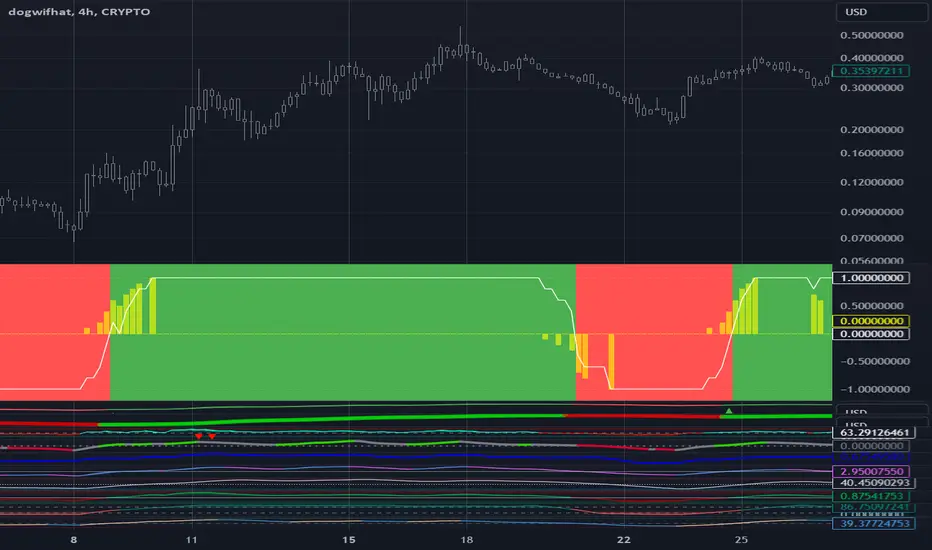
You know who you are.
Use the "Plot" option one indicator at a time to verify that you have the correct time series for each indicator and that the bullish/bearish formula you enter is correct. Only one indicator can be plotted at a time and the best source of validation is the numerical value from the last candle that shows as a highlight in each indicator.
After you have verified that all indicators are correctly set up click on "Use in TPI" and make sure no "Plot" option is selected.
Set the Threshold to "1000" to define the +1/-1 TPI component value by comparing two time series data (usually on perpetual indicators) as opposed to the fixed value in Threshold (usually on oscillators).
Zero range specifies a band around which the difference between the two values will be considered zero. -1 disables it and outputs only +1/-1 values for each component.
Good luck!
Use the "Plot" option one indicator at a time to verify that you have the correct time series for each indicator and that the bullish/bearish formula you enter is correct. Only one indicator can be plotted at a time and the best source of validation is the numerical value from the last candle that shows as a highlight in each indicator.
After you have verified that all indicators are correctly set up click on "Use in TPI" and make sure no "Plot" option is selected.
Set the Threshold to "1000" to define the +1/-1 TPI component value by comparing two time series data (usually on perpetual indicators) as opposed to the fixed value in Threshold (usually on oscillators).
Zero range specifies a band around which the difference between the two values will be considered zero. -1 disables it and outputs only +1/-1 values for each component.
Good luck!
Notas de prensa
You know who you are.Use the "Plot" option one indicator at a time to verify that you have the correct time series for each indicator and that the bullish/bearish formula you enter is correct. Only one indicator can be plotted at a time and the best source of validation is the numerical value from the last candle that shows as a highlight in each indicator.
After you have verified that all indicators are correctly set up click on "Use in TPI" and make sure no "Plot" option is selected.
Set the Threshold to "1000" to define the +1/-1 TPI component value by comparing two time series data (usually on perpetual indicators) as opposed to the fixed value in Threshold (usually on oscillators).
Zero range specifies a band around which the difference between the two values will be considered zero. -1 disables it and outputs only +1/-1 values for each component.
Good luck!
Notas de prensa
Adding -1/+1 lines so that the scale remains the same irrespective of the period.Notas de prensa
Added rate of change and split TPI from signal to better support alert generationNotas de prensa
Added number of bars the TPI has remained at +1 to be used as a strategy input.Notas de prensa
Added the option to have the day of the month on TPI transitions to help in indicator tunning.Notas de prensa
Add the ability to exports TPI transition dates to aid with indicator selection and optimization.Notas de prensa
Fixed error on exported day of the transition dateScript de código abierto
Fiel al espíritu de TradingView, el creador de este script lo ha convertido en código abierto, para que los traders puedan revisar y verificar su funcionalidad. ¡Enhorabuena al autor! Aunque puede utilizarlo de forma gratuita, recuerde que la republicación del código está sujeta a nuestras Normas internas.

Exención de responsabilidad
La información y las publicaciones no constituyen, ni deben considerarse como asesoramiento o recomendaciones financieras, de inversión, de trading o de otro tipo proporcionadas o respaldadas por TradingView. Más información en Condiciones de uso.
Script de código abierto
Fiel al espíritu de TradingView, el creador de este script lo ha convertido en código abierto, para que los traders puedan revisar y verificar su funcionalidad. ¡Enhorabuena al autor! Aunque puede utilizarlo de forma gratuita, recuerde que la republicación del código está sujeta a nuestras Normas internas.
Exención de responsabilidad
La información y las publicaciones no constituyen, ni deben considerarse como asesoramiento o recomendaciones financieras, de inversión, de trading o de otro tipo proporcionadas o respaldadas por TradingView. Más información en Condiciones de uso.