OPEN-SOURCE SCRIPT
Actualizado Current Candle
### Overview
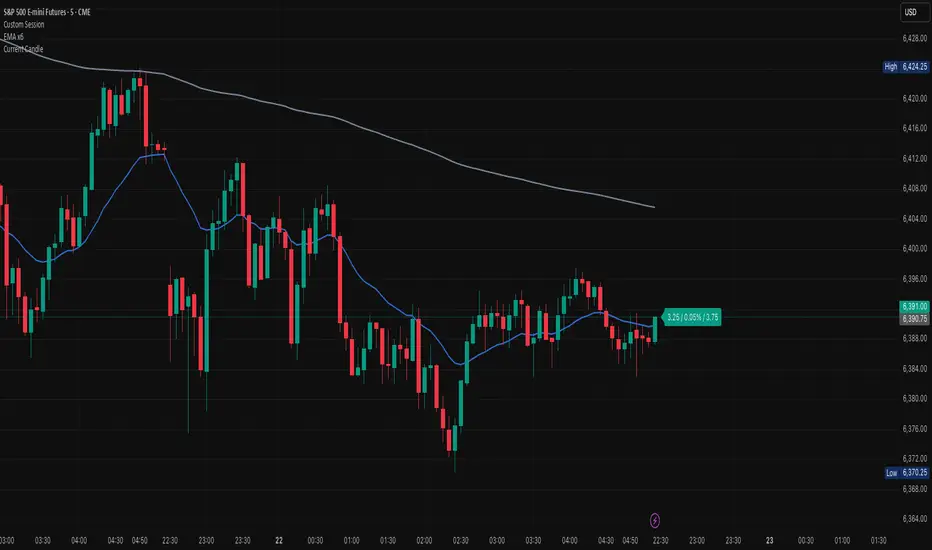
The **Current Candle** indicator displays live information about the active bar. It shows the price change, percentage change, and candle range (high–low), conveniently placed to the right of the current candle.
### Features
• Shows absolute price change from the previous close
• Shows percentage change (%)
• Shows candle range (high–low)
• Customizable bull and bear colors (default TradingView candle colors: green = rgb(8,153,129), red = rgb(242,54,44))
• Toggle on/off Value, Percentage, and Range individually
• Always updates on the latest candle only, keeping charts clean
### How to Use
1. Add the indicator to your chart.
2. Adjust the “Right offset (bars)” to position the label.
3. Enable or disable Value, Percentage, or Range via checkboxes.
4. Customize bull/bear colors to match your chart theme if desired.
### Notes
• Label is plotted only on the latest candle (`barstate.islast`) to avoid clutter.
• Colors cannot be automatically synced to your TradingView chart theme — use the color inputs to match them manually.
• This script is designed for clarity and quick reference without altering your chart’s candles.
---
*Stay focused on the current candle — see change, percentage, and range at a glance.*
The **Current Candle** indicator displays live information about the active bar. It shows the price change, percentage change, and candle range (high–low), conveniently placed to the right of the current candle.
### Features
• Shows absolute price change from the previous close
• Shows percentage change (%)
• Shows candle range (high–low)
• Customizable bull and bear colors (default TradingView candle colors: green = rgb(8,153,129), red = rgb(242,54,44))
• Toggle on/off Value, Percentage, and Range individually
• Always updates on the latest candle only, keeping charts clean
### How to Use
1. Add the indicator to your chart.
2. Adjust the “Right offset (bars)” to position the label.
3. Enable or disable Value, Percentage, or Range via checkboxes.
4. Customize bull/bear colors to match your chart theme if desired.
### Notes
• Label is plotted only on the latest candle (`barstate.islast`) to avoid clutter.
• Colors cannot be automatically synced to your TradingView chart theme — use the color inputs to match them manually.
• This script is designed for clarity and quick reference without altering your chart’s candles.
---
*Stay focused on the current candle — see change, percentage, and range at a glance.*
Notas de prensa
### OverviewThe **Current Candle** indicator displays live information about the active bar. It shows the price change, percentage change, and candle range (high–low), conveniently placed to the right of the current candle.
### Features
• Shows absolute price change from the previous close
• Shows percentage change (%)
• Shows candle range (high–low)
• Customizable bull and bear colors (default TradingView candle colors: green = rgb(8,153,129), red = rgb(242,54,44))
• Toggle on/off Value, Percentage, and Range individually
• Always updates on the latest candle only, keeping charts clean
### How to Use
1. Add the indicator to your chart.
2. Adjust the “Right offset (bars)” to position the label.
3. Enable or disable Value, Percentage, or Range via checkboxes.
4. Customize bull/bear colors to match your chart theme if desired.
### Notes
• Label is plotted only on the latest candle (`barstate.islast`) to avoid clutter.
• Colors cannot be automatically synced to your TradingView chart theme — use the color inputs to match them manually.
• This script is designed for clarity and quick reference without altering your chart’s candles.
---
*Stay focused on the current candle — see change, percentage, and range at a glance.*
Notas de prensa
### OverviewThe **Current Candle** indicator displays live information about the active bar. It shows the price change, percentage change, and candle range (high–low), conveniently placed to the right of the current candle.
### Features
• Shows absolute price change from the previous close
• Shows percentage change (%)
• Shows candle range (high–low)
• Customizable bull and bear colors (default TradingView candle colors: green = rgb(8,153,129), red = rgb(242,54,44))
• Toggle on/off Value, Percentage, and Range individually
• Always updates on the latest candle only, keeping charts clean
### How to Use
1. Add the indicator to your chart.
2. Adjust the “Right offset (bars)” to position the label.
3. Enable or disable Value, Percentage, or Range via checkboxes.
4. Customize bull/bear colors to match your chart theme if desired.
### Notes
• Label is plotted only on the latest candle (`barstate.islast`) to avoid clutter.
• Colors cannot be automatically synced to your TradingView chart theme — use the color inputs to match them manually.
• This script is designed for clarity and quick reference without altering your chart’s candles.
---
*Stay focused on the current candle — see change, percentage, and range at a glance.*
Notas de prensa
### OverviewThe **Current Candle** indicator displays live information about the active bar. It shows the price change, percentage change, and candle range (high–low), conveniently placed to the right of the current candle.
### Features
• Shows absolute price change from the previous close
• Shows percentage change (%)
• Shows candle range (high–low)
• Customizable bull and bear colors (default TradingView candle colors: green = rgb(8,153,129), red = rgb(242,54,44))
• Toggle on/off Value, Percentage, and Range individually
• Always updates on the latest candle only, keeping charts clean
### How to Use
1. Add the indicator to your chart.
2. Adjust the “Right offset (bars)” to position the label.
3. Enable or disable Value, Percentage, or Range via checkboxes.
4. Customize bull/bear colors to match your chart theme if desired.
### Notes
• Label is plotted only on the latest candle (`barstate.islast`) to avoid clutter.
• Colors cannot be automatically synced to your TradingView chart theme — use the color inputs to match them manually.
• This script is designed for clarity and quick reference without altering your chart’s candles.
---
*Stay focused on the current candle — see change, percentage, and range at a glance.*
Script de código abierto
Fiel al espíritu de TradingView, el creador de este script lo ha convertido en código abierto, para que los traders puedan revisar y verificar su funcionalidad. ¡Enhorabuena al autor! Aunque puede utilizarlo de forma gratuita, recuerde que la republicación del código está sujeta a nuestras Normas internas.

Exención de responsabilidad
La información y las publicaciones no constituyen, ni deben considerarse como asesoramiento o recomendaciones financieras, de inversión, de trading o de otro tipo proporcionadas o respaldadas por TradingView. Más información en Condiciones de uso.
Script de código abierto
Fiel al espíritu de TradingView, el creador de este script lo ha convertido en código abierto, para que los traders puedan revisar y verificar su funcionalidad. ¡Enhorabuena al autor! Aunque puede utilizarlo de forma gratuita, recuerde que la republicación del código está sujeta a nuestras Normas internas.
Exención de responsabilidad
La información y las publicaciones no constituyen, ni deben considerarse como asesoramiento o recomendaciones financieras, de inversión, de trading o de otro tipo proporcionadas o respaldadas por TradingView. Más información en Condiciones de uso.