OPEN-SOURCE SCRIPT
Actualizado Custom Rotatable Pinwheel
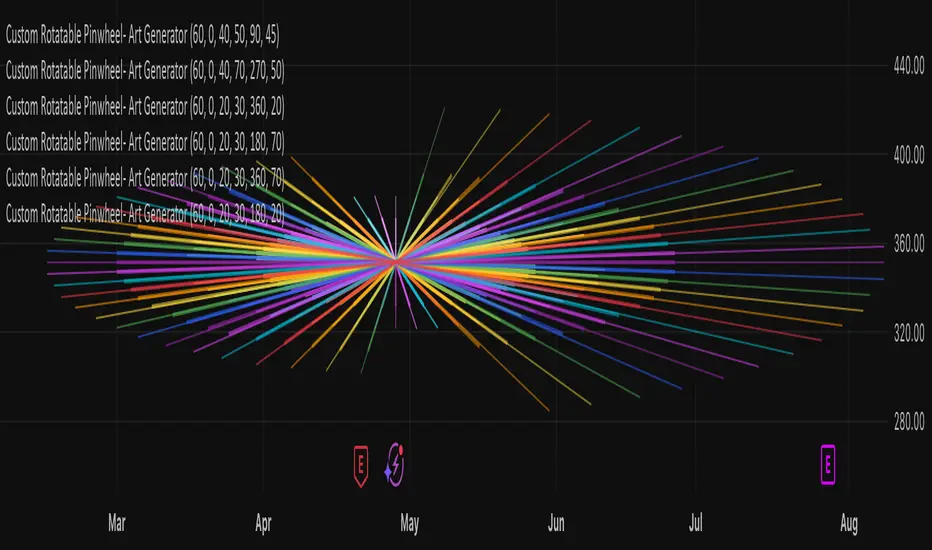
Custom Rotatable Pinwheel – Art Generator (Fully Color-Configurable)
This visual indicator draws a rotating pinwheel using radial spokes. It's designed purely for artistic and decorative purposes — not for trading signals. Use it to create abstract, mandala-like effects by layering multiple instances with different rotation angles and color palettes.
Fully Customizable Spoke Colors
You can now define up to 8 custom spoke colors, which cycle across the pinwheel arms.
Optionally, enable "Use Single Color" to override all spokes with a single color.
This gives full creative control over your color palette and design aesthetic.
Controls:
Number of Spokes – Total number of radial arms
Rotation Offset (°) – Adjusts the starting angle, useful when layering multiple instances
Spin Speed – Controls how fast the pinwheel rotates with each bar
Inner / Outer Radius – Adjusts the spoke arm lengths
Transparency – Controls how visible the lines are
Use Single Color – Toggle between a single color or a full custom palette
Color 1–8 – Set your preferred spoke colors (used when single color is off)
Setup for a Clean Chart Canvas (No Price Bars or Gridlines)
To hide all default chart visuals and show only the pinwheel design:
Right-click chart → Settings
Symbol tab: Uncheck "Show Bars"
Scales tab: Uncheck "Price Scale" and "Time Scale"
Appearance tab:
Set background to black
Uncheck grid lines, watermark, etc.
Status Line and Events: Uncheck all
This visual indicator draws a rotating pinwheel using radial spokes. It's designed purely for artistic and decorative purposes — not for trading signals. Use it to create abstract, mandala-like effects by layering multiple instances with different rotation angles and color palettes.
Fully Customizable Spoke Colors
You can now define up to 8 custom spoke colors, which cycle across the pinwheel arms.
Optionally, enable "Use Single Color" to override all spokes with a single color.
This gives full creative control over your color palette and design aesthetic.
Controls:
Number of Spokes – Total number of radial arms
Rotation Offset (°) – Adjusts the starting angle, useful when layering multiple instances
Spin Speed – Controls how fast the pinwheel rotates with each bar
Inner / Outer Radius – Adjusts the spoke arm lengths
Transparency – Controls how visible the lines are
Use Single Color – Toggle between a single color or a full custom palette
Color 1–8 – Set your preferred spoke colors (used when single color is off)
Setup for a Clean Chart Canvas (No Price Bars or Gridlines)
To hide all default chart visuals and show only the pinwheel design:
Right-click chart → Settings
Symbol tab: Uncheck "Show Bars"
Scales tab: Uncheck "Price Scale" and "Time Scale"
Appearance tab:
Set background to black
Uncheck grid lines, watermark, etc.
Status Line and Events: Uncheck all
Notas de prensa
Custom Rotatable Pinwheel – Art Generator (Fully Color-Configurable)This visual indicator draws a rotating pinwheel using radial spokes. It's designed purely for artistic and decorative purposes — not for trading signals. Use it to create abstract, mandala-like effects by layering multiple instances with different rotation angles and color palettes.
Fully Customizable Spoke Colors
You can now define up to 8 custom spoke colors, which cycle across the pinwheel arms.
Optionally, enable "Use Single Color" to override all spokes with a single color.
This gives full creative control over your color palette and design aesthetic.
Controls:
Number of Spokes – Total number of radial arms
Rotation Offset (°) – Adjusts the starting angle, useful when layering multiple instances
Spin Speed – Controls how fast the pinwheel rotates with each bar
Inner / Outer Radius – Adjusts the spoke arm lengths
Transparency – Controls how visible the lines are
Use Single Color – Toggle between a single color or a full custom palette
Color 1–8 – Set your preferred spoke colors (used when single color is off)
Setup for a Clean Chart Canvas (No Price Bars or Gridlines)
To hide all default chart visuals and show only the pinwheel design:
Right-click chart → Settings
Symbol tab: Uncheck "Show Bars"
Scales tab: Uncheck "Price Scale" and "Time Scale"
Appearance tab:
Set background to black
Uncheck grid lines, watermark, etc.
Status Line and Events: Uncheck all
Notas de prensa
Custom Rotatable Pinwheel – Art Generator (Fully Color-Configurable)This visual indicator draws a rotating pinwheel using radial spokes. It's designed purely for artistic and decorative purposes — not for trading signals. Use it to create abstract, mandala-like effects by layering multiple instances with different rotation angles and color palettes.
Fully Customizable Spoke Colors
You can now define up to 8 custom spoke colors, which cycle across the pinwheel arms.
Optionally, enable "Use Single Color" to override all spokes with a single color.
This gives full creative control over your color palette and design aesthetic.
🛠️ Controls:
Number of Spokes – Total number of radial arms
Rotation Offset (°) – Adjusts the starting angle, useful when layering multiple instances
Spin Speed – Controls how fast the pinwheel rotates with each bar
Inner / Outer Radius – Adjusts the spoke arm lengths
Transparency – Controls how visible the lines are
Use Single Color – Toggle between a single color or a full custom palette
Color 1–8 – Set your preferred spoke colors (used when single color is off)
Setup for a Clean Chart Canvas (No Price Bars or Gridlines)
To hide all default chart visuals and show only the pinwheel design:
Right-click chart → Settings
Symbol tab: Uncheck "Show Bars"
Scales tab: Uncheck "Price Scale" and "Time Scale"
Appearance tab:
Set background to black
Uncheck grid lines, watermark, etc.
Status Line and Events: Uncheck all
This setup gives you a pure visual canvas ideal for abstract design layering.
Tip: Add multiple instances of this indicator with different spoke counts and rotation offsets to build complex radial art or geometric structures.
Script de código abierto
Fiel al espíritu de TradingView, el creador de este script lo ha convertido en código abierto, para que los traders puedan revisar y verificar su funcionalidad. ¡Enhorabuena al autor! Aunque puede utilizarlo de forma gratuita, recuerde que la republicación del código está sujeta a nuestras Normas internas.

Exención de responsabilidad
La información y las publicaciones no constituyen, ni deben considerarse como asesoramiento o recomendaciones financieras, de inversión, de trading o de otro tipo proporcionadas o respaldadas por TradingView. Más información en Condiciones de uso.
Script de código abierto
Fiel al espíritu de TradingView, el creador de este script lo ha convertido en código abierto, para que los traders puedan revisar y verificar su funcionalidad. ¡Enhorabuena al autor! Aunque puede utilizarlo de forma gratuita, recuerde que la republicación del código está sujeta a nuestras Normas internas.
Exención de responsabilidad
La información y las publicaciones no constituyen, ni deben considerarse como asesoramiento o recomendaciones financieras, de inversión, de trading o de otro tipo proporcionadas o respaldadas por TradingView. Más información en Condiciones de uso.